
Scan from link settings are accessible under Settings > Security tab .
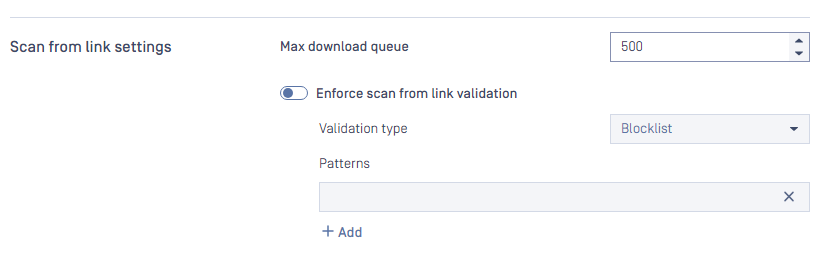
This settings is apply for the header downloadfrom when scanning file via API POST /file
Max download queue:
Determines the number of total concurrent requests that can be downloaded at a time.
Range: [1-1000]
Default: 500
Info: If your system has poor internet speed, you should decrease this number or if you have a decent internet speed, you might want to increase the setting. This setting depends on your network.
Note: this setting only applies to total concurrent download requests, and it is different from the total scan queue in Setting -> General > Queue size
Enforce scan from link validation:
Enable this setting will make Metadefender Core validate the links from "downloadfrom" header.
Default: disable
Validation type: Blocklist or Allowlist
Patterns: Regular Expression patterns
For example, if we would like to validate the links in "downloadfrom" header, and ONLY allow for the site https://allowlisted-domain.com we should use this pattern:
^https:\/\/allowlisted-domain\.com\/
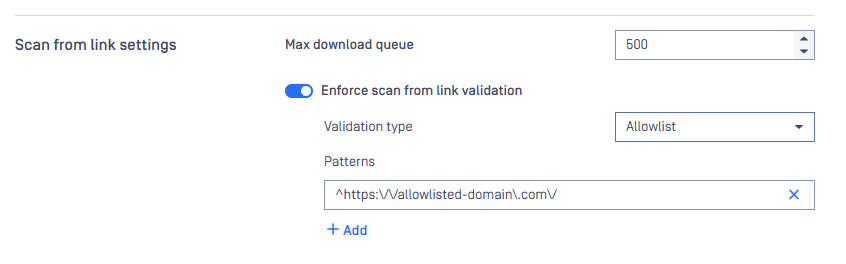
Enforce scan from link validate: use Allowlist Over Blocklist
We strongly recommend using an allowlist approach rather than a blocklist for the following reasons:
Positive security model: Only explicitly permitted URLs are allowed
Reduced attack surface: Unknown or new malicious domains are automatically blocked
Better maintainability: Easier to manage a list of trusted sources
Configure Specific URL Patterns
To prevent URL manipulation attacks and bypass attempts, configure your allowlist patterns with maximum specificity:
Vulnerable Configuration:
allowlisted-domain.com
Secure Configuration:
^https:\/\/allowlisted-domain\.com\/
Why Specific Patterns Matter
Attackers can exploit loose patterns using various techniques:
Subdomain spoofing:
https://allowlisted-domain.com.malicious-site.com/Path injection:
https://evil-site.com/allowlisted-domain.com/malware.exeQuery parameter manipulation:
https://malicious-site.com/?redirect=allowlisted-domain.com
Pattern Configuration Best Practices
Always use anchors: Start patterns with
^and end with appropriate boundariesSpecify protocol: Include
https:\/\/to enforce secure connectionsEscape special characters: Use
\.instead of.for literal dotsInclude path separators: End with
\/to prevent subdomain spoofing
Example Configurations
For a specific domain:
^https:\/\/downloads\.yourcompany\.com\/
For a subdirectory:
^https:\/\/cdn\.vendor\.com\/updates\/
Testing Your Configuration
After configuring your allowlist patterns, test with various URL formats to ensure they work as expected:
Verify legitimate URLs are accepted
Confirm malicious variations are rejected
Test edge cases and potential bypass attempts
Following these guidelines will provide robust protection against URL-based attacks while maintaining legitimate functionality.