
Nowadays, data leak becomes more and more popular, once the data went outside the organization, there is no way to track who caused the leak. Adding watermark to sensitive data is one of the solutions.
Supported File Types
Images JPEG, TIFF, PNG, GIF, BMP, WMF, EMF, SVG
Document: DOC, DOCX, RTF, PDF
To set watermark
Policies > Workflow rules > "Workflow name" > Proactive DLP
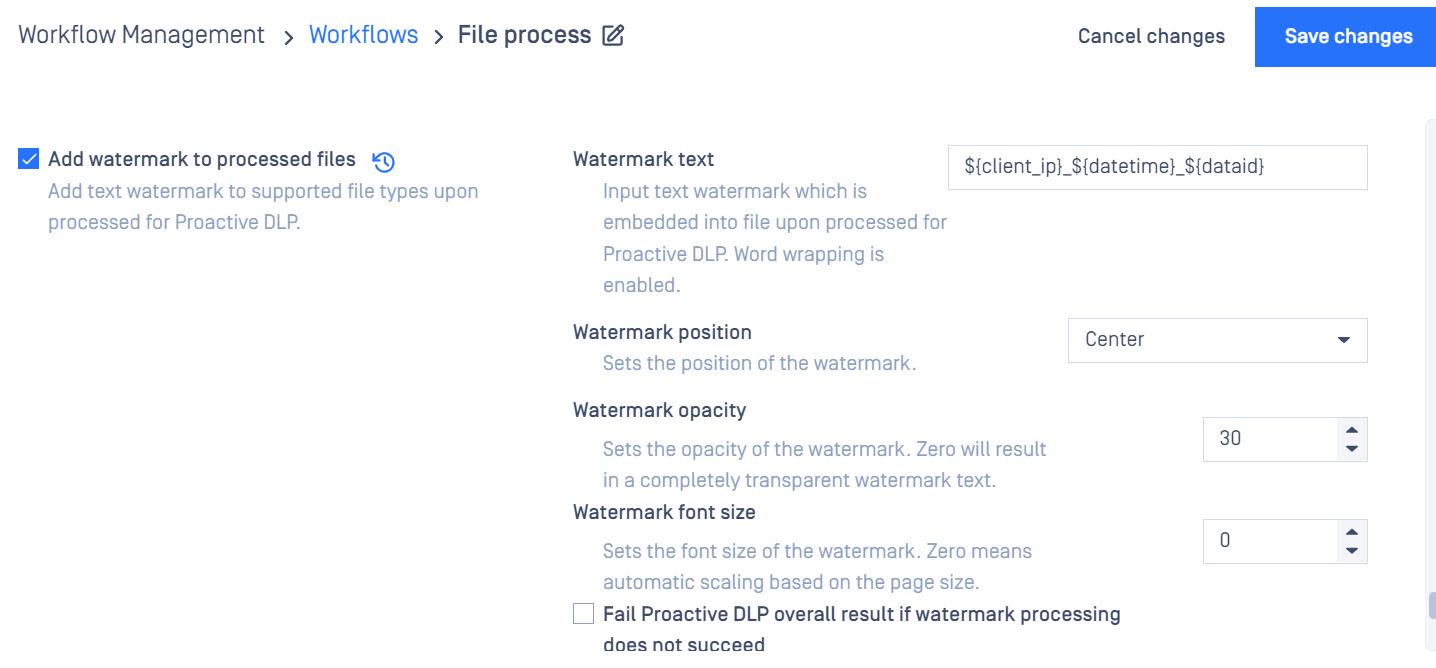
Watermark configurations
Watermark text supports the following variables:
${user}: Username who submitted file (if any)
${client_ip}: Client IP address (version 4) where the file submission comes from
${filetime|epoch} : Unix/Epoch timestamp (e.g. 1561729083296) of file submission time
${filetime|full} : Full format timestamp of file submission time (28 06 2019 01:38:03 PM UTC)
${filetime|short} : Short format timestamp (e.g. 28/06/2019) of file submission time
${dataid} - this string identifies a file processing and can be used to retrieve results of processing
${original.basename} - name of the file to be processed, without file extension
${original.extension} - extension of the file to be processed
${converted.extension} - extension based on the target file type, for now, it is the same as ${original.extension}
From MetaDefender Core 4.16.3, you can define variables in metadata in the process file api and retrieve them for the "TEXT WATERMARK". For example: metadata: {"client_ip":"10.0.1.100","user_name":"john"} TEXT WATERMARK: ${ client_ip }_${ user_name}
Watermark position
Center: setting position to Center will use some rotation to make the text diagonal
Top-Left
Top-Right
Bottom-Left
Bottom-Right
Watermark opacity: the opacity of the watermark
Watermark font size: Setting font size to 0 means it will be automatically calculated
Sample output

Known issues/limitations:
A very long Watermark text can overflow on a low resolution image in Linux version.
Long Watermark text without whitespaces can overflow in pdf files on all supported platforms
A non-English watermark (e.g., Hebrew, Japanese) requires additional fonts to be installed on your Linux system; otherwise, the watermark process may fail.
Watermark Text Issue
If the watermark text appears as '□' instead of displaying the actual text, it may indicate that the required font is not installed on your system. In such cases, we suggest installing UNIFONT on your system to resolve the issue.
To fix the issue with non-English watermarks, you need to install fonts provided by Microsoft (msttcore-fonts). These fonts are free to install and use. You can follow the tutorial on the following page to learn how to install msttcore-fonts on a Linux system.