
How do I prevent Symantec Endpoint Protection from interfering with the optimal functioning of MetaDefender Core?
This article applies to all MetaDefender Core V4 and V5 releases deployed on Windows systems.
If Symantec Endpoint Protection (SEP) is used as a local AV on the machine where MetaDefender Core resides, it can interfere with the correct functioning of the OPSWAT product - unless SEP settings are updated as follows.
Update your SEP settings as follows to ensure optimal functioning of MetaDefender Core:
Exclude the folder where MetaDefender Core is installed from the SEP real-time protection:
Add security risk exception *> Folder > C:\Program Files\OPSWAT*
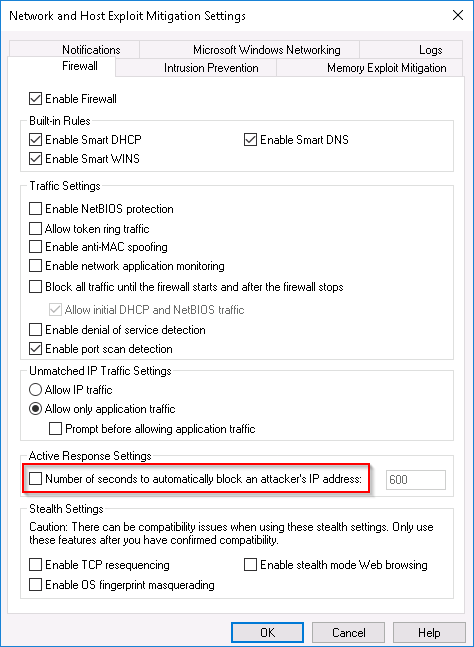
Go to Network and Host Exploit Mitigation Settings > Firewall:
Uncheck the Number of seconds to automatically block an attacker's IP address option, as follows:
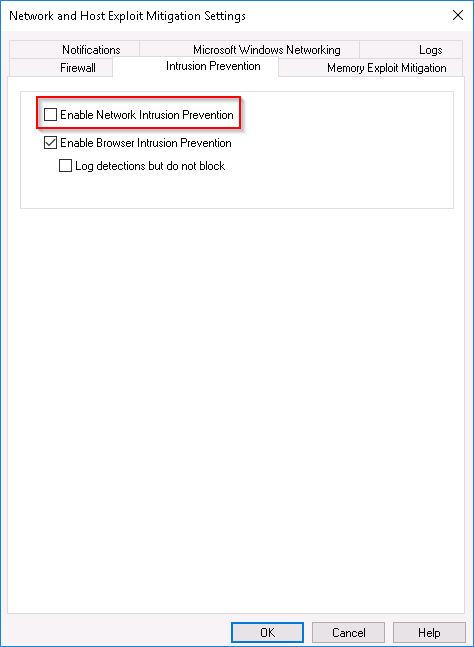
Go to Network and Host Exploit Mitigation Settings > Intrusion Prevention:
Uncheck the Enable Network Intrusion Prevention option, as follows:
If you have followed all of the steps above but are still experiencing issues, please follow these instructions on How To Create a Support Package, before creating a support case or chatting with our support engineer.