
To de-integrate/remove MetaAccess NAC from a Layer 2 or Layer 3 network, follow the steps defined for the network device brand managing that respective network below. If you do not see your network device listed below, encounter any issues, or have any questions, please submit a ticket at: Case Management
These steps should only be followed as instructed by OPSWAT Support or if enforcement has already been disabled in the MetaAccess NAC UI as defined at How To Toggle Enforcement on Layer 2 or Layer 3 networks (RBE/PBR)
RBE (Layer 2 / Radius Based Enforcement)
Aruba Controllers
Aruba Open or PSK SSIDS
Execute the following on the master controller
To have any devices in a quarantine state be marked as compliant (to ensure no devices are stuck in a block state), execute the following:
To re-integrate MetaAccess NAC:
Aruba WPA2E SSIDS
This method cannot be used if MetaAccess NAC is the only RADIUS server, as there must be an alternate RADIUS server to point at in the below steps
To remove RBE from the RADIUS path of your network, you must remove (or demote) the entry pertaining to the RBE server from the controllers RADIUS configurations.
Through the Web UI, navigate to Configuration->Authentication->AAA Profiles and select the 802.1X Authentication Server Group of the profile used by your SSID. You can either delete or demote the entry for MetaAccess NAC RBE device.
Alternatively, this can be done from the CLI (replace devradius.pd.impulse.com with the MetaAccess NAC appliance and replace rbetest2.pd.impulse.com with an alternate RADIUS server)
To have any devices in a quarantine state be marked as compliant (to ensure no devices are stuck in a block state), execute the following:
To re-integrate MetaAccess NAC:
Cisco Controllers
Cisco Open SSIDS (AireOS versions earlier than 8.3.102.0)
Turn MAC filtering off (Click on WLAN > Security > Layer 2 and uncheck Mac Filtering)
Set Layer 3 Security to None (Click on WLAN > Security > Layer 3, and select None from the dropdown)
Uncheck AAA Override (Click on WLAN > Advanced, and uncheck AAA Override)
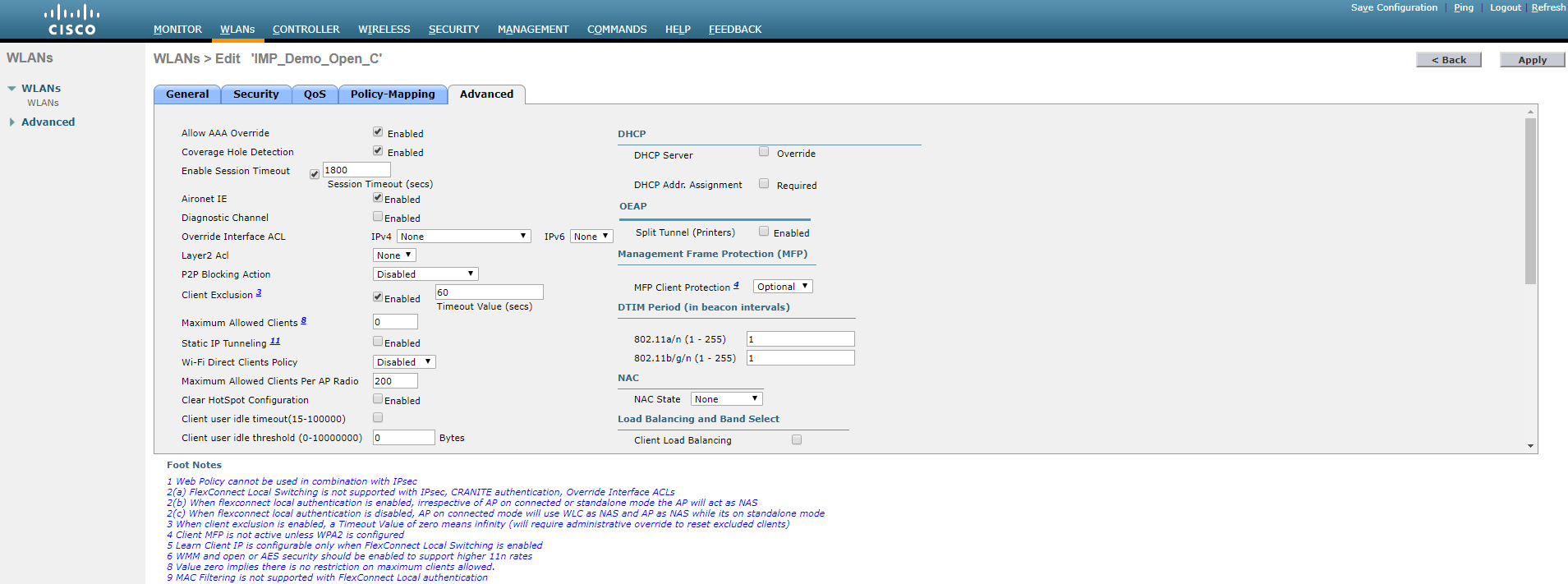
To re-integrate MetaAccess NAC:
Turn MAC filtering on (Click on WLAN > Security > Layer 2 and check Mac Filtering)
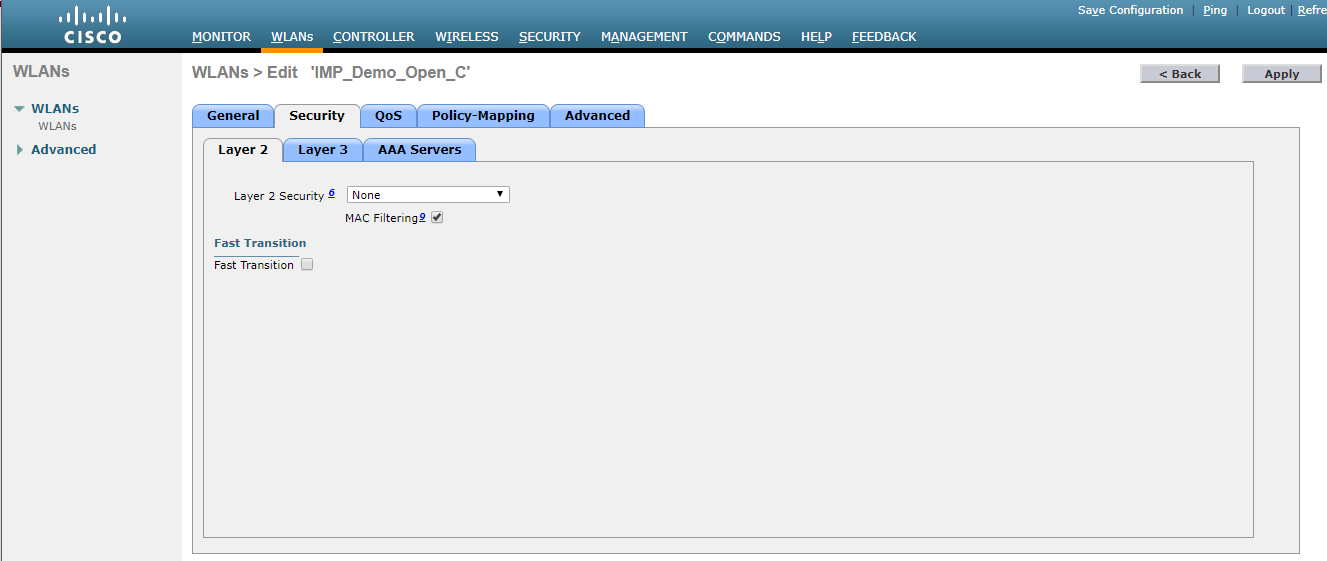
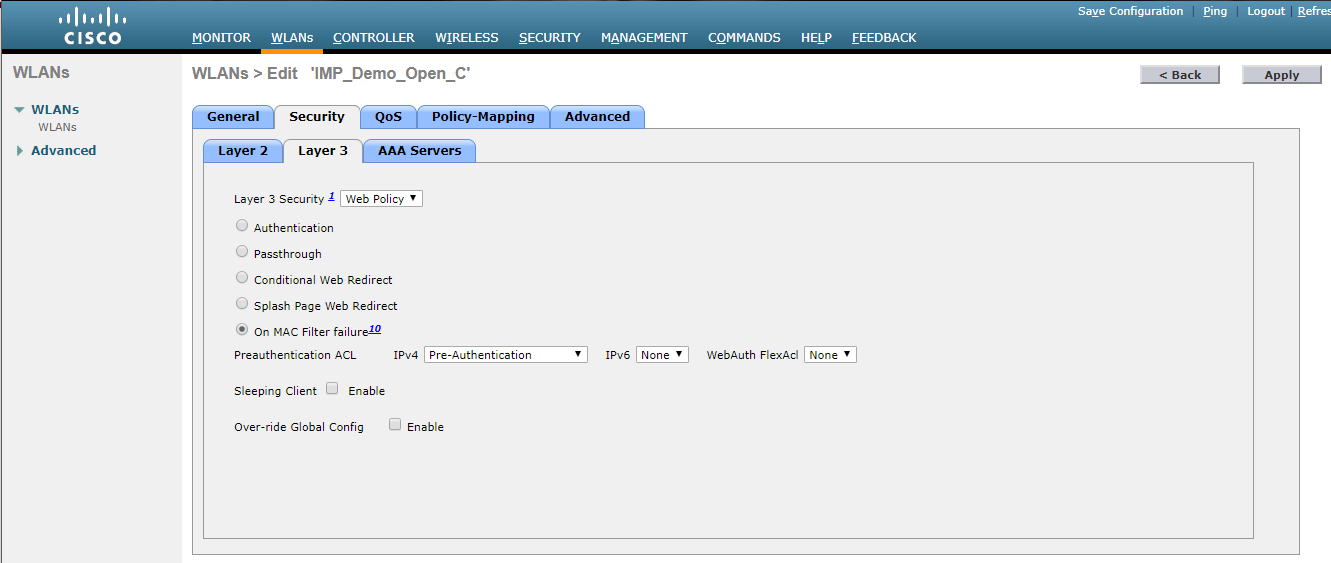
Set Layer 3 Security to Web Policy (Click on WLAN > Security > Layer 3, and select Web Policy from the dropdown, ensure that On MAC Filter Failure is selected and the sc_quarantine_acl ACL is selected.)
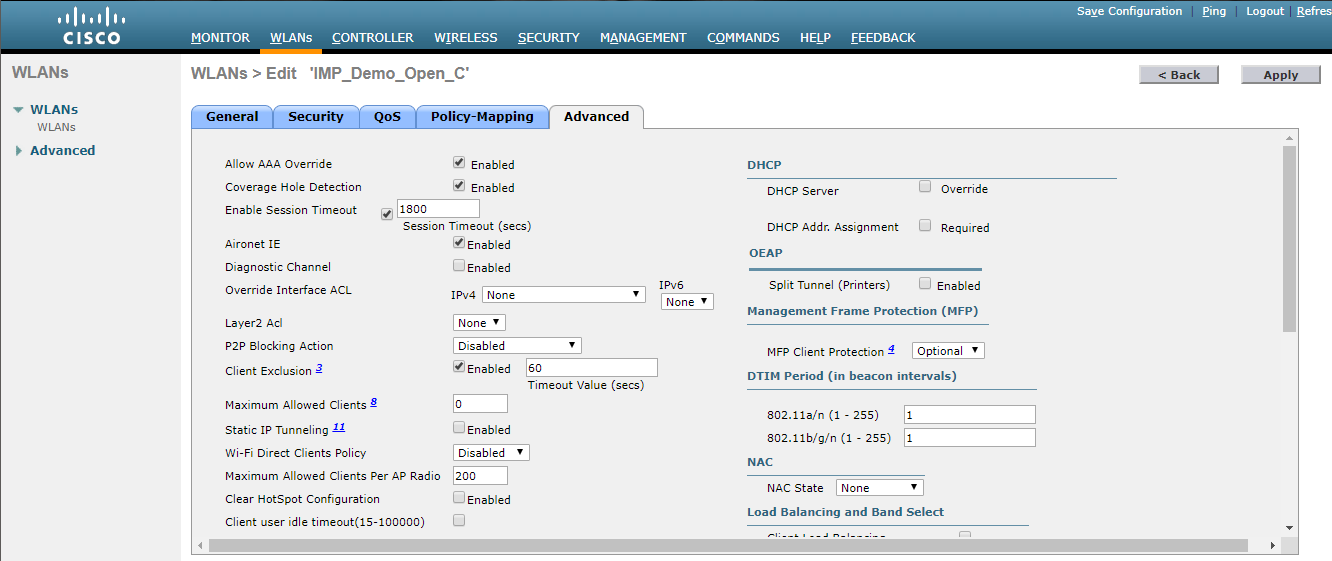
Check AAA Override (Click on WLAN > Advanced, and check AAA Override)
Cisco Open SSIDS (AireOS version 8.3.102.0 and later)
Turn MAC filtering off (Click on WLAN > Security > Layer 2 and uncheck Mac Filtering)
Uncheck AAA Override (Click on WLAN > Advanced, and uncheck AAA Override)
This method cannot be used if MetaAccess NAC is the only RADIUS server, as there must be an alternate RADIUS server to point at in the below steps
To re-integrate MetaAccess NAC :
Turn MAC filtering on (Click on WLAN > Security > Layer 2 and check Mac Filtering)
Check AAA Override and set NAC State (Click on WLAN > Advanced, check AAA Override and select Radius NAC or ISE NAC)
Cisco WPA2E SSIDS
Set RADIUS authentication server to an alternative RADIUS server (WLAN > Security >AAA Servers > Set Server 1 to Alternate RADIUS Server)
Set Allow AAA override to Disabled, and set NAC State to None (WLAN > Advanced > Uncheck "Allow AAA Override" and set NAC State to "None")
To re-enable MetaAccess NAC:
Set RADIUS authentication server to MetaAccess NAC RADIUS server (WLAN > Security >AAA Servers > Set Server 1 to MetaAccess NAC RADIUS Server)
Check AAA Override and set NAC State (Click on WLAN > Advanced, check AAA Override and select Radius NAC or ISE NAC)
Aerohive Controllers
Aerohive HM6 Open, WEP, WPAPSK WLANS
Navigate to Configuration > SSIDs > (Name of Open, WEP or WPAPSK SSID) and deselect Enable MAC Authentication. Click Save. Push updated policy.
To re-integrate MetaAccess NAC :
Navigate to Configuration > SSIDs > (Name of Open, WEP or WPAPSK SSID) and select Enable MAC Authentication. Click Save. Push updated policy.
Aerohive HM6 WPA2E/802.1X WLANs
Navigate to Configuration > SSIDs > (Name of Secure SSID) and change SSID Access Security to Open. Click Save. Push updated policy.
To re-integrate MetaAccess NAC:
Navigate to Configuration > SSIDs > (Name of Secure SSID) and change SSID Access Security to WPA/WPA2 802.1X (Enterprise). Click Save. Push updated policy.
Aerohive HMNG Open, WEP, or WPAPSK WLANs
Navigate to Configure > (Name of policy) > Wireless Settings > (Name of secure SSID) > MAC Authentication and turn off Mac Authentication. Click Save. Push updated policy.
To re-integrate MetaAccess NAC:
Navigate to Configure > (Name of policy) > Wireless Settings > (Name of secure SSID) > MAC Authentication and turn on Mac Authentication. Click Save. Push updated policy.
Aerohive HMNG WPA2E/802.1X WLANs
Navigate to Configure > (Name of policy) > Wireless Settings > (Name of secure SSID) and change SSID Access Security to Open. Click Save. Push updated policy
To re-integrate MetaAccess NAC:
Navigate to Configure > (Name of policy) > Wireless Settings > (Name of secure SSID) and change SSID Access Security to Enterprise. Click Save. Push updated policy
PBR (Layer 3 / Policy Based Routing)
Clearing the opswat_block ACL
NEXUS Router
Cisco/Brocade ICX Router (Non NEXUS Router)
Alcatel Router
Confirm the name of the policy network group, as the group may be called "blockedhost" rather than "opswat_block" on some legacy devices. If so, replace "opswat_block" with "blockedhost" or whatever the name of the policy network group may be, before executing the script.
HP Router
Huawei Router
MLX Router
If you encounter the following error:
telnet@BG-MLX8-Core2(config)#no ip access-list extended opswat_block
Cannot delete l4 access-list opswat_block : Currently in use by PBR.
error - ACL In Use.
Execute:
acl-policy
force-delete-bound-acl
Removing the MetaAccess NAC route mapWhere "X" = Layer3 interface that has route-map applied. X can be determined be issuing "show ip policy" and reviewing the results to determine which interfaces have the route-map applied
To restore the MetaAccess NAC route-map: