
These configurations relate to storage settings, particularly for managing files and data within a system.
These configurations outline how files are managed and stored within the system, specifying the storage provider (Amazon S3), access credentials, cleanup criteria, and the specific location and container (bucket) where files are stored.
The location of the Storage settings are Admin Panel > Settings > Configurations > Storage.
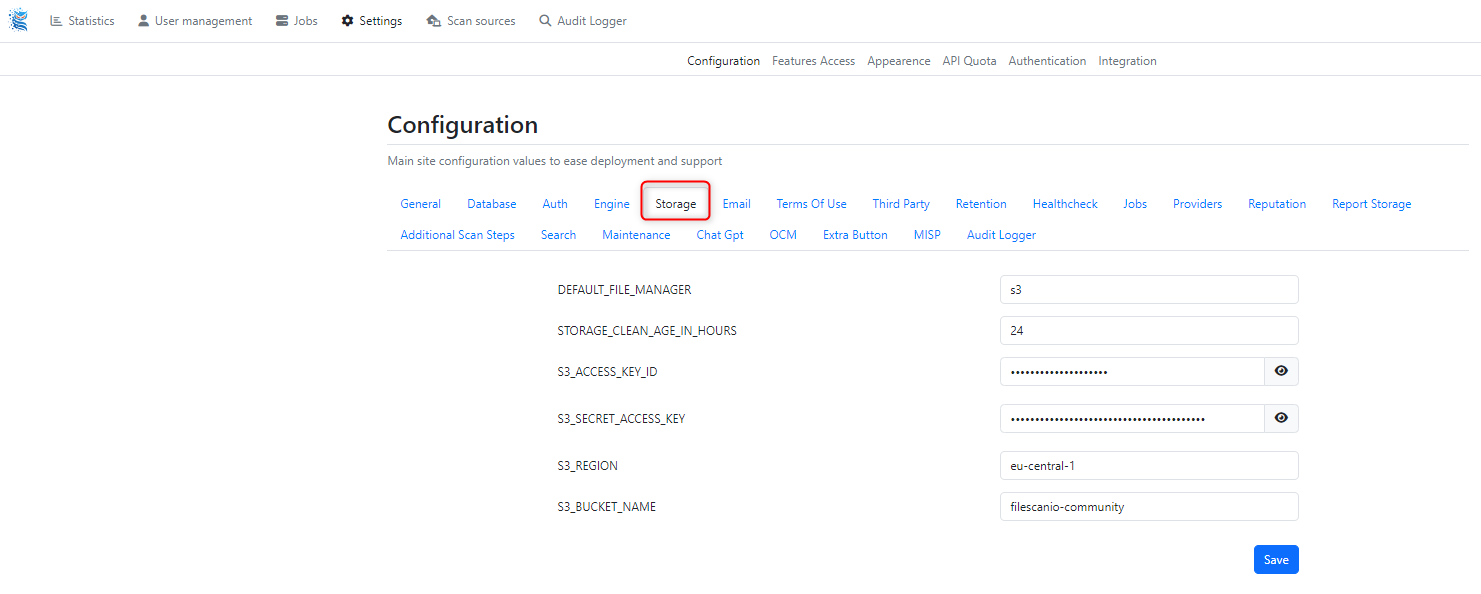
Field | Description |
|---|---|
| This setting specifies the default file manager used for storing and handling files. In this case, it's set to "s3," indicating that the system uses Amazon Simple Storage Service (S3) for file storage. |
| It determines how long files are retained in storage before they are considered eligible for cleanup. In this instance, files older than 24 hours are flagged for potential removal, ensuring storage space is efficiently managed. |
| Authentication mechanism for accessing the S3 service. It functions like a username, providing access to the specified S3 bucket. |
| Similar to a password, this key is used in combination with the access key ID to authenticate access to the S3 service securely. |
| The geographical region where the S3 bucket is located. Each region represents a separate geographic area where Amazon's data centres are situated. In this case, it's set to "eu-central-1," indicating the European Union (Frankfurt) region. |
| Name of the specific S3 bucket where files are stored. In this example, the bucket name is "filescanio-community". |