
To achieve the maximum possible throughput on a single server, make sure to deploy MetaDefender Sandbox (previously known as OPSWAT Filescan Sandbox) on a powerful instance:
32 vCPUs (preferably 64 vCPUs)
128 GB RAM (preferably 256 GB)
500 GB SSD (preferably 1 TB)
The overall throughput of such a server may eclipse the default maximum limit of 25000 scans/day, and it primarily depends on the sample set. The processing time for individual samples can range from 5 seconds to 2 minutes (depending on the complexity of the sample).
The following special settings can be used to optimize the throughput when the main objective is quickly obtaining an accurate verdict for a sample, but deeper analysis is not required.
It is important to set any custom option values in the .custom properties file for fsTransform and fsBroker!
If you make any changes in the default properties file, then the upgrade process will "reset" those changes. But the .custom property files remain untouched during the upgrade process!
fsTransform Configuration
Please add the following settings in /home/filescanio/FileScanIO/fsTransform/conf/transform.properties.custom:
fsBroker Configuration
Please add the following settings in /home/filescanio/FileScanIO/fsBroker/conf/broker.properties.custom:
Webservice Admin Settings
Log in to the sandbox using an admin user, and open the Admin Panel to change the following settings.
1. Configure Reputation Providers (use your MDCLOUD_API_KEY):
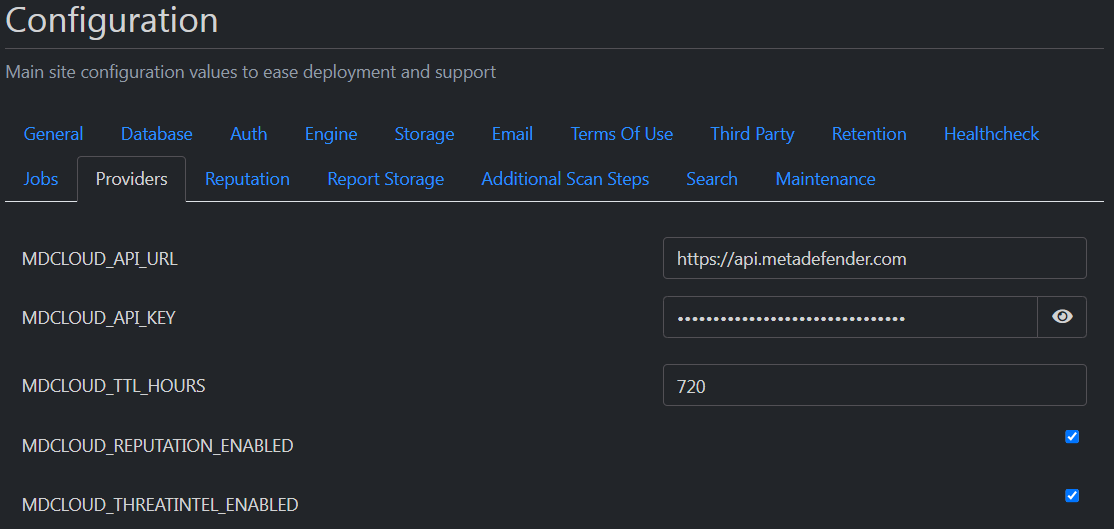
2. Configure a short retention period for samples and scan reports (e.g. 3 days):
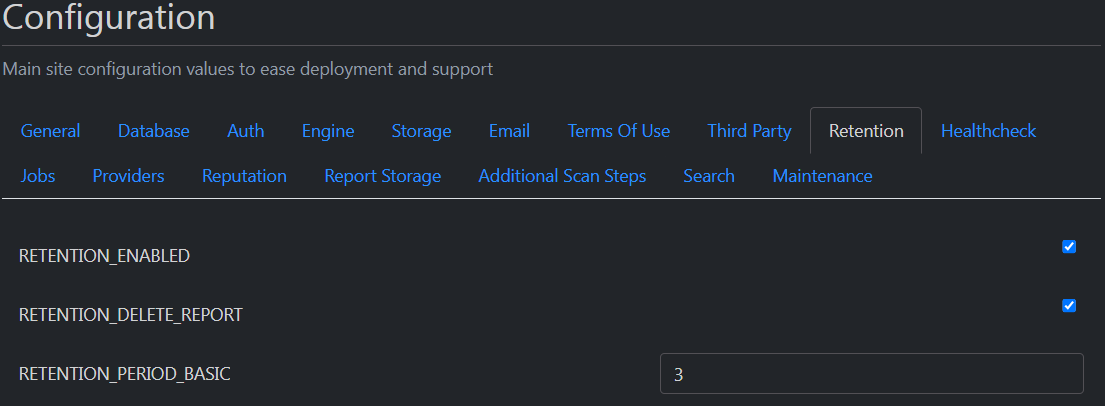
3. Disable Trends-related jobs that might lead to a database bottleneck (Statistics tab):

4. Disable other non-essential jobs (Reports tab):

5. Configure "Finalize finished reports with hanging subtasks" job to run "Every 2 minutes" (Scan tab):
