Configuration
v5.12.1
Search this version
Configuration
Configuration
Title
Message
Create new category
What is the title of your new category?
Edit page index title
What is the title of the page index?
Edit category
What is the new title of your category?
Edit link
What is the new title and URL of your link?
Software Update
Copy Markdown
Open in ChatGPT
Open in Claude
Important
You need a security dongle inserted in the server which configuration you want to change, RED or BLUE. You need to update both sides BLUE and RED independently.
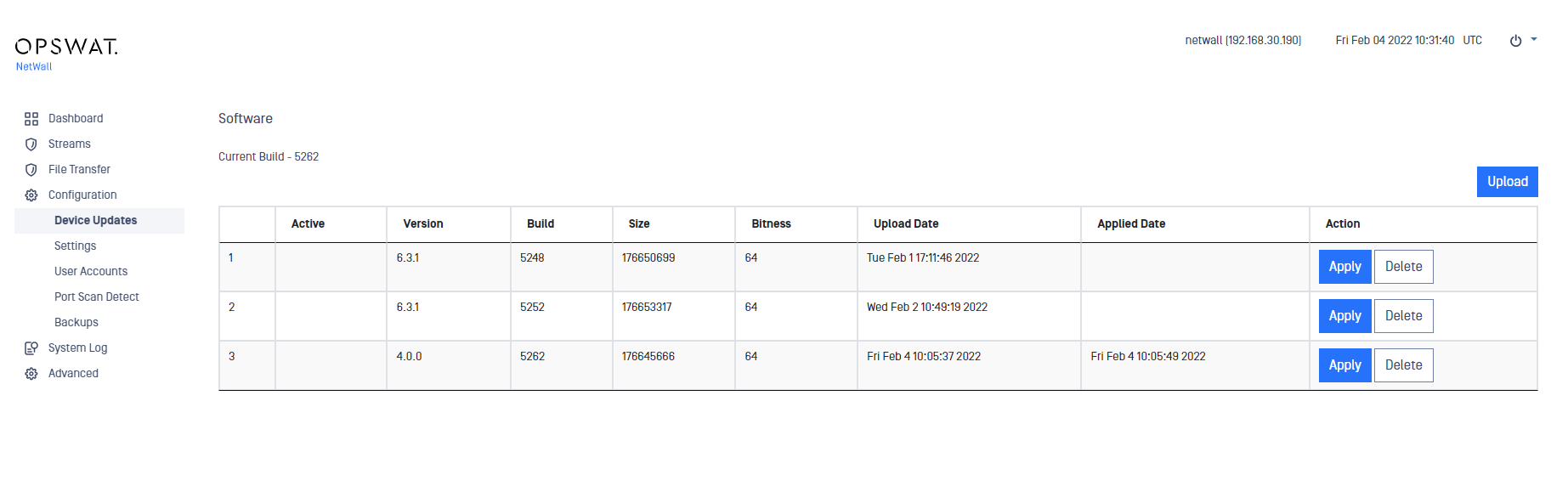
You can easily update the software from the management UI.
Login using right credentials in the management UI
Go to Configuration-> Device Updates
Click on Upload button
Select a valid personality and click on Upload Package
Then click on Apply button, the system needs to reboot to apply the personality, continue by clicking on Apply and Reboot
Last updated on
Was this page helpful?
Next to read:
Syslog Streamnull
Discard Changes
Do you want to discard your current changes and overwrite with the template?
Archive Synced Block
Message
Create new Template
What is this template's title?
Delete Template
Message