
Check Your Version:
This article applies to all versions of MetaDefender Storage Security Linux deployments.
Background
When dealing with disk space issues related to the logging created by MDSS in environments where MDSS default log partition might be highly restricted, MDSS supports the ability to use symlinks to point the logs folder to a different partition/location.
Steps
The following provides steps on how to add a symlink for the /etc/mdss/services_logs directory/folder:
Change name of the current services_logs folder and it backup
sudo mv services_logs/ services_logs_v1/Create a symlink:
sudo ln -s [absolute_path_to_destination_folder]/services_logs [MDSS_dicretory]example: sudo ln -s /home/opswat/MDSS_LOGS/services_logs /etc/mdss/Restart MDSS:
sudo mdss -c restartOnce the product restarts, you will be able to see the symlink created by executing the command:
ls -al. Sample symnlink created shown below: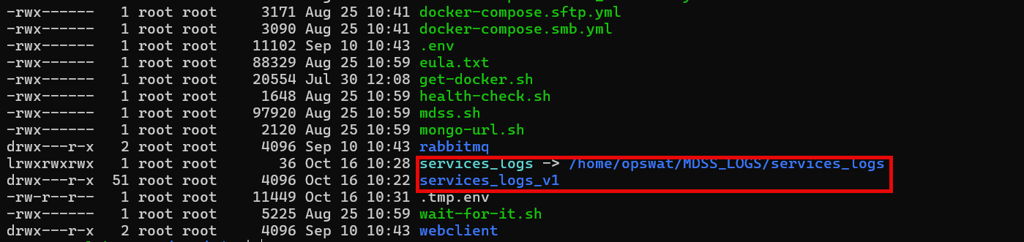
Notes:
After restart, a new file structure and logs will be created on the destination of the symlink.
Further restarts of MDSS will not affect symlink functionality.
Support:
If Further Assistance is required, please proceed to log a support case or chat with our support engineer.