This guide explains how to use the provisioning tools provided by OPSWAT to create an AWS GKE and generate all the Kubernetes components needed to run MetaDefender Core and MetaDefender Storage Security.
In case of having the K8S cluster already created, please check the Deployment Using Helm page
This page is purely for provisioning the EKS cluster and install the products at the same time with the tools that OPSWAT has prepared.
Deploy using Terraform
Locally clone the metadefender-k8s repository and go to terraform folder
Modify terraform.tfvars file
PERSISTENT_DEPLOYMENT=true -> To create K8S cluster with EC2 Worker Nodes
DEPLOY_FARGATE_NODES=false -> To true if wanted to create a Fargate profile
DEPLOY_RDS_POSTGRES_DB=true -> To create RDS instance for PostgreSQL server
POSTGRES_USERNAME -> if DEPLOY_RDS_POSTGRES_DB=true, set up admin database username
POSTGRES_PASSWORD -> if DEPLOY_RDS_POSTGRES_DB=true, set up admin database password
MQ_USERNAME -> if DEPLOY_RABBITMQ=true
MQ_PASSWORD -> if DEPLOY_RABBITMQ=true
Run terraform init and apply. Check the resource to be created, after that enter "y"
MetaDefenderK8S script details
Script path:
Programming Language: Bash
Installation Pre-requisites for provisioning:
AWS Credentials
Set in your local environment credentials the IAM user credentials under AWS_ACCESS_KEY_ID& AWS_SECRET_ACCESS_KEY
MetaDefender Core License Key (Required with --mdcore parameter)
Set it in your local environment credentials under MDCORE_LICENSE_KEY
As security measure do not use the root user for any deployment or operation. Follow the principle of least privilege for all access granted.
How to run the script
Script Parameters
Parameter | Flags | Options | Default | Description | Required/Optional |
|---|---|---|---|---|---|
Action |
| Action to indicate the script if we want to provision (Create resources + install Core) or install (Install Core) | Required | ||
Location | -l or --location |
| Where is going to be the K8S cluster | Required | |
MetaDefender Flag Installation | Combination of
| Install MetaDefender Core in the cluster provisioned | Required | ||
Image Version | --image |
| latest | MetaDefender Core image version to install | Optional |
Region | --region | eu-central-1 | AWS region where all the resources will be provisioned | Optional | |
Cluster Name | --name | Not uppercase allowed | md-k8s | Name of the cluster that will be used for naming all the resources | Optional |
Number of Replicas | --replicas | [0-9]* | 1 | Number of replicas for MetaDefender Core service | Optional |
Namespace | --namespace | [A-Za-z]{1,10} | Namespace where MetaDefender products will be installed in the K8S Cluster | Optional Max Characters: 10 |
Limitations using parameters
When using Fargate
the pods should be installed in the default namespace.
if using AWS Load Balancer controllers need a worker node to be installed in.
The script will deploy a single Worker Node for the cluster with enough space for 1 replica of MD Core. AWS EC2 Instance size is c5.2xlarge (8 vCPU & 16 GiB Memory). Each pod would request 7 vCPU and 8 GiB Memory. To change the request to adapt each pod to the specific case go to values.yml To change the node group go to the terraform file terraform/aws/eks_cluster_module
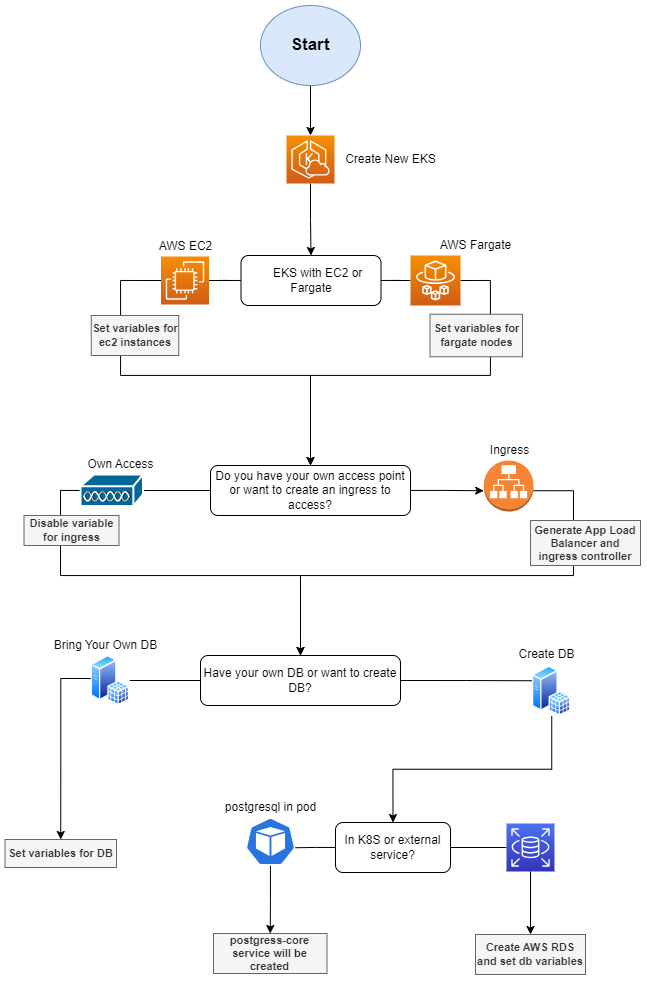
MetaDefender Core Flowchart Provisioning in AWS
The following flowchart represents how the provisioning script will configure the environment based on the options selected for provisioning AWS EKS.
Summary options to be selected
EKS with EC2 or Fargate
Access to the K8S cluster. Generate Ingress or provide own access.
An Ingress will be create per each product flag added as parameter to the script
Own Access, you decide how to access to the cluster so it won't generate any load balancer for accessing
Have your own database or create new database
Own database, will be asked if you want the script to set up the credentials and database host url for you or the script will just indicate the secrets to edit, later on by you, for connecting the MetaDefender Core with your database.
Create new DB in K8S or external DB that for AWS we will provision a RDS instance