
Prerequisites:
an Amazon EFS file storage.
a Linux machine where MDSS is installed. This machine needs to be inside AWS and to have access to file storage from 1
Step 1:
On MDSS machine, please install the cifs-utils package
Step 2:
On machine where MetaDefender Storage Security is installed, create a new folder at the following path /mnt/mdss/nfs/{my-new-folder}
Step 3:
On machine where MetaDefender Storage Security is installed, mount the Amazon EFS file storage in the folder created at step 1. In our testing, we have used the following command, provided by Amazon:
Please note the mount command has multiple parameters that can be configured in many ways. Feel free to adapt it to your needs. Any configuration works with our product, as long as the Amazon EFS file storage is mounted successfully and we have, at least, read access to it (to benefit from our remediation capabilities, we will need write access).
Step 4:
To ensure the mount is persistent, please add it in /etc/fstab . Otherwise, the mount will be lost when machine restarts.
Step 5:
In order to integrate Amazon EFS with MetaDefender Storage Security, please follow these steps:
As NFS is not using any credentials, you can have only one NFS account in MDSS. If you already have one, please go to step 4
From the left side menu, navigate to Inventory, click Add New > Account, choose NFS (Network File System) and click Next.
Give your account a name so you can easily identify it later
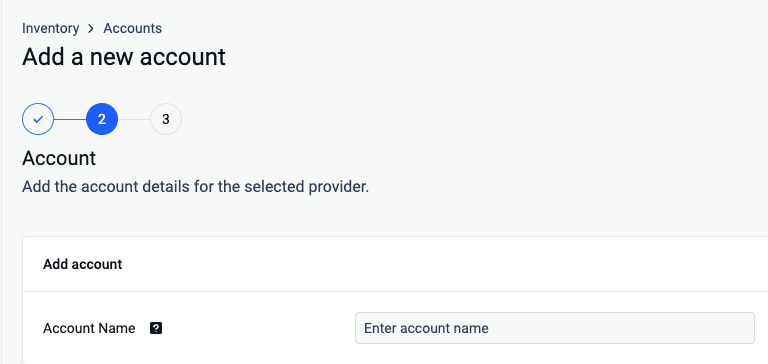
From the left side menu, navigate to Inventory, click Add New > Unit, choose the previously created account and click Next.
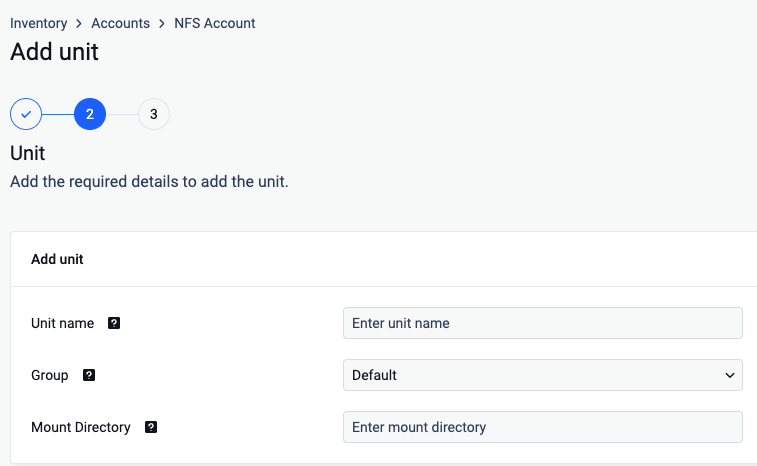
Give your unit an unique name so you can easily identify it later
Assign your unit to a Group
Input the mount directory where your Amazon EFS shared files are mounted on the MetaDefender Storage Security machine. For instance, if your files are mounted at
/mnt/mdss/nfs/efs, simply enterefsin the text box.Click Next in order to finish the process.