
NFS with Data Wrapping works like a standard NFS storage, except that the files on the share are kept in a wrapped form. Each file is unwrapped as it gets read, so scans always run on the original content, and wrapped as the file gets written to the share.
Step 1:
To scan a storage that contains wrapped files, you have to integrate it as an NFS storage unit. Please see this page.
Step 2:
In order to integrate NFS with Data Wrapping with MetaDefender Storage Security, please follow these steps:
As NFS with Data Wrapping is not using any credentials, you can have only one NFS with Data Wrapping account in MDSS. If you already have one, please go to step 4
From the left side menu, navigate to Inventory, click Add New > Account, choose NFS with Data Wrapping and click Next.
Give your account a name so you can easily identify it later
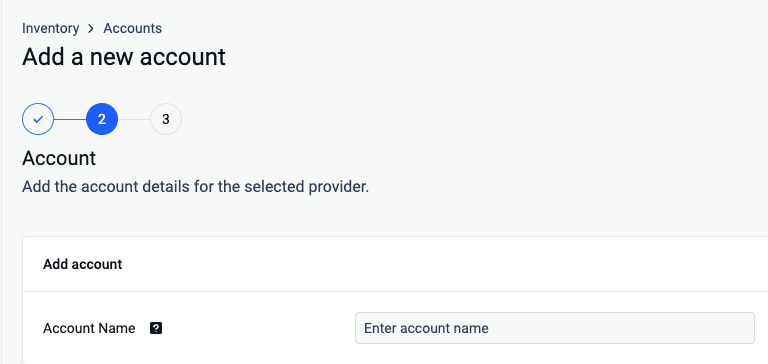
From the left side menu, navigate to Inventory, click Add New > Unit, choose the previously created account and click Next.
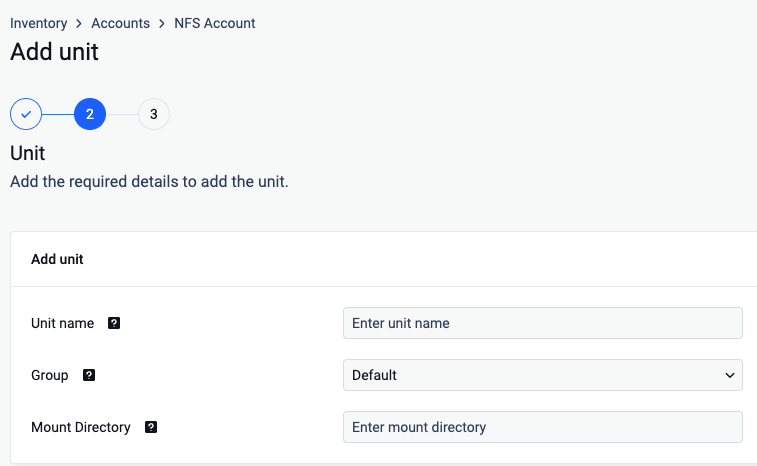
Give your unit an unique name so you can easily identify it later
Assign your unit to a Group
Input the mount directory to the folder created at Step 1.
Click Next in order to finish the process.
Remediation behavior is as follows:
Files moved between NFS with Data Wrapping storage units remain unchanged
Files moved from NFS with Data Wrapping to another storage type (such as Amazon S3) are unwrapped during the move
Files moved from another storage type (such as Amazon S3) to NFS with Data Wrapping are wrapped during the move
The wrap/unwrap action is not configurable.