
NOTE
If the current MetaDefender Storage Security (MDSS) deployment (4.0.0 or later) was upgraded from 3.6.1 or earlier, any existing MongoDB backups will be deleted during uninstallation. Manually back up the data beforehand if it’s still needed.
Uninstall via Command Line
Debian / Ubuntu (.deb package)
To remove all files installed by MetaDefender Storage Security:
sudo mdss -u clean
To remove the mdss package from the system:
sudo apt-get remove mdss
Red Hat Enterprise Linux / CentOS (.rpm package)
To remove all files installed by MetaDefender Storage Security
sudo mdss -u clean
To remove the mdss package from the system:
sudo yum remove mdss
Uninstall via Uninstall Wizard (Windows only)
NOTE
The Uninstall Wizard is available only for the Windows installer (
.msi).
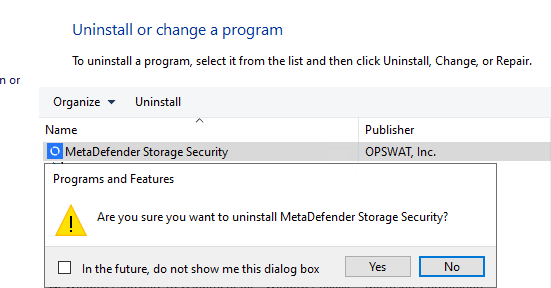
Step-by-Step Instructions
Open Start → Control Panel → Uninstall a program
Locate MetaDefender Storage Security in the list
Double-click the entry
Click Uninstall and Yes to begin the process
Wait for the uninstallation to complete
Click Finish to finish.
Was this page helpful?
Installation