Automatic Empty Folder Deletion After Remediation
The Delete Empty Folders feature automatically removes directories that become empty following remediation actions. This feature helps maintain a clean and organized file system by eliminating unnecessary empty folders.
NFS, SMB and SFTP
Deletion Behavior
Empty folder deletion occurs after a scan completes and then every 10 minutes.
A folder will NOT be deleted if it contains any files or folders after the remediation.
A folder will NOT be deleted if it was empty before the remediation.
Configuring Empty Folder Deletion
Navigate to Storage Units from the left-side navigation menu
Select the storage unit for which you want to configure empty folder deletion
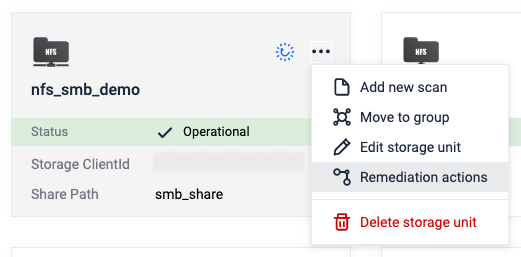
Click the More Options button (represented by three dots) and choose Remediation Actions from the dropdown
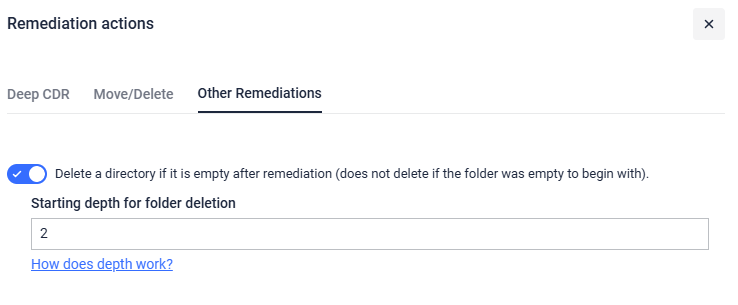
In the Remediation Actions modal window, select the Other Remediations tab.
Enable the option: Delete a directory if it is empty after remediation - this does not delete if the folder was empty to begin with.
Depth Parameter
The depth parameter is used to determine where deletion of empty folders starts. It is a value in the range 1-10000
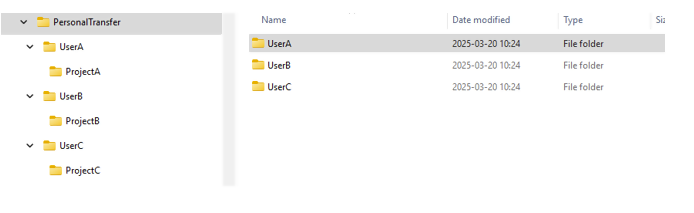
For example in the picture below we have a folder structure. Let's say that there is an nfs storage that has the sharePath PersonalTransfer.
Default - Depth = 1 -> PersonalTransfer Folder (which is also root) is kept, the rest of the empty folders are deleted
Depth = 2 -> UserA, UserB and UserC are kept, the rest of the empty folders are deleted
Depth = 3 -> UserA, UserB, UserC, ProjectA, ProjectB and ProjectC are kept, the rest of the empty folders are deleted