
The Session Log Configuration page allows the selection of which sections to include in the session log file. Session log location and format is configurable in the global configuration.
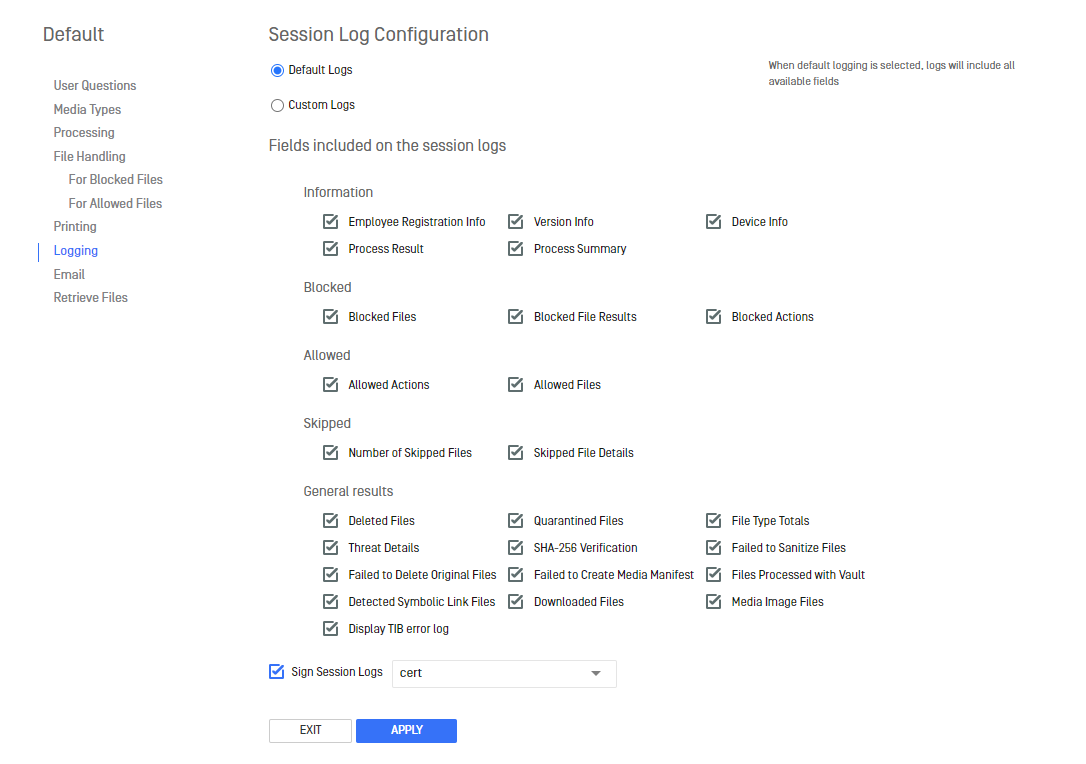
For each workflow, session logs can be digitally signed if certificates are available. See Setting up HTTPS for adding certificates to Kiosk. By default, "Sign Session Logs" is disabled. When enabled, the signature of the session log is generated along with the log:

Warning
Certificates with passwords are not supported for signing session logs.
The signature file can be used to validate the session log to ensure contents have not been tampered with and the signature was signed with a trusted certificate. OpenSSL can be used to perform this validation.
Sample batch script to validate using OpenSSL's command line
@echo OFF
set /p sessionlog="Enter the session log file path: "
set /p signature="Enter the sign file path: "
set /p certificate="Enter the certificate file path: "
set openssl="C:\Program Files (x86)\OPSWAT\Metadefender Kiosk\Client\REST\Data\openssl.exe"
echo Verifying "%sessionlog%" using signature "%signature%" and certificate "%certificate%"
%openssl% x509 -inform pem -in %certificate% -pubkey -noout > publickey
%openssl% enc -d -A -base64 -in %signature% -out sign
%openssl% dgst -sha256 -verify publickey -signature sign %sessionlog%
del publickey
del sign
pause
Was this page helpful?
Operating