
The syslog settings are configured under Logs → Configuration:
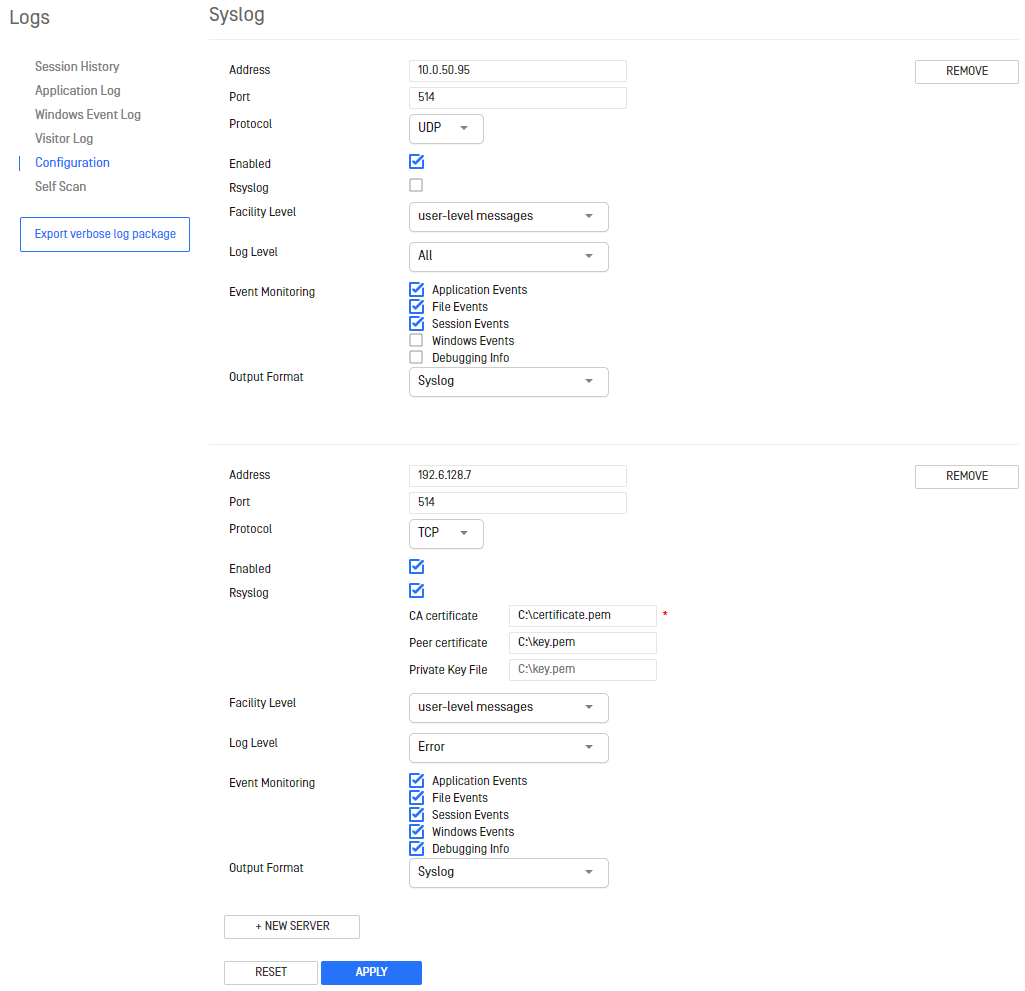
Setting | Description | Default Value |
|---|---|---|
Address | Where the syslog messages are sent | |
Port | The open port for accepting syslog messages | 514 |
Protocol | Select between using UDP or TCP | UDP |
Enabled | Enables usage of the syslog server | Enabled |
Rsyslog | Enables usage of syslog over TLS | Disabled |
| Path to CA certificate. Used to sign all of the other certificates. The CA cert must be trusted by all clients and servers. | <empty> |
| Path to the certificate that conveys the Kiosk client identity | <empty> |
| Path to the private key file, used to properly decrypt the traffic | <empty> |
Facility Level | How Kiosk appears in syslog messages | User-level |
Log Level | Determines which messages get sent to the syslog server, it filters out any message less important than that selected | All |
Event Monitoring | Determines which types of events are logged | Application |
Output Format | Select the format of the message between standard "syslog" or "CEF" | syslog |
Select new server to add a new syslog server to the list; remove to delete a server. Select reset to revert the settings back to how Kiosk is currently configured. Select apply to set Kiosk settings to how they appear on this page.
syslog Message Format
Example: MDM[12752] eventCode='000000', logType='databaseLog', Configuration reloaded
Component | Description | Value(s) |
|---|---|---|
Product ID | Short product ID | MDM |
Kiosk Process ID | The process ID of Kiosk | [#] |
eventCode | 6 digit code to indicate the type of event | 000000 - Unclassified |
logType | Event monitoring log type | databaseLog - Application Events |
Message | The content of the message | Text or JSON formatted content |
CEF Message Format
Base Format: CEF:<Version>|<Vendor>|<Product>|<Version>|<EventCode>|<Message>|<Severity>|<Extension> Example: CEF:0|OPSWAT|MDM|4.2.6.1111|000000|Configuration reloaded|16|