
MetaDefender Kiosk 4.7.0 | |
|---|---|
09 August 2024 | |
Enhancements | |
Webpage loading on KIOSK Console | Optimized resources on the webpage to enhance the user experience. |
Fixed Bugs | |
Issue with Certificate Configuration | Resolved issues related to configuring certificates on the KIOSK Console, making it easier for admins to manage certificates. (Note: From this version onwards, to enhance security, KIOSK will no longer support private keys using insecure DES encryption.) |
Issue with Configuring "Exit Credential" | This version addresses the issue where KIOSKs were unable to update the "Exit Credential" configuration from OCM/MyOPSWAT through Set/Group settings. |
29 July 2024 | |
New Features | |
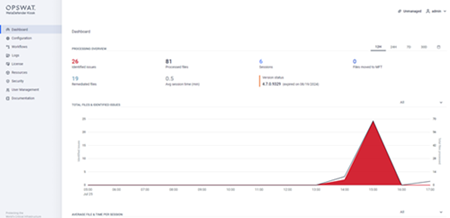
Innovate the KIOSK Web Management Console | The KIOSK Web Management Console has been totally revamped with a more streamlined and user-friendly design, making it easier than ever to configure your KIOSK. |
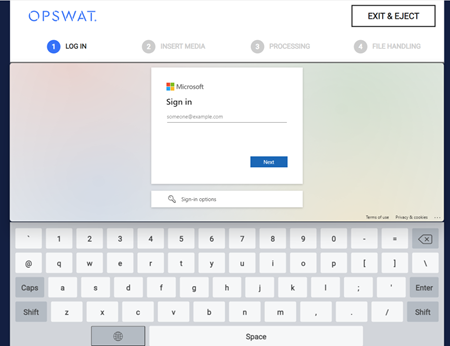
Support Microsoft Entra ID Authentication on Kiosk UI and Web Management Console | Officially support to configure Microsoft Entra ID as new authentication method for both KIOSK UI and Console through the SAML 2.0 protocol. See Microsoft Entra ID Integration for more details. |
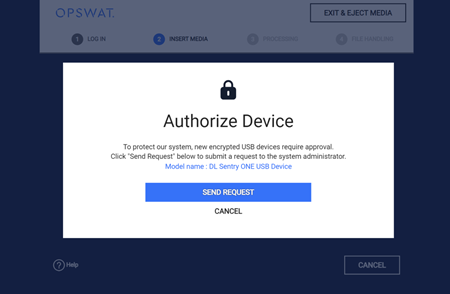
Encrypted Drive Verification and Approval | The Kiosk system protection functionality will check file integrity in the unlocked partitions of encrypted peripheral media devices before decryption. The encrypted devices containing unauthorized data will be spotted and require approval before being added to the data whitelisting and usable with the Kiosk system. See Encrypted Device Verification And Approval for more details. |
Continuous support for My OPSWAT integration | The administrator can now centrally manage KIOSK(s) from My OPSWAT with the following additional product functionalities:
|
Support UK keyboard layout | Users can now input UK characters from the Kiosk UI by using the UK keyboard. |
Enhancements | |
Enhance stability and security of KIOSK application | Carry out database improvements and update third-party dependencies to the most recent stable version. |
Enable searching through the KIOSK Console session history by submitting a large file | The user can now submit a file larger than 200MB to search for in the KIOSK Console session history. |
Compatible support with the new version of CimTrak | Compatible support when integrating with CimTrak 4.1.41 |
Improve the printing process | Eliminate KIOSK usage or creation of PowerShell script when utilizing the printer to align with the whitelisting service. |
Fixed Bugs | |
Issue copying the remediated file after scanning | Fixed the issue cannot copy the remediated file that was downloaded from MD Core after scanning to a shared folder with Kiosk logged-in user permission |
Issue when retrieving files from the network share | Ensure that the authorized AD user can retrieve files from a network share. |
Issue when unlocking Kanguru Defender 3000 with the latest firmware | Enhance KIOSK compatibility when unlocking the encrypted USB Kanguru Defender 3000 with firmware version 5.6.7.0 |
Known Issues | |
Issue when upgrading in-place from older versions | KIOSK has upgraded several 3rd party components in this version. Therefore, when upgrading from very old KIOSK versions, administrators should uninstall the current KIOSK version to clean up the system before reinstalling version 4.7.0. After reinstalling, configurations will be retained as they were before. |
Issue with Custom Authentication on OCM7 | Administrators cannot edit the configuration of custom authentication on OCM7. This will be addressed in our next versions. |
Was this page helpful?
Release Notes