
This article applies to all MetaDefender Kiosk V4 releases deployed on Windows or Linux systems.
One key feature of the MetaDefender Kiosk solution is its advanced file-type detection capability (a.k.a. file-type analysis/file-type mismatch/file mismatch analysis, etc.), driven by Kiosk’s integration with MetaDefender Core.
To enable Kiosk’s file-type analysis feature:
Open your Kiosk Management Console>Workflows tab.
Click the edit icon on the relevant user workflow
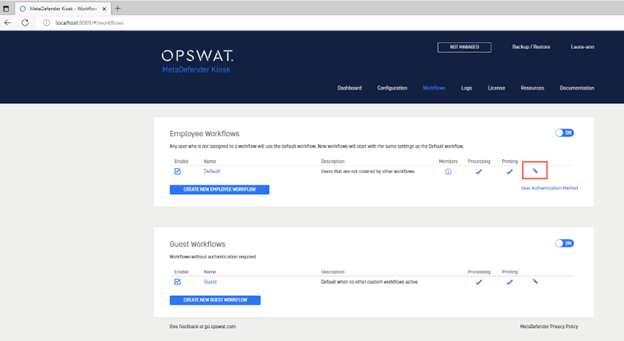
Assign the appropriate workflow (a workflow with file-type detection enabled) under Processing>Workflow Rule, as illustrated below:
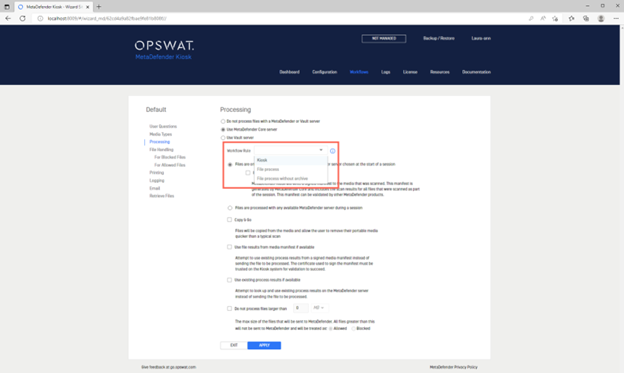
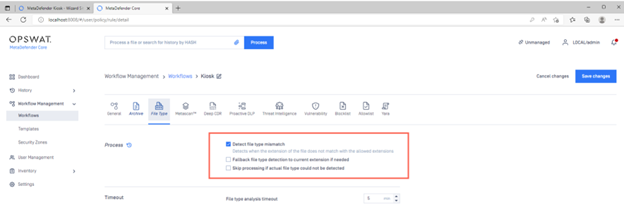
To enable or configure the file-type analysis feature on a given workflow:
open your Core Management Console>Workflow Management>Workflows tab
open any Kiosk-associated workflow
make changes under the File Type tab, as illustrated in the screenshot below.
For the full list of 4500+ file-types supported by MetaDefender Core’s file-type detection feature, please Read This Article
If you have any difficulty Configuring and Assigning Workflows to Enable Kiosk’s File-Type Detection Feature, please follow these instructions on How To Create a Support Package, before creating a support case or chatting with our support engineer.