
1. VLAN Sub-Interface
A VLAN sub-interface is a logical interface tied to one parent NIC, created for one specific VLAN ID.
For example, if eth0carries tagged traffic for VLAN 10, Linux can create a VLAN sub-interface like eth0.10 to represent VLAN 10 on that parent interface.
What it does:
Matches frames tagged with VLAN 10 arriving on
eth0Exposes them as a separate interface
eth0.10Lets you:
assign an IP to that VLAN interface
route/NAT/filter traffic for that VLAN interface
2. VLAN Aware-Bridge
A VLAN-aware bridge is a switch-like bridge that understands VLANs and forwards traffic between ports based on VLAN membership.
What it does: It makes Linux behave more like a managed switch:
Multiple ports join one bridge
For example, each port can be:
Tagged member of VLAN 10
Untagged member of VLAN 20
Trunk carrying many VLANs
Forwarding is done inside the bridge according to VLAN rules
3. Core difference
VLAN sub-interface = endpoint/interface model
You create one interface per VLAN on a parent NIC.
Example:
eth0.10eth0.20
Linux sees them as separate interfaces.
Best for:
assigning IPs
routing
NAT/firewall
VLAN-aware bridge = switch/forwarding model
You create one bridge and define which VLANs are allowed on each bridge port.
Example:
br0port
eth0: tagged VLAN 10,20port
eth1: untagged VLAN 10port
eth2: untagged VLAN 20
Best for:
switching traffic between ports
trunk/access port behavior
multi-port VLAN forwarding
4. Use case
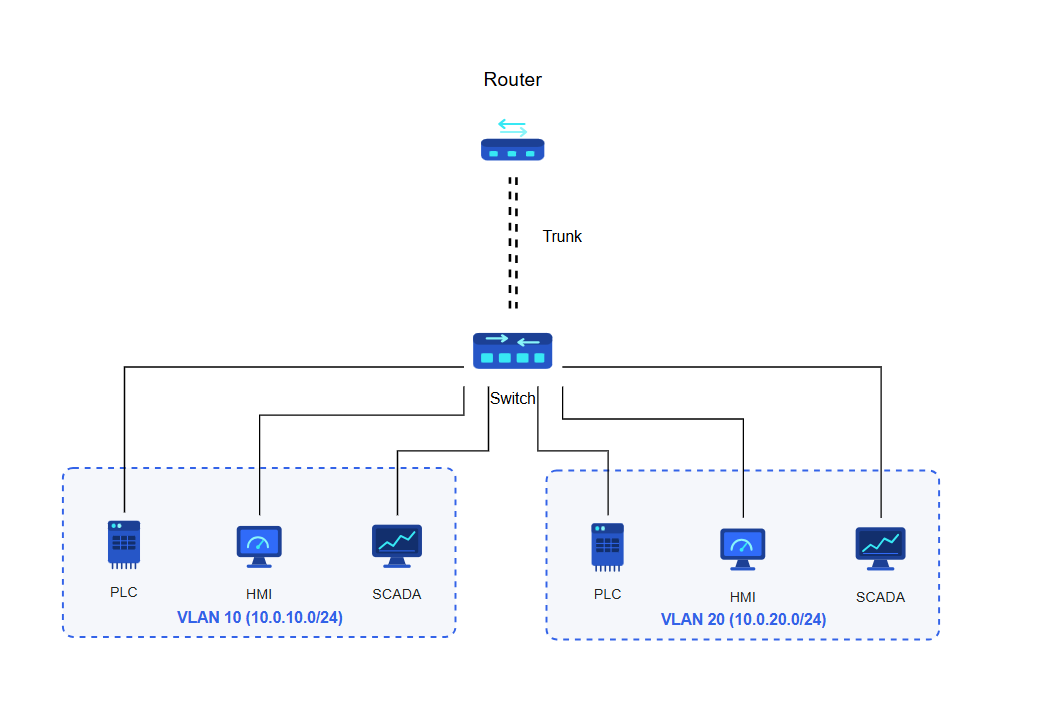
Router on a stick (ROAS):
Machines in the same VLAN can communicate directly because they belong to the same Layer 2 broadcast domain and IP subnet. The switch forwards traffic between them without requiring routing.
Machines in different VLANs belong to separate Layer 2 domains and cannot communicate directly. To enable communication between VLANs, Router on a Stick (ROAS) can be used. In this setup, a single router interface is divided into VLAN sub-interfaces, each serving as the default gateway for a specific VLAN. Traffic destined for another VLAN is forwarded to the router over a trunk link, routed to the target VLAN, and then sent back to the switch for delivery.
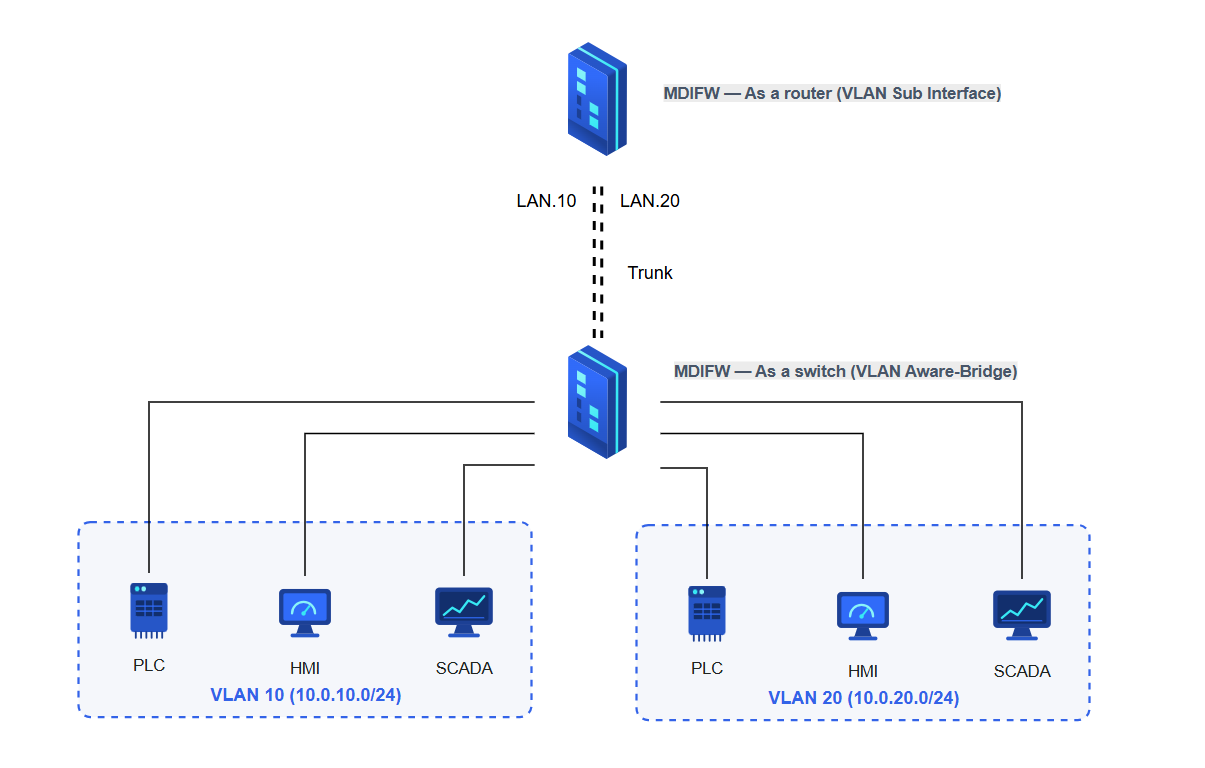
In a ROAS deployment, MDIFW can be used to replace either the switch or the router, depending on the required role in the network. When used as a switch replacement, the device should be configured with a VLAN Aware Bridge to provide VLAN-based Layer 2 forwarding between connected interfaces. When used as a router replacement, the device should be configured with VLAN sub-interfaces, where each sub-interface represents a VLAN and serves as the Layer 3 gateway for that VLAN. This allows the device to support either VLAN switching or inter-VLAN routing within the same overall ROAS topology.
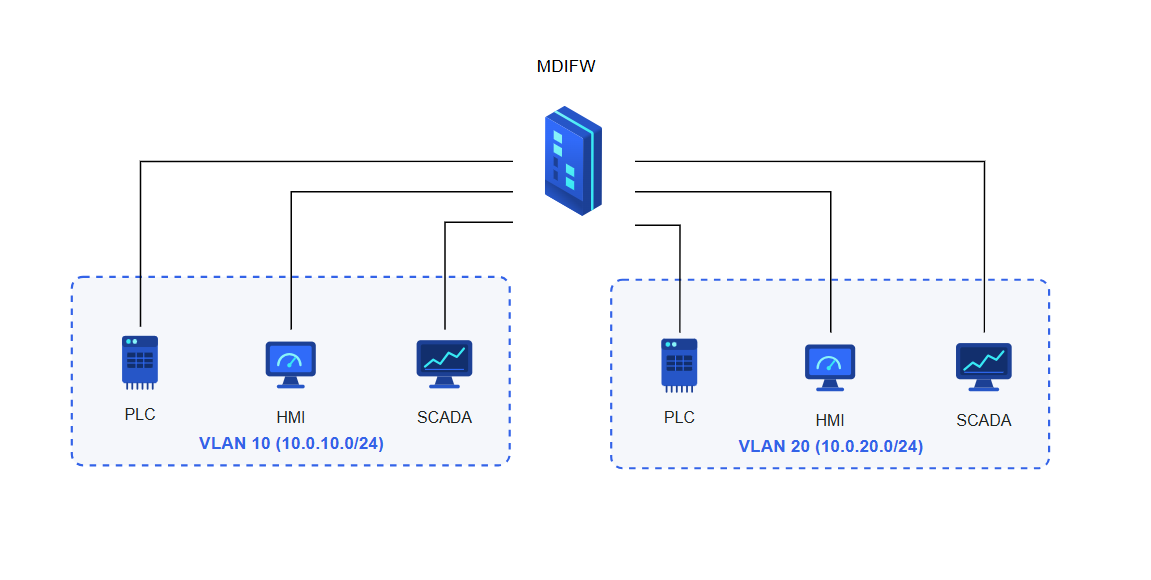
We can also configure MDIFW in a way which it can replace both the switch and the router in a ROAS topology. In this configuration, the device provides VLAN-aware Layer 2 switching for communication between machines within the same VLAN, while also performing Layer 3 routing between machines in different VLANs. This allows a single device to handle both intra-VLAN and inter-VLAN traffic, simplifying the network design and reducing the need for separate switching and routing components.