
Overview
The MetaDefender Industrial Firewall is a ruggedized industrial firewall designed to meet the stringent demands of mission-critical OT and ICS infrastructure. It is available in multiple models with high-speed Ethernet ports, and can operate in transparent Layer 2 (inline) mode or Layer 3 routing mode, with stateful packet inspection on every port.
Enhanced by Firewall Learning Mode (FLM), it monitors and analyzes network traffic and automatically generates candidate security policies. These policies can be implemented as protocol-specific Deep Packet Inspection (DPI) rule sets to block anomalies, zero-day vulnerabilities, and DoS/DDoS attacks.
Key capabilities include:
Stateful packet inspection across all ports, in transparent or routing mode.
Protocol-specific Deep Packet Inspection (DPI) for industrial protocols, with filtering down to the function/command-code level.
Firewall Learning Mode (FLM) — automated traffic baselining that proposes security policies before enforcement.
DoS/DDoS protection at the OT boundary.
Network segmentation and connectivity — VLAN segmentation, NAT, static and dynamic routing (RIP, OSPF), and VPN (IPSec / OpenVPN).
Resilient deployment — high availability via VRRP and an integrated hardware bypass for fail-open operation.
Centralized management and monitoring — web UI, REST API, remote syslog, and SNMP, with optional central management.
Ports and Cabling
MetaDefender Industrial Firewall (MD-IF-4P)
The MetaDefender Industrial Firewall inspects and enforces traffic between its data ports in both directions, and each data port can operate in Transparent (Layer 2 inline) or Routing (Layer 3) mode. Neither data port is a fixed “trusted” or “untrusted” side — what is enforced is determined by the firewall rules you configure, not by the port a device is connected to.
The MetaDefender Industrial Firewall has four physical ports:
DEVICE: Data port that typically faces the OT asset/zone you place the firewall in front of.
LAN: Data port that typically faces the upstream or plant network.
MANAGEMENT: Administrative access to the Web UI and SSH. When set to Routing mode, the management port can also forward network traffic.
SFP: Fiber data port. It can also be assigned the management role.
Management port: On the MetaDefender Industrial Firewall, the management role can be assigned only to the MANAGEMENT or SFP port. LAN and DEVICE always remain data ports.
To set each port’s mode (Routing or Transparent) and choose the management port, see Port Configuration at System Setting
Panel Layout
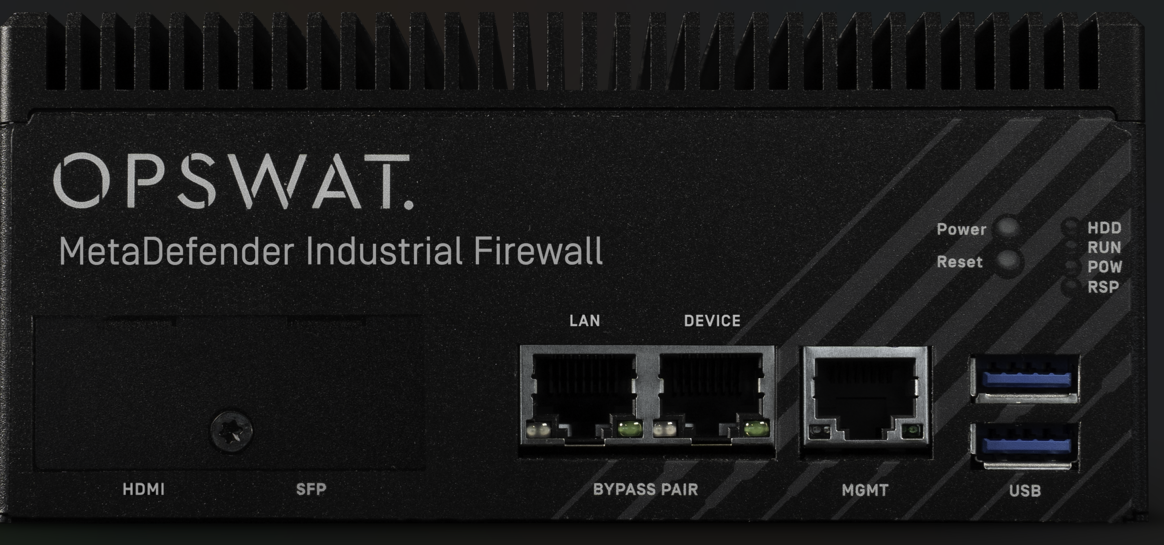
The numbers below match the callouts in the panel illustration.
HDMI port
Screw: Unscrew it to access the HDMI and SFP ports.
SFP port: 1 Gbps SFP interface.
LAN port: 2.5 GbE RJ45 port.
Bypass port pair: Hardware bypass between the LAN and DEVICE ports.
DEVICE port: 2.5 GbE RJ45 port.
MGMT port: Management port for accessing the web UI.
USB 3.1 Gen 2 port
Reset button: Restart the device.
Power button: Turn off the device.
RPS LED (Redundant Power Supply):
Solid Green: both power supplies are functioning.
Solid Red: the redundant power supply is likely to fail or has failed.
Power LED:
Solid Green: the device is powered on.
Off: the device is powered off.
RUN LED:
Solid Green: operating normally.
Solid Red: there is blocking traffic that has not yet been acknowledged.
HDD LED:
Blinking Green: data access activities.
Off: no data access activities.
MetaDefender Industrial Firewall 8-Port (MD-IF-8P)
The MetaDefender Industrial Firewall 8-Port has eight data ports — Port 1–Port 6, SFP 1, and SFP 2. Like the 4P, it inspects traffic between its ports in both directions and runs each port in Transparent (Layer 2 inline) or Routing (Layer 3) mode; neither side of a bridge is a fixed “trusted” or “untrusted” side.
Unlike the 4P, which has a fixed DEVICE/LAN pair, the 8P’s ports are assigned individually: each port can run as a Routing interface, or be paired with another port into a Transparent. The OT-facing and network-facing roles are therefore chosen per deployment by how you cable and pair the ports rather than fixed to specific port names.
Management port: On the MetaDefender Industrial Firewall 8-Port the UI-access (management) role is assigned to a Port 6, selected in Port Configuration.
License
There are two kinds of license:
Standard: Supports all protocols except GE protocols.
GE: Supports all protocols, including GE protocols.
The license is indicated when you purchase.
Protocols and activities
MetaDefender Industrial Firewall supports various Layer 7 protocols, and each protocol supports the following activities:
Read Only
Read/Write
Full Access
The meaning of each activity differs depending on the protocol. Refer to the Protocols and Activities page for the full list of supported protocols and their associated activities.