
The current documentation is based on McAfee Web Gateway version 7.7.
Prerequisites
McAfee Web Gateway is installed and license is activated
MetaDefender ICAP Server is started and configured with "Use persistent connections" option enabled. For details please check 3. Configuring MetaDefender ICAP Server.
Configure McAfee Web Gateway to use MetaDefender ICAP Server
In your browser navigate to the McAfee Web Gateway's user interface. By default it is accessible via http://<IP address>:4711 or https://<IP address>:4712. Default user/password combination is admin/webgateway
Choose Policy
Under the Rule Sets tab select **Add → Rule Set from Library...

Select ICAP Client → ICAP Client from the rule set list and click OK

Select the newly created ICAP Client under Rule Sets and click on Edit... next to ReqMod server

In the Edit List (ICAP Server) window under List content double-click on the first item. In the new Edit ICAP Server window change the URI for the MetaDefender ICAP Server. It should look like icap://<ICAP IP>:<ICAP port>/OMSScanReq-AV. Click OK to close the Edit ICAP Server window and click OK again to close the ReqMod server editor window
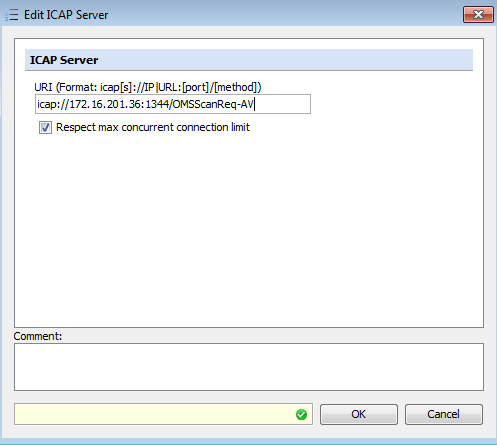
Repeat steps 5-6 to set the RespMod server. The URI for MetaDefender ICAP Server should be icap://<ICAP IP>:<ICAP port>/OMSScanResp-AV
After everything is configured click Save Changes in the top-right corner. McAfee is now configured to use MetaDefender ICAP Server.
Enabling SSL Scanner
If you want to inspect contents in HTTPS connections with MetaDefender ICAP Server you should enable SSL Scanner in Mcafee Web Gateway.
In your browser navigate to the McAfee Web Gateway's user interface. By default it is accessible via http://<IP address>:4711 or https://<IP address>:4712. Default user/password combination is admin/webgateway
Choose Policy
Under Rule Sets select the SSL Scanner rule which is disabled by default

Check Enable option and click Save Changes. McAfee is now configured to decrypt HTTPS traffic and send it to MetaDefender ICAP Server unencrypted
Troubleshooting
To use the Mcafee Web Console, you need to enable java in your browser and add the Web Console's url to the trusted sites in Java Config.
There are notifications or even non-working web pages after enabling SSL Scanner: you should download and install the SSL certificate used by Web Gateway to your browser. You can get the certificate under Policy → Settings → SSL Client Context with CA → Default CA. Click Export... next to Certificate Authority and import the created file to your browser's trusted root certificates
If you see "16000 - NoIcapServerAvailable" errors: MetaDefender ICAP Server should be configured to use persistent connections. Please check 3. Configuring MetaDefender ICAP Server.