
To support encrypted USB devices, please follow these steps:
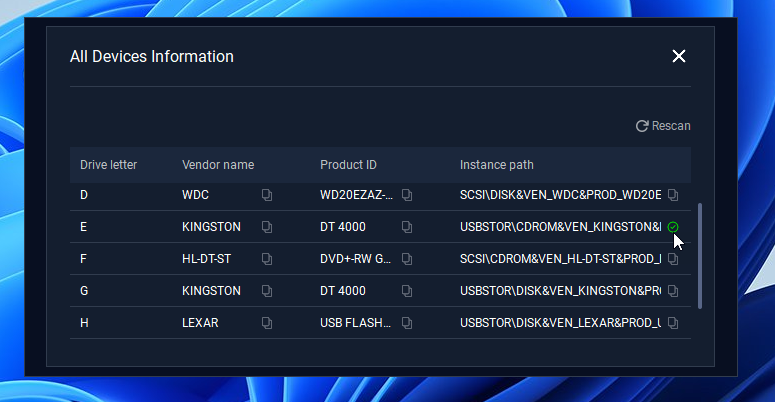
Step 1: Access the device information in MetaDefender Endpoint Validation and copy the decrypted tool drive's instance path.
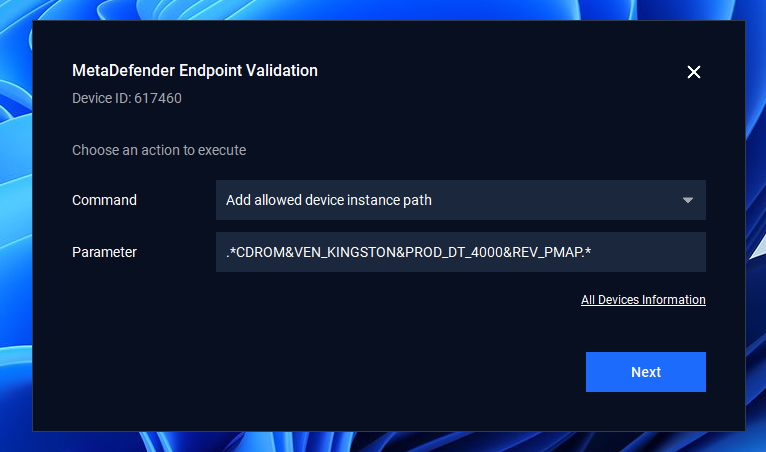
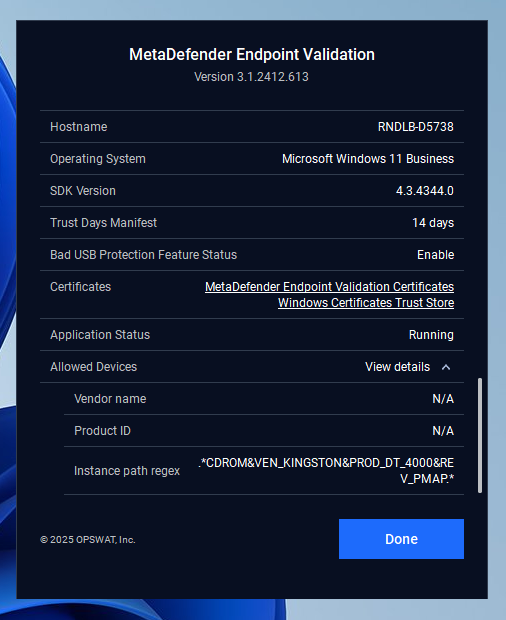
Step 2: Allow the decrypted tool drive by option "Allow device by instance path" from the MetaDefender Endpoint Validation UI
Step 3: Plug the encrypted USB device and run the decrypted tool inside the allowed drive.
Step 4: Enter password to decrypt and then users can use a data drive as normal (ensure all files inside that are validated by Kiosk)
Below is a list of known encrypted media that are supported, and have been rigorously tested by the MetaDefender Endpoint Validation development team.
Media | Minimum version |
|---|---|
Kingston DataTraveler DT4000 | 3.1.2408.524 |
Kingston IronKey D300s | 3.1.2408.524 |
Kingston DataTraveler Vault Privacy 3.0 (DTVP30) | 3.1.2408.524 |
Kingston DataTraveler Vault Privacy 3.0 (DTVP30M-R) | 3.1.2408.524 |