
This article applies to all MetaDefender Endpoint releases deployed on Windows, Linux, macOS, iOS or Android systems.
For any issues encountered with MetaDefender Endpoint, please export logs and provide the package when reaching out to Customer Support.
Export Logs via the Endpoint User Interface
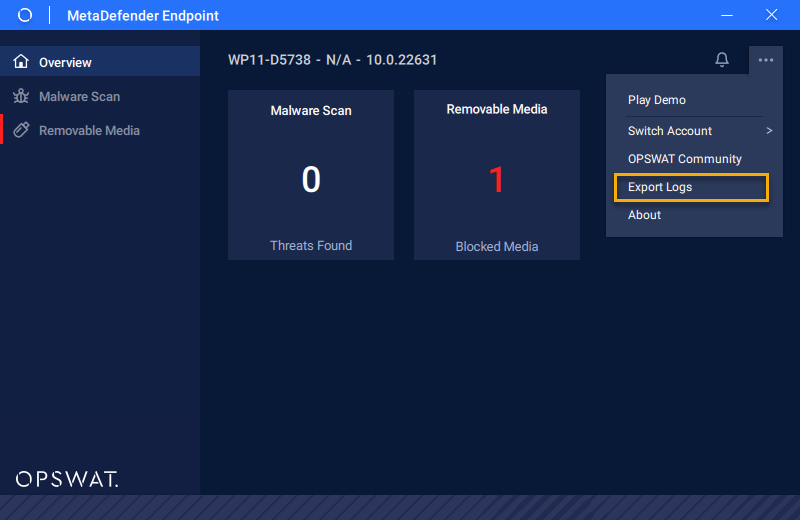
Click on the “…” in the top right corner of MetaDefender Endpoint and choose “Export Logs”.
Export Logs via the Tray Icon
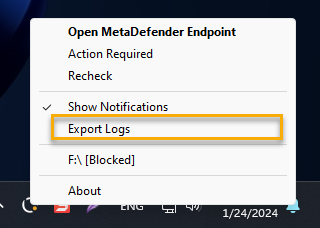
Right click the MetaDefender Endpoint system tray icon and select "Export Logs”.
Output
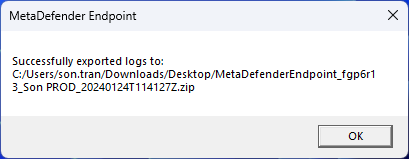
Exporting the logs will take a few seconds for MetaDefender Endpoint to generate a .zip package on the desktop. When complete, a notification will be displayed:
If you have any difficulty, please open a Support Case with the OPSWAT team via phone, online chat or form, or feel free to ask the community on our OPSWAT Expert Forum.