
Check Your Version:
This article applies to All version of Metadefender Downloader Windows and Linux version
Issue:
This article provides the commands and directory locations required to fully uninstall MetaDefender Downloader from Windows and Linux environments, including the removal of application files, configuration files, services, and residual data.
Solution:
To completely uninstall MetaDefender Downloader and ensure a clean removal of all application components by follow the instructions below:
Uninstall on a Window’s Deployment:
Go to Add or Remove Program under the search menu
Find the MetaDefender Update Downloader and Press the Uninstall button to uninstall application.
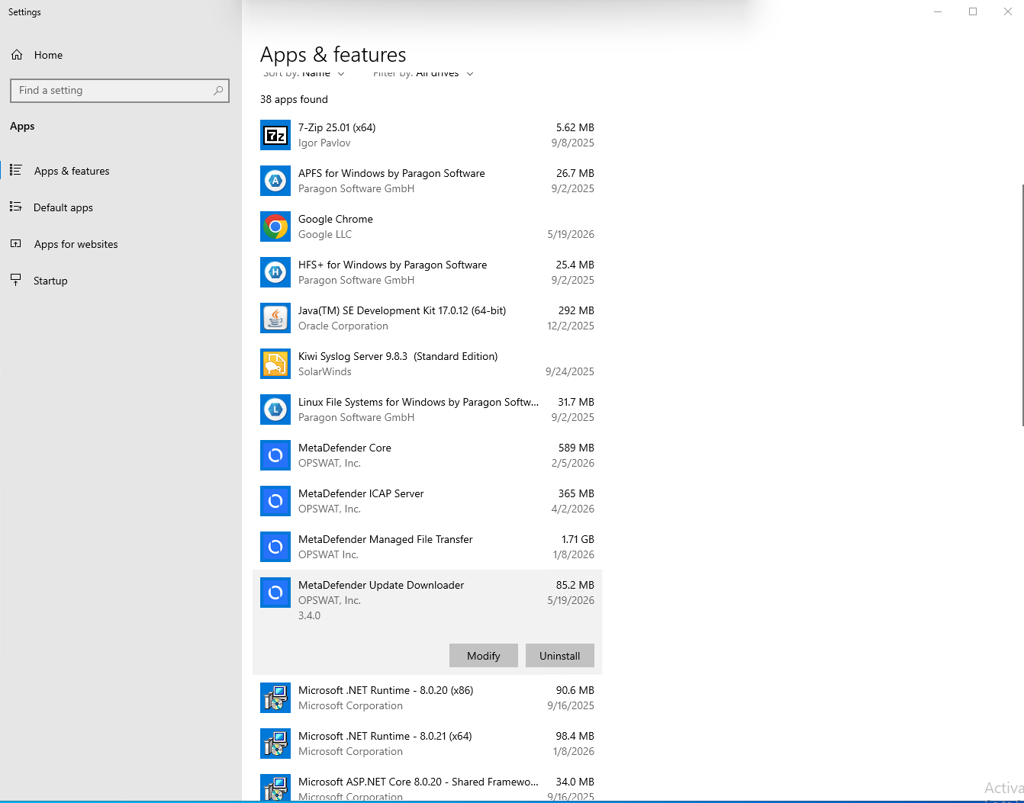
Click the Uninstall button to uninstall the MetaDefender Downloader application.
To completely remove all MetaDefender Downloader related data, logs and configuration files, please deleted all the directories reference in this article: What are the installation directories for MetaDefender Update Downloader?
Uninstall Linux Environment:
The command line to uninstall the downloader is as follows:
Stop and Disabled MetaDefender Downloader Core services.
For Debian-based Systems (Ubuntu, Debian):
For RPM-Based Systems (Rocky Linux, CentOS, RHEL):
To completely remove all MetaDefender Downloader related data, logs and configuration files, please deleted all the directories reference in this article: What are the installation directories for MetaDefender Update Downloader?
Support:
If Further Assistance is required, please proceed to log a support case or chatting with our support engineer.