Title
Create new category
Edit page index title
Edit category
Edit link
Deployment automation support
An Ignition file could be utilized for either / both of following use-cases:
Pre-define PostgreSQL server information for MetaDefender Core to connect and setup database: only required on Linux installation, or Windows with command line installation. Learn more details at:
- Standalone Mode > Command Line Installation ( applicable on version 4.19.0 or newer).
- Shared Database Mode > Command Line Installation (only applicable on version 4.20.0 or newer).
Automating to accept EULA, create a default local admin user and import MetaDefender Core configurations upon installed: Those steps could be automated using ignition file described in this page.
Ignition file location to create:
- Windows:
C:\OPSWAT\ometascan.conf - Linux:
/etc/opswat/ometascan.conf
The product supports fully automated deployment. It means that it can be installed and configured with no human interaction.
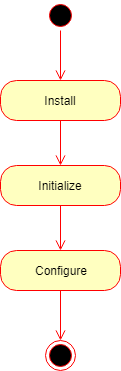
The automated deployment can be split to three steps on a high level:
- Installation
- Initialization
- Configuration

Installation
To automate the installation, install the product from the command line and provide the installation-time options as parameters to the installer. For further details see Command Line Installation
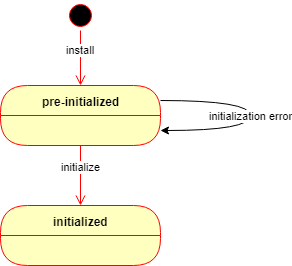
After the installation is complete, the product starts up and waits in a pre-initialized status. The product may be initialized in two ways:
- Manually using the Wizard Setup or
- Automatically using an ignition file (see below).
If the automated initialization fails for some reason (e.g. the ignition file is not in place) then the automated initialization may be retried after fixing the problem (e.g. placing the ignition file in its lookup location) and restarting the OPSWAT MetaDefender Core service.
Until the product is in pre-initialized status, it will try the automated initialization every time after a service (re)start.
Initialization
Initialization is the process of bringing the product to an operable status.
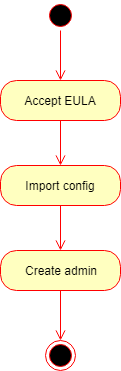
Basically the initialization consists of the following steps:
- Accept the End User License Agreement (EULA),
- Import product configuration and
- Create the first administrator user account.
Ignition file
The initialization process can be configured in a file called the ignition file.
In Linux, the ignition file and the folder /etc/opswat should have the permission 755 and must be in conf format.
Ignition file location
- Windows:
C:\OPSWAT\ometascan.conf - Linux:
/etc/opswat/ometascan.conf
Example:
eula=true[user]name=adminpassword=adminemail=admin@localapikey=44c96cbb4e4e6c0a1d16bcb3c3da24def317[config]import=config_package.zipimport_password=123[security]session_cookie_samesite=Lax[internal]skip_startup_pages=trueskip_upgrade_scan_data=false[dbserver]type=localhost=localhostport=5432user=postgrespassword=non_Unicode_passwordprivate_username=my_internal_db_userprivate_password=mypassword[ocm]ocm_url=https://my.opswat.comreg_code=XXXXXXXX[max_body_size]body_size=body_size_in_byte[https]cert_name=my_cert_namecert_path=C:/OPSWAT//certs/server.crtkey_path=C:/OPSWAT/certs/server.keypassphrase=my_pass_if_anytls_version=1.2,1.3Ignition file fields
The ignition file accepts the following fields:
Ignition file — configuration keys
| Section | Key | Required | Accepted values | Description |
|---|---|---|---|---|
| — (top of file) | eula |
Optional; mandatory when [user] section is present |
true, false (default) |
Whether to accept the End User License Agreement. Must be set at the top of the ignition file. Must be true to accept; any other value fails initialization. When [user] is defined, this key must be set. |
[global] — Global configuration |
||||
[global] |
dbmode |
Optional | 1 (default), 3, 4 |
1: Standalone Core (default). 3: Non-persistent mode (no scan results in DB; use webhook-style retrieval). 4: Shared database (all Core instances share the same database). |
[global] |
instance_name |
Optional | Unicode and numbers; at least 3 characters; no whitespace | Instance name. If omitted, a name is generated automatically. |
[global] |
storage_path |
Optional | Local or UNC path | Path for storages (DLP, quarantine, sanitized files). Local path or shared folder; must be read/write for MetaDefender Core. Examples: C:\folder, \\192.168.1.1\folder. |
[user] — Initial administrator account |
||||
[user] |
name |
Optional | string | User name for the initial administrator (Administrator role). |
[user] |
password |
Optional | string | Password for the initial administrator. Warning: clear text in the file; may be visible to unauthorized parties. |
[user] |
email |
Optional | string | E-mail for the initial administrator. |
[user] |
apikey |
Optional | string | API key for the initial administrator. |
[config] |
||||
[config] |
import |
Optional | string (path) | Path to JSON or ZIP with exported configuration to import. ZIP includes full config including users and overwrites [user]. |
[config] |
import_password |
Optional | string | Password to decrypt a .zip configuration package. |
[security] |
||||
[security] |
session_cookie_samesite |
Optional | Strict, Lax (default), None |
Restrict session cookie to first-party / same-site context. |
[internal] |
||||
[internal] |
skip_startup_pages |
Optional | true, false (default) |
Skip welcome and other startup pages (e.g. upgrade result) after install/upgrade; go straight to the product index. |
[internal] |
skip_upgrade_scan_data |
Optional | true, false (default) |
Skip upgrading processing result data (Processing History), Deep CDR sanitized files, Proactive DLP, quarantined files. |
[internal] |
data_directory |
Optional; fresh install only (not applied on Core upgrade) | string (absolute path) | Directory where Core stores its application data. |
[dbserver] |
||||
[dbserver] |
type |
Mandatory if [dbserver] is present |
local, remote |
Where PostgreSQL runs physically. remote means DB and Core are not on the same machine. |
[dbserver] |
host |
Mandatory if [dbserver] is present |
string (IP or hostname) | PostgreSQL server address. localhost when applicable. |
[dbserver] |
port |
Mandatory if [dbserver] is present |
number | PostgreSQL listen port for client connections. |
[dbserver] |
user |
Mandatory if [dbserver] is present |
string (non-Unicode only) | PostgreSQL user; SUPERUSER required for first-time DB and extension setup. |
[dbserver] |
password |
Mandatory if [dbserver] is present |
string (non-Unicode only) | PostgreSQL user password. |
[dbserver] |
private_username |
Optional | string | Internal DB user for Core operations; auto-generated if omitted. See “Customize Internal PostgreSQL User”. |
[dbserver] |
private_password |
Optional | string | Password for internal user; auto-generated if omitted. |
[ocm] |
||||
[ocm] |
ocm_url |
Optional | string | URL to My OPSWAT server. |
[ocm] |
reg_code |
Optional | string | Registration code for My OPSWAT enrollment. |
[max_body_size] |
||||
[max_body_size] |
body_size |
Optional | number; 0 = unlimited (default); otherwise ≥ 1,048,576 (1 MB) |
Maximum request body size for client uploads, independent of workflow rules. |
[https] |
||||
[https] |
cert_name |
Optional | string (no None; no []:|;=+*?<>@/) |
Name of the user-defined certificate. |
[https] |
cert_path |
Optional | string (absolute path) | Path to certificate file. |
[https] |
key_path |
Optional | string (absolute path) | Path to private key file. |
[https] |
passphrase |
Optional | string | Certificate passphrase if any; omit if none. |
[https] |
tls_version |
Optional | 1.2, 1.3, or both e.g. 1.2,1.3 |
Allowed TLS version(s). |
Detailed initialization process
1) After the product has been started, it looks for the ignition file in the designated location.
- Windows:
C:\OPSWAT\ometascan.conf - Linux:
/etc/opswat/ometascan.conf
2) If an ignition file is found, then
2.1) It gets validated, and if it is valid, then based on the information found in the ignition file:
- The EULA is accepted,
- The configuration is imported,
- The administrator account is created.
- If any of the above steps fails, then the error is logged, and the initialization gets terminated.
In this case the product starts normally: if for example the basic configuration wizard has not been completed yet, then it must be completed first.
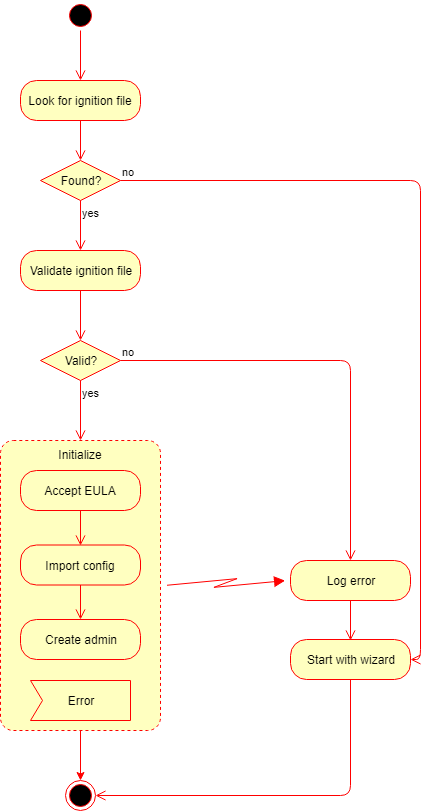
2.2) If it is not valid, then the error is logged, and the initialization gets terminated.
In this case the product starts normally: if for example the basic configuration wizard has not been completed yet, then it must be completed first.
3) If there is no ignition file, then no initialization is performed.
In this case the product starts normally: if for example the basic configuration wizard has not been completed yet, then it must be completed first.

If the automated initialization fails for some reason (e.g. the ignition file is not in place) then the automated initialization may be retried fixing the problem (e.g. placing the ignition file to its lookup location) and restarting the OPSWAT MetaDefender Core service.
Until the product is in pre-initialized status, it will try the automated initialization every time after a service (re)start.
Configuration
After initialization is complete, the product is ready with both the default and imported configurations.
This configuration can be later changed by calling the configuration API functions. For further details about the API, see Configuration related APIsAPI