
Overview
Since 5.14.0 - MetaDefender Core offers an enhanced encryption option for quarantined files, providing a significant security improvement over the standard encryption method.
Benefits of Advanced Encryption for Quarantine
Stronger Security: Advanced encryption provides superior protection for quarantined files
Data Integrity: Ensures quarantined files remain unaltered and protected
Industry Standard: Uses encryption standards recognized across the security industry
Performance: Optimized for efficient operation
Configuration
Please go to Settings -> Security > Encryption quarantine files
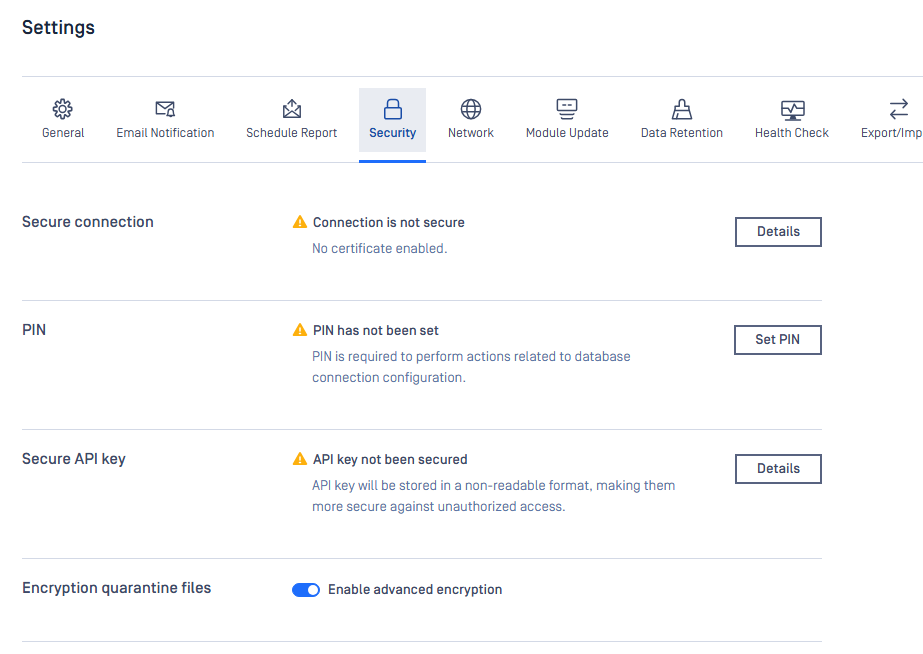
Standard encryption is enabled by default
Existing quarantined files will remain encrypted with the method used when they were quarantined
Enabling advanced encryption will only affect newly quarantined files
There is no performance impact when using advanced encryption
Recommendations
For environments with sensitive data or compliance requirements, we strongly recommend enabling advanced encryption for quarantined files to provide maximum security for potentially malicious content.