
OPSWAT publish all official public docker images on Docker Hub:
opswat/metadefendercore-<os-type>:<version>
The docker images are all bundled with the official release MetaDefender Core.
Note:
To ensure better tracking of the running image version, it is advisable for users to not use the :latest tag when deploying containers in production.
Instead, it is recommended to specify a meaningful tag such as 5.13.2.
More information:
https://hub.docker.com/r/opswat/metadefendercore-debian
https://hub.docker.com/r/opswat/metadefendercore-rocky-nonroot
Pull from the OPSWAT Docker Hub repository
<repository>- OPSWAT repository address<platform>- can bedebian,rocky<version>- desired Core version (optional, default islatest)
Example:
Run MetaDefender Core Docker image
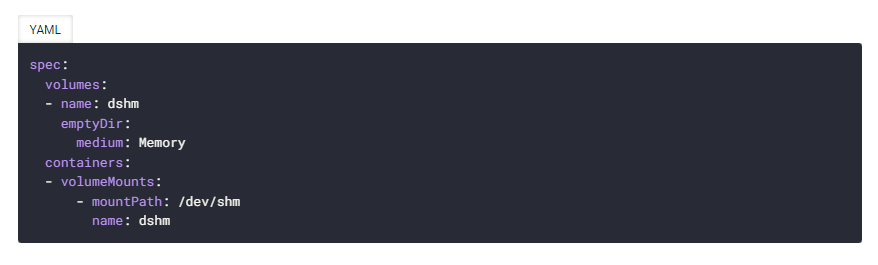
For IKARUS, --shm-size=1gb should be added when starting the docker.
If you're using Kubernetes (K8S), the section below should be specified in the yaml file:
[Parameter] Container Name
Argument: --name <container_name>
Description: Your container’s name
Example: --name mdcore01
[Parameter] Init Details (Environmental Variables & Ignition File)
Argument: -v <ignition_folder>:<container_ignition_folder> -e "<env_var>=<value>"
Description:
You must configure MetaDefender Core (default local admin account, database connection etc.) before running MetaDefender Core docker image. It could be done via either one of following options (do not use all options, otherwise the ignition file settings will be ignore and overwritten):
Using ignition file (
-v)Using environmental variables (
-e)Using
IGNITION_JSON
Option 1: Using environmental variables
-e "<env_var>=<value>" : set an environmental variable to configure, each environmental variable need one -e argument.
Available environmental variables:
Environmental variable | Necessity | |
|---|---|---|
DB_MODE | required | database mode |
DB_TYPE | required | database type |
DB_HOST | required | database host |
DB_PORT | required | database port |
DB_USER | required | database user |
DB_PWD | required | database password Support some specific characters: Not support |
MD_INSTANCE_NAME | optional | instance name |
MD_USER | optional | username to create the first admin user |
MD_PWD | optional | password to create the first admin user |
MD_EMAIL | optional | email to create the first admin user |
APIKEY | optional | the API key will be assigned to the admin user for license auto deactivation, activation, HTTPS enabling, proxy enabling and health check enabling. |
LICENSE_KEY | optional | an license key for license auto activation |
STORAGE_PATH | optional | a full path of storage for sanitized, DLP processed and quarantined files |
DATA_DIR | optional | a full path of MetaDefender Core working data directory |
REST_ADDRESS | optional | REST binding address for MetaDefender Core’s Nginx to be allowed |
REST_PORT | optional | REST binding port for MetaDefender Core’s Nginx to be allowed |
IGNITION_JSON | optional | The ignition file settings, only JSON format is accepted. For example: For database password, this support some specific characters: Not support |
CORE_CONF_JSON | optional | MetaDefender Core configuration file settings, only JSON format is accepted. For example: |
CORE_DATA_PATH | optional | a full path to folder (in container) storing all writable data (engine data, logs, runtime data, etc.). Default is /opt/ometascan/core_data Make sure to mount a volume to this folder to run with the policy. |
CERT_PATH | optional | A full path to folder containing certificate file and private key file. There files must have the same filename meanwhile its extensions must be .crt and .key After being added, the filename without extension will be the name of the certificate in MetaDefender Core |
MDCORE_DB_NAME | optional | Used for customizing the PostgreSQL database name of MetaDefender Core. By default, in shared DB mode, it is |
MDCORE_DB_PRIVATE_USERNAME | optional | PostgreSQL server's internal user created for MetaDefender Core own operational purpose. If not specified, then MetaDefender Core will auto generate this user. Details: Customize Internal PostgreSQL User |
MDCORE_DB_PRIVATE_PASSWORD | optional | PostgreSQL server's internal user password created for MetaDefender Core own operational purpose. If not specified, then MetaDefender Core will auto generate this user. Details: Customize Internal PostgreSQL User |
PROXY | require | true: Enable proxy feature. false: Disable proxy feature. |
PROXY_HOST | require | Proxy server |
PROXY_PORT | require | Proxy port |
PROXY_USER | optional | Username for proxy authentication |
PROXY_PWD | optional | Password for proxy authentication |
PROXY_EXCLUSION | optional | List of IPs to be added to proxy exception |
MDCORE_HEALTH_CHECK | optional | true
false
|
MDCORE_QUEUE_THRESHOLD | optional | Health check criteria. Threshold for scan queue. Unit is %. Default: 100 (%). When allocated slots percentage exceeds the threshold, MetaDefender Core will set itself unhealthy. |
MDCORE_MINIMUM_NUMBER_AV | optional | Health check criteria. Minimum number of AV engines. Default: 0. When number of active AV engines is less than or equal to the predefined value, MetaDefender Core will set itself unhealthy. |
MDCORE_REQUIRED_ENGINES | optional | Health check criteria. A list of mandatory engines. Default: all the engines of a license. When any predefined engines are not active, MetaDefender Core will set itself unhealthy. |
UPGRADE_DB | optional | true
false / not defined
|
MDCORE_UPGRADE_FROM_DB_NAME | optional | Required when UPGRADE_DB = true If this variable does not exist, upgrade process will exit with code 1. |
MIGRATE_HISTORY | optional | Required when UPGRADE_DB = true true
false / not defined
|
MDCORE_LICENSE_COMMENT | optional | Default: empty string Add the comment for the license when activating. |
OLMS_HOST_URL | optional | The OLMS server endpoint. If users want to use OLMS, this variable is required. MetaDefender Core will treat OLMS higher priority than the normal way in license activation. |
OLMS_TOKEN | optional | Token created from OLMS server. If users want to use OLMS, this variable is required. |
OLMS_RULE | optional | Rule containing licenses from OLMS server. If users want to use OLMS, this variable is required. |
OLMS_REST_PORT | optional | Default: 8040 OLMS port for REST API. |
OLMS_SOCKET_PORT | optional | Default: 3316 OLMS port for socket interface. |
OLMS_CONNECTION_TYPE | optional | Default: Can be |
OLMS_USE_PROXY | optional | Default: false If the user want to use proxy for the OLMS activation |
OLMS_PROXY_SERVER | optional | Default: empty string Proxy server address This field is required if OLMS_USER_PROXY is set to true |
OLMS_PROXY_PORT | optional | Default: empty string Proxy port This field is required if OLMS_USER_PROXY is set to true |
OLMS_PROXY_PROXY_TYPE | optional | Default: empty string Proxy type. Accepted values:
This field is required if OLMS_USER_PROXY is set to true |
OLMS_PROXY_USERNAME | optional | Default: empty string Proxy username |
OLMS_PROXY_PASSWORD | optional | Default: empty string Proxy password |
The priority for overriding configs is:
JSON environmental variable (IGNITION_JSON, CORE_CONF_JSON) > single environmetal variable
For example, the following command will start a container with global/restport=8009 , and ignore REST_PORT=8010 :
docker run -it --name core -p 8009:8009 \
-e DB_MODE=4 \
-e DB_TYPE=remote \
-e DB_HOST=10.40.50.194 \
-e DB_PORT=5432 \
-e DB_USER=postgres \
-e DB_PWD=admin \
-e REST_PORT=8010 \
-e IGNITION_JSON='{"user/name": "admin", "user/password": "admin", "user/email": "admin@local"}' \
-e CORE_CONF_JSON='{"global/restport": "8009", "logger/loglevel": "info"}' \
opswat/metadefendercore-debian:latest
If missing any of the required environmental variables, docker run will return failed with error message <ENV> is missing. Please set <ENV> before running container.
Option 2: Using ignition file
-v <ignition_folder>:<container_ignition_folder> - (optional) mounting the folder containing the ignition file to the container’s folder
<ignition_folder>- ignition folder path containing the ignition file<ignition_folder>/ometascan.conf<container_ignition_folder>- container’s folder to be mounted to/opt/ometascan/core_data/opswat(by default)
Example
Setup a PostgreSQL version 14 server. After that, we assume that remote PostgreSQL server’s information is
host = 10.40.50.194
port = 5432
user = postgres
password = admin
type = remote
In case of local PostgreSQL:
host = localhost
type = local
Option 1 - using environmental variables
Option 2 - using ignition file
Option 3 - using ignition file with a full configuration package (.zip)
Note:
a. When using Local Update Folder, let's make sure pickupfolder (Pick up update from) in the settings_export.json is correct.
Format:
<DATA_DIR>/path/to/update-folderFor example:
"pickupfolder": "/opt/ometascan/core_data/var/lib/ometascan/update_autoadd"
b. If you want to activate license or enable HTTPS during container starting, please make sure apikey of an administrator in .zip package matches with
apikey under [user] section (if present) in ignition file
or
APIKEYenvironment variable (if present)
[Parameter] User
Argument: -u <user ID>
Description: [Optional] run container with any user ID (UID) or group ID (GID). Range: [1000, 65533]
If not specified, the container will run as root user. Otherwise, a user will be used for non-root option.
Example: -u 1011
When running container with non-root user (-u <user ID> param), you are expected to grant write permission to the _ignition folder _and _ignition file_for a user with the respectively uid on the host machine, before running the container. There are 2 ways to do this:
Grant write permission for others (e.g. chmod 777)
Change owner to uid 1011 or gid 1011 (e.g. chown 1011:1011), then grant write permission for owner or group owner (e.g.: chmod 755)
[Parameter] Host Folder
Argument: -v <host_folder>:<container_folder>
Description: [Optional] mounting any additional folder from your host to the container (for managing config file, persistent data, storing log)
Example: -v /var/mdcore:/temp
[Parameter] REST Port
Argument: -p <rest_port>:<internal_port>
Description: Port on the host machine to map with Core REST and web console management port
Example: -p 30808:8008
[Parameter] Image Name
Argument: <image_name>
Description: MetaDefender Core docker image was built/pulled earlier
Example: mdcore:debian
Start / Stop container
<container_name>- container’s name for using later<timeout>- timeout in second before Docker forces stop the container, this can result in lost data and restart the container abnormally, so this need to be set to long timeout, minimum 30 is recommended.
Example:
Access to view MetaDefender Core logs
<container_name>- container’s name for using later[-f]- keep following the log[-n <number_of_lines>]- number of last lines existed in log file will be shown instantly when running this command.
Example:
Configure MetaDefender settings
You can modify the /etc/ometascan/ometascan.conf file. It can be modified in 2 ways:
Directly inside the container by using docker exec to go inside the container and modify
Mount the
/etc/ometascanfolder to host when starting the container, then modify the file on host folder