
The possible infrastructure vary depending on how the PostgreSQL database is provisioned
Options:
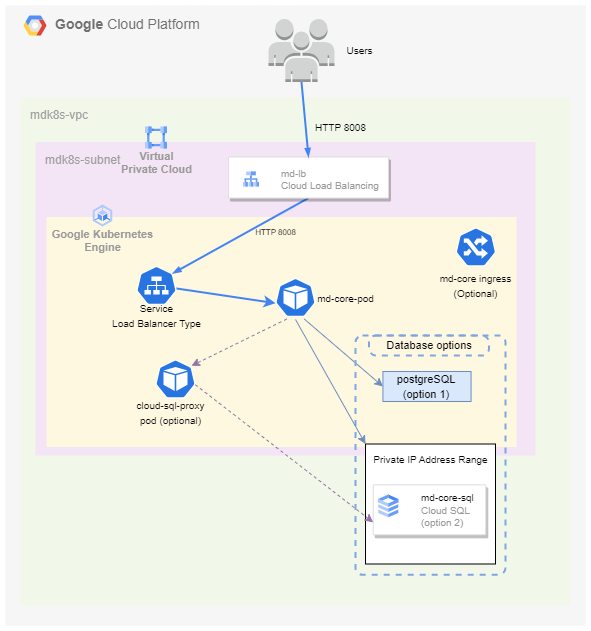
GCP GKE + GCP Cloud SQL
GCP GKE + PostgreSQL Pod
GCP GKE Autopilot + GCP Cloud SQL
We offer a provisioning script that depending on the selection, we automatically provision the cluster for you and install the K8S components needed for MD Core service. See GKE Cluster Deployment
MetaDefender PostgreSQL database details
Recommendations
For running MD Core in a Kubernetes cluster we recommend to use, for production environments, an external database service for PostgreSQL. In case of GCP it is GCP Cloud SQL which the script will deploy and configure to be accessible from the cluster.
We offer different ways to access to the Cloud SQL Server from the GKE Cluster, these are the following ordered by recommended solutions
Private Connection
GCP Provided Connector in a Pod
GCP Provided Connector in a Sidecar container
For non-production environments or for stateless use cases, we offer the option of installing the database within the cluster using a standard PostgreSQL image.
GCP GKE + Cloud SQL Server/PostgreSQL Pod Diagram
GCP GKE Autopilot + Cloud SQL Server

Resources Inventory
Networking
Service Type | Resource Name | Description |
|---|---|---|
GCP Compute Network | mdk8s-<project_id>-vpc | VPC for all the resources needed for MetaDefender products |
GCP Compute Subnet | mdk8s-<project_id>-subnet | |
GCP Compute Global Address | private-ip-address | |
GCP Service Networking Connection |
Compute
Service Type | Resource Name | Description | Option |
|---|---|---|---|
GCP GKE | <cluster_name> | Google Kubernetes Engine | All |
Google Cloud SQL | postgresql-<postgres_db_account_name> | PostgreSQL Server for MetaDefender Core | Option 2 with Cloud SQL |
The script will deploy a single Worker Node for the cluster with enough space for 1 replica of MD Core. Azure VM size is Standard_F8s_v2 (8 vCPU & 16 GiB Memory). Each pod would need a minimum of 4 vCPU and 8 GiB Memory. To change the request to adapt each pod to the specific case go to values.yml To change the size of the node pool go to terraform file terraform/azure/main.tf