
The Workflow rule page is found under Workflow Management>Workflows after successful login.
The rules represent different processing profiles.
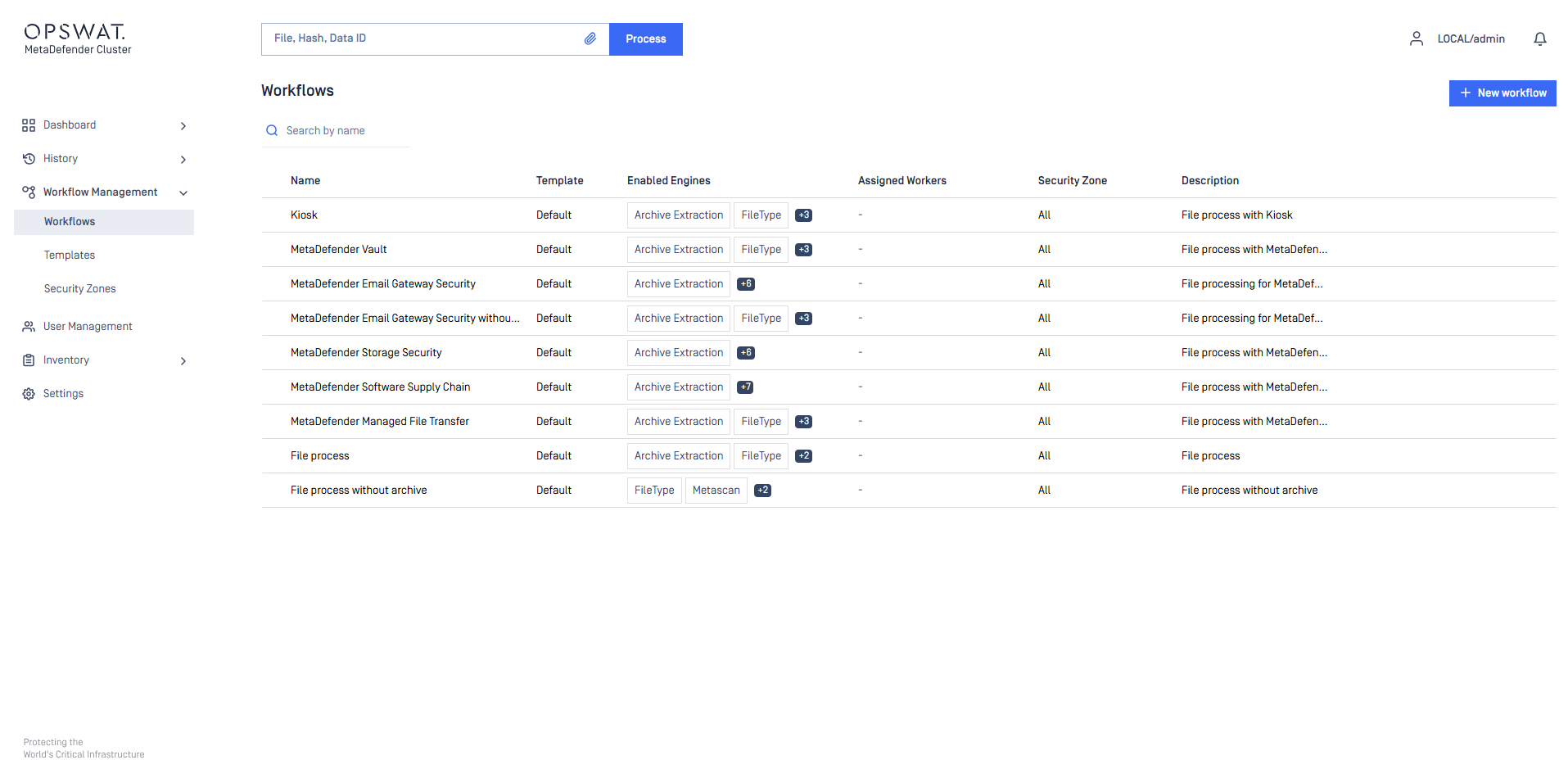
The following actions are available:
New rules can be added
Existing rules can be viewed
Existing rules can be modified
Existing rules can be deleted
Rules combine workflow templates and security zones and describe which workflows are available in a specified security zone. Multiple rules can be added for the same security zone.
Assigned Instances
By default, every MetaDefender Core instance in the cluster can process files for any workflow.
Enable Assign this workflow to specific MetaDefender Core instances on the General tab to reserve a workflow for a chosen set of instances. For example, to keep large archives on dedicated hardware, or to serve separate channels from separate instances inside a single cluster.
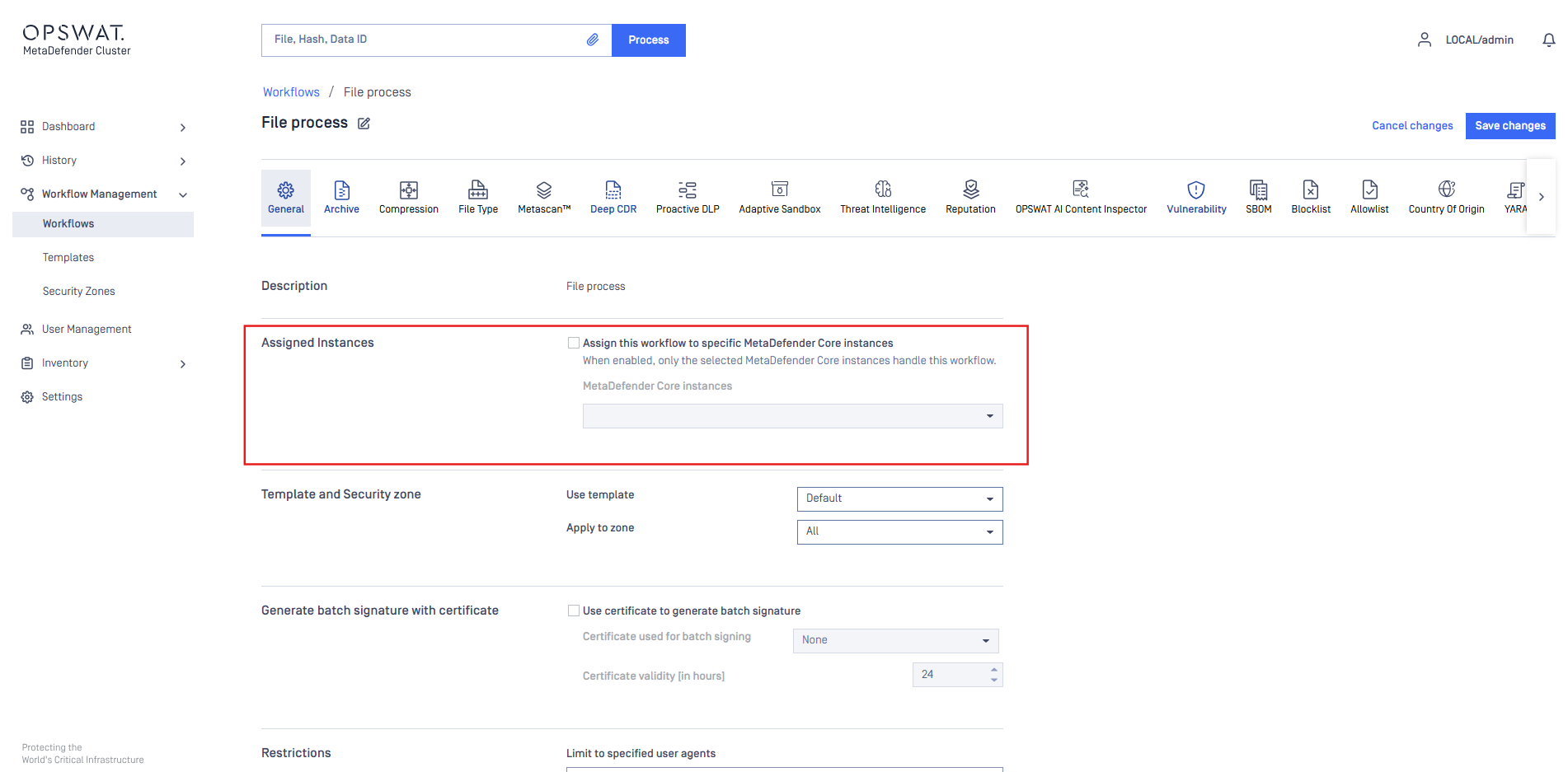
When the option is enabled, pick one or more instances from MetaDefender Core instances. Each instance is listed as <display name> - N CPUs, R GB RAM, so a workflow can be matched to instances of the right capacity. At least one instance must be selected.
Files matched to this workflow are processed only by the selected instances. Instances that are not selected never receive them.
While a selected instance has nothing of its own to process, it also handles workflows that have no assigned instances, so its capacity is not wasted.
Workflows with the option disabled are unchanged: any MetaDefender Core instance can process them.
The Assigned Workers column on the Workflows list shows the instances each workflow is assigned to.
The same assignment can be made from the instance's side — see Inventory > Workers
Only MetaDefender Core instances can be assigned; the API Gateway and the Callback Service cannot. Assignment requires MetaDefender Core 5.22.0 or later. Earlier versions do not appear in the list.
While files matched to the assigned workflow are still being processed, the option cannot be turned off and the workflow cannot be deleted. Wait for processing to finish and try again.
In Kubernetes deployments, a MetaDefender Core instance loses its workflow assignments when it is terminated or redeployed. The workflows must then be reassigned to the instance.
Restriction
Processing result reports are generated dynamically based on the permissions defined in the selected Role settings.

Two special roles are also available:
Every authenticated — applies to any logged-in user.
Everybody — applies to all users, including unauthenticated users.
Users who are not assigned to any role specified in the rule cannot view scan results. Access can be further limited by using the RESTRICT ACCESS TO FOLLOWING ROLES setting.
You can also override workflow template settings for a specific rule by selecting the corresponding tab and changing individual properties. These changes apply only to the selected rule and do not modify the original workflow template.
This allows multiple rules to use the same workflow template while applying different custom settings. Any properties that are not overridden continue to use the values defined in the original template.
Rules are evaluated in order. MD Cluster uses the first rule that matches the client’s source IP address. If no matching rule is found, the MD Cluster API Gateway denies the scan request.
Skip hash calculation
The SKIP HASH CALCULATION option can be enabled in the General tab of a workflow rule. This feature is disabled by default.
When enabled, MD Cluster skips calculating file hashes during processing. As a result, the following features become unavailable because they rely on file hash values:
File-based Vulnerability Assessment — requires the file hash as input.
Reputation checks — require the file hash as input.
sanitized-file-hashresponse header — contains the SHA256 hash of the sanitized file.Scan result reuse for identical files — depends on the SHA256 hash to identify matching files.
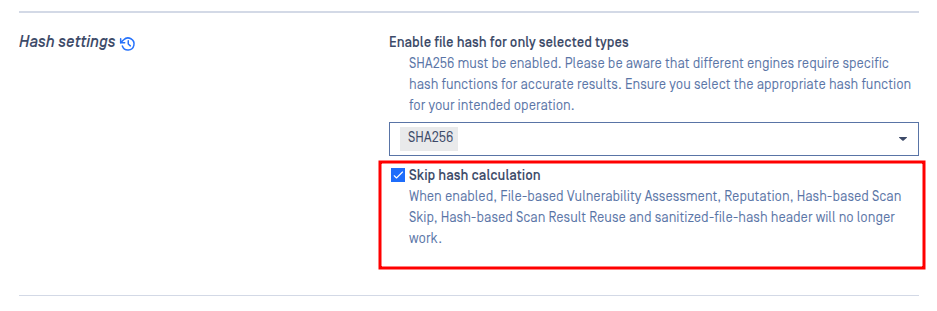
This feature allows MD Cluster to skip hash calculation for all processed files, including files inside archives.
It is primarily intended for large file processing scenarios, where skipping hash generation can significantly reduce overall processing time.
When this option is enabled:
The
md5,sha1,sha256, andsha512fields in the JSON scan result are returned as empty values.The
process_info.skip_hashfield is set totrue, which can be used by client integrations to identify that hash calculation was skipped.
Reuse scan results for the same hash
The Reuse Existing Results option, available in the General section of a MD Cluster workflow rule, allows authorized users to automatically reuse eligible processing results for files with the same hash. This setting is disabled by default.
When enabled, MD Cluster can reuse results from an already processed file for other matching requests that are still in progress, helping reduce processing time and improve overall performance.
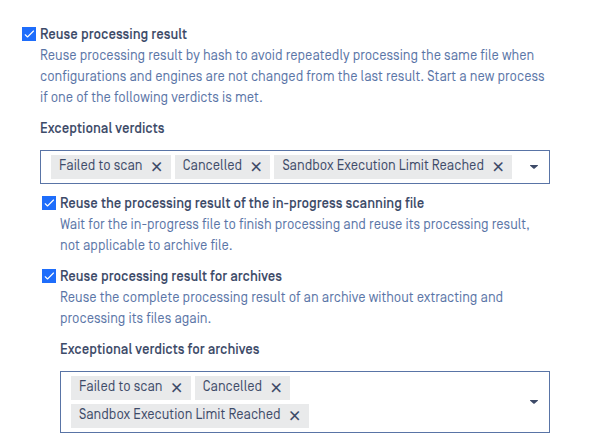
MD Cluster also allows customers to control when previously processed results can be reused. In some cases, customers may prefer to start a new scan instead of reusing an earlier result, such as when a previous scan ended with a verdict like Failed to scan.
A scan request is eligible to reuse the results of an earlier request with the same file hash only when all of the following conditions are met:
Reuse processing result is enabled.
Skip hash calculation is disabled.
The earlier scan was submitted either by the same user or by an anonymous user.
Both scan requests use the same workflow rule.
The earlier scan verdict is not included in the workflow rule’s configured “skip reuse” verdict list.
The following request headers match the earlier request:
metadataengines-metadata
No scan engines or engine databases have been updated since the earlier request started.
No engine configurations have changed since the earlier request started.
No workflow configurations have changed since the earlier request started.
If the earlier request produced a Deep CDR-sanitized file, that file should still be retained in the MD Cluster File Storage.
If the earlier request produced a Proactive DLP-processed file, that file should still be retained in the MD Cluster File Storage.
If Discard processed files when the original file is blocked is enabled and the processed files were removed, the previous result cannot be reused.
The list of detected possible file types must match between the earlier and current requests.
The earlier result is still available for reuse, either in the current instance's local reuse pool or in the Redis global reuse pool for up to 50 minutes.
By default, processing-result reuse applies to individual files. To reuse results for archive files as well, enable Reuse Processing Result for Archives. This can significantly reduce processing time when the same archive is submitted again.
When this option is enabled:
You can separately configure which previous verdicts must not be reused for archives.
Reuse also applies to nested archives. If a submitted archive contains a nested archive that was processed previously, the stored result for that nested archive can be reused while the remaining contents of the outer archive are processed normally.
In addition to the configured verdict exclusions and the general reuse conditions described above, an archive is re-scanned in the following cases:
Re-scanned Condition | Why the archive is re-scanned |
|---|---|
The archive, or any file inside it, is password-protected or encrypted. | A stored result cannot currently validate the password provided with a new request. The archive must therefore be extracted and scanned again. |
A stored archive result that exceeded the expansion-factor limit is reused as a nested archive inside another archive. | The expansion-factor limit depends on the size of the top-level file, so the result may be different when the archive appears in a different position. |
The previous archive extraction timed out. | Extraction timeouts can depend on system load and may not occur again. For this reason, timeout results are treated as non-repeatable and the archive is scanned again. |
A skip-by-hash allowlist or blocklist entry that affected a file inside the archive has changed or expired. | The stored decision for that file is no longer current, so the archive is scanned again using the latest allowlist and blocklist configuration. |
Shared Archive Processing
MD Cluster can share archive processing tasks among multiple MD Core instances. Distributing the workload across the cluster helps optimize resource usage and improves performance when handling large archive files.
This feature is enabled by default and can be configured in the General section of an MD Cluster workflow rule.

Archive processing includes both extraction and compression. When an archive file is processed, extraction tasks are distributed across available MD Core instances. If the Compression Engine is enabled, compression tasks are distributed in the same manner, allowing MD Cluster to process large archive files more efficiently and scale more effectively.