Knowledge Base
nac_v8.0.7
Search this version
Knowledge Base
Knowledge Base
Title
Message
Create new category
What is the title of your new category?
Edit page index title
What is the title of the page index?
Edit category
What is the new title of your category?
Edit link
What is the new title and URL of your link?
How to Silently Install the Policy Key
Copy Markdown
Open in ChatGPT
Open in Claude
- Download a copy of the Windows installer ServiceInstaller.exe by following the knowledge base article below Download Policy Key Installer
- Navigate to the folder path where ServiceInstaller.exe was downloaded to and execute ServiceInstaller.exe /s to silently install Policy Key. In the example below ServiceInstaller.exe was downloaded to C:\Users\John Doe\Downloads

`
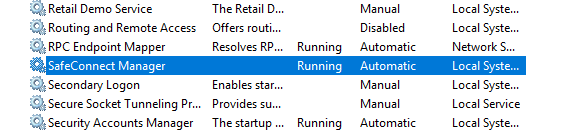
- Policy Key should now be installed. You may verify this by opening Windows services and checking that SafeConnect Manager is running.
Type to search, ESC to discard
Last updated on
Was this page helpful?
Discard Changes
Do you want to discard your current changes and overwrite with the template?
Archive Synced Block
Message
Create new Template
What is this template's title?
Delete Template
Message