
Microsoft continually updates security intelligence in antimalware products to cover the latest threats and to constantly tweak detection logic (daily or twice a day), enhancing the ability of Microsoft Defender Antivirus and other Microsoft antimalware solutions to accurately identify threats. This security intelligence works directly with cloud-based protection to deliver fast and powerful AI-enhanced, next-generation protection. They provide a different version of KB2267602 instead of a new KB name.
You can update this KB by triggering the update immediately downloads and applying the latest security intelligence or manually download the latest update if you cannot automatics update them
Trigger an update
In Windows 10, select Check for updates in the Windows Security Virus & threat protection screen to check for the latest updates.
Enterprise administrators can also push updates to devices in their network. To clear the current cache and trigger an update, use a batch script that runs the following commands as an administrator:
Install via OPSWAT VBScript
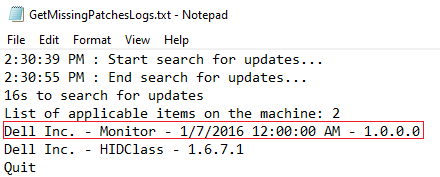
Get all OS missing patches on the device. The script result will return all missing patches in real time
The output result will show the same as the current folder script. You can custom the path here
Install OS missing patches
Runs the script as an administrator
1/ Get the KB title via the output of the script to get the missing patches above
2/ Input the KB title to the install missing patches script
For further queries or concerns regarding the Security intelligence updates for Microsoft Defender Antivirus and other Microsoft Antimalware - KB2267602, please open a Support Case with the OPSWAT team via phone, online chat or form, or feel free to ask the community on our OPSWAT Expert Forum.