| Set objFSO=CreateObject("Scripting.FileSystemObject") |
| outFile = "InstallMissingPatchesLogs.txt" |
| Set objFile = objFSO.CreateTextFile(outFile, True) |
| |
| |
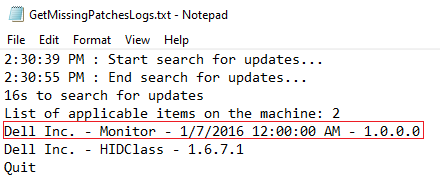
| updateTitle = "Dell Inc. - Monitor - 1/7/2016 12:00:00 AM - 1.0.0.0" |
| Set updateSession = CreateObject("Microsoft.Update.Session") |
| updateSession.ClientApplicationID = "MSDN Sample Script" |
| |
| |
| Set updateSearcher = updateSession.CreateUpdateSearcher() |
| |
| |
| |
| |
| |
| |
| |
| WScript.Echo "Start install for patch: " & updateTitle |
| objFile.Write "Start search for updates..." & vbCrLf |
| Dim searchResult |
| |
| Set searchResult = updateSearcher.Search("(IsInstalled=0 AND IsHidden=1) OR (IsInstalled=0 AND IsHidden=0) OR (IsInstalled=0 AND DeploymentAction=*)") |
| objFile.Write "End search for updates..." & vbCrLf |
| |
| If searchResult.Updates.Count = 0 Then |
| objFile.Write "There are no applicable updates." & vbCrLf |
| objFile.Close |
| WScript.Echo "Finish with no applicable updates" & vbCRLF |
| WScript.Quit |
| End If |
| |
| objFile.Write "List of applicable items on the machine: " & searchResult.Updates.Count & vbCrLf |
| |
| For I = 0 To searchResult.Updates.Count-1 |
| Set update = searchResult.Updates.Item(I) |
| objFile.Write update.Title & vbCrLf |
| Next |
| |
| Set updateToInstall = CreateObject("Microsoft.Update.UpdateColl") |
| |
| For i = 0 To searchResult.Updates.Count-1 |
| Set update = searchResult.Updates.Item(i) |
| If UCase(update.Title) = UCase(updateTitle) Then |
| If update.IsInstalled = False Then |
| objFile.Write "Result: Update applicable, not installed." & vbCrLf |
| updateIsApplicable = True |
| updateToInstall.Add(update) |
| Else |
| objFile.Write "Result: Update applicable, already installed." & vbCrLf |
| updateIsApplicable = True |
| objFile.Close |
| WScript.Echo "Finish with patch already installed." & vbCRLF |
| WScript.Quit |
| End If |
| End If |
| Next |
| |
| objFile.Write vbCrLf |
| |
| If updateIsApplicable = False Then |
| objFile.Write "Result: Update is not applicable to this machine." & vbCrLf |
| objFile.Close |
| WScript.Echo "Finish with update is not applicable to this machine." & vbCRLF |
| WScript.Quit |
| End If |
| |
| |
| Set downloader = updateSession.CreateUpdateDownloader() |
| downloader.Updates = updateToInstall |
| Set downloadResult = downloader.Download() |
| objFile.Write "Download Result: " & downloadResult.ResultCode & vbCrLf |
| |
| |
| Set installer = updateSession.CreateUpdateInstaller() |
| WScript.Echo vbCRLF & "Installing..." |
| installer.Updates = updateToInstall |
| Set installationResult = installer.Install() |
| |
| |
| objFile.Write "Installation Result: " & installationResult.ResultCode & vbCrLf |
| objFile.Write "Reboot Required: " & installationResult.RebootRequired & vbCrLf |
| |
| objFile.Write "Finish install" & vbCrLf |
| objFile.Close |
| WScript.Echo "Finish install." & vbCRLF |
| WScript.Quit |