
Customise your analysis options
Step 1 - Basic Options
Set the most important analysis options for your upload
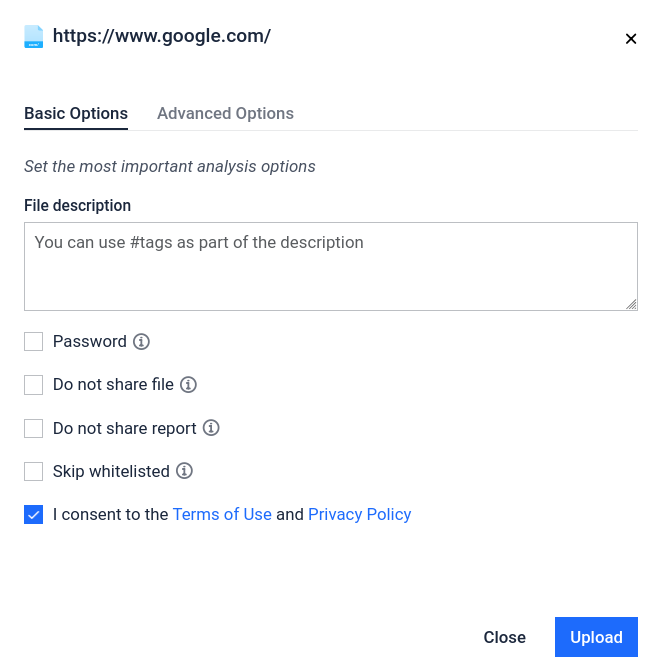
Tags: You can add some description with #tags
Optional You can apply some optional settings:
Password: You could provide a password for password-protected archives. The following common password will be applied automatically if archive uses common password:
“infected”
“malware”
“virus”
“password”
Do not share file: This setting prohibits other community members from accessing the file. However, the reports remain public (Including screenshots and extracted texts.)
Skip whitelisted: If the file is detected as "whitelisted", the file won't be scanned and report won't be created.
Step 2 - Advanced Options
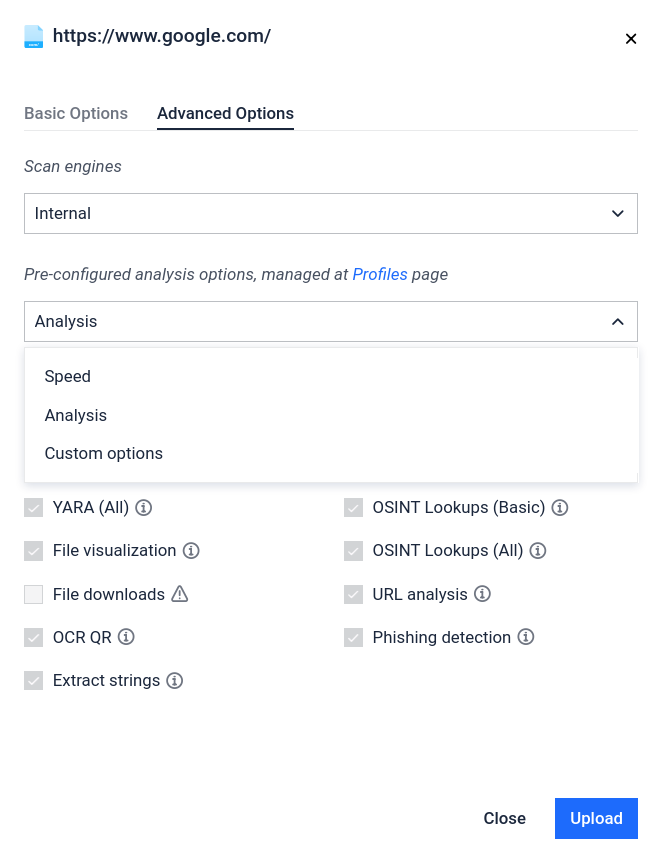
Optional Authentication required For advanced options you must be authenticated. Advanced options are:
Pre-configured analysis options
It excludes the apply_fine-tune_analysis use case. If you apply this setting, then the system will apply a preconfigured profile to execute the scan.
Rapid mode
Most simple analysis, disable multiple individual options. The "Rapid mode" allows the user to turn-off some of the features and set timeout for the scanning.
no file downloader (2nd stage attack analysis)
no YARA rules is being run on extracted files
no parsers is being run on unzipped files
no recursive unpacking
no base64 string detect
no string extraction extracted on RTF files
VBA timeout reduced (30 sec)
no OPSWAT multiscanning
No Safe Browsing Lookup
no clamav
no virus total
no unipacker
no OLE dump
no QR code scan
no OCR
no ipstack lookup
no whois lookup
no Domain Resolving
no file visualization
no ChatGPT report
no disassembly
no VBA emulation on scripts, html files, extracted files or downloaded files
Fine-tune key aspects of your analysis
You can choose from the following list. The selection is optional. It is not required to select at least one.
YARA (Basic) - Enabling YARA rule matches on input file
YARA (All) - Enabling YARA rule matches on extracted artefacts
File visualization - Enabling file visualization (e.g. PDF rendering)
Images OCR - Enabling OCR text recognition on extracted images
File downloads - Enabling downloading files from extracted URLs
OSINT Lookups - Enable OSINT Lookups globally
OSINT Lookups (Basic) - Enable OSINT Lookups on the IOCs related to the input file
OSINT Lookups (All) - Enable OSINT Lookups also on the extracted artifacts
Domain resolving - Enable Resolving domains to the IPs (DNS)
WHOIS - Enable WHOIS record lookups
IP geolocation - Enable metadata lookups for Extracted IDs
Personalization: You can apply this feature to save the selected configuration.
Save preset
Step 3 - Accept the Term of Use and Privacy Policy
Required For scan it is necessary to accept the Term of Use and Privacy Policy.
