
By default, the hardcoded file size limit is 100MB per submission. However, this upper boundary can be changed. To do so, please do the following changes:
In ~/FileScanIO/fsBroker/conf/broker.properties modify:
maxFileSizeInKilobytes=102400
Note: remember to move your custom changes to broker.properties.custom to persist it beyond system upgrades.
In ~/FileScanIO/fsWebservice/nginx/conf/production/default.conf modify:
client_max_body_size 100M;
For set the MAX_UPLOAD_SIZE in the webservice please navigate Admin -> Settings -> Configuration -> General:
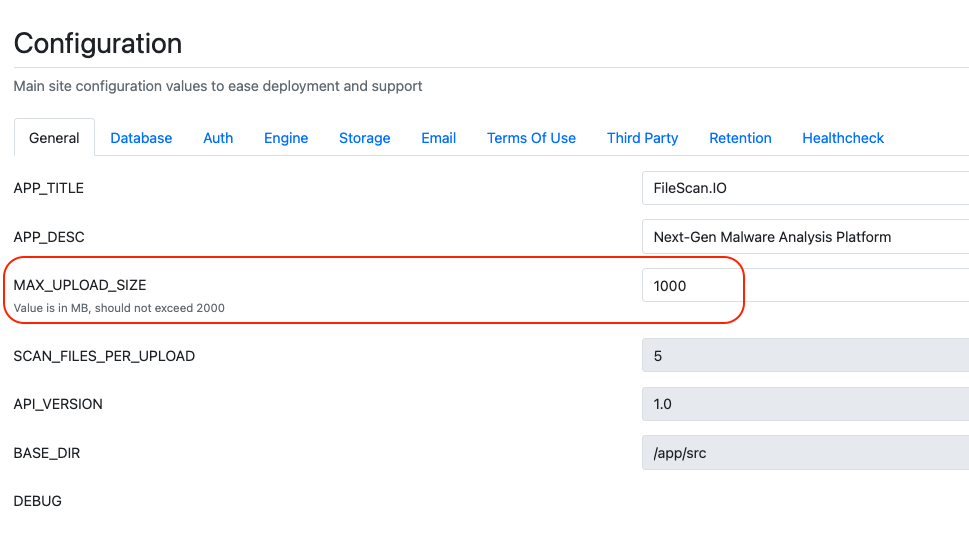
Now restart both the broker and the webservice for the changes to take affect:
sudo service fsiobroker stop
sudo service fsiobroker start
sudo ~/FileScanIO/shutdown_webservice.sh
sudo ~/FileScanIO/launch_webservice.sh
Note: if you’re in an offline environment, please rather use the following command to launch the webservice (instead of the one shown above):
sudo ~/FileScanIO/launch_webservice.sh --no-build