
Check Your Version:
This article applies to all My OPSWAT Central Management releases deployed on Windows and Linux systems.
Navigate to My OPSWAT Portal - One-stop Hub for Customers and Partners > License Management > Activate License on an internet connected machine.
Select the product: My OPSWAT Central Management
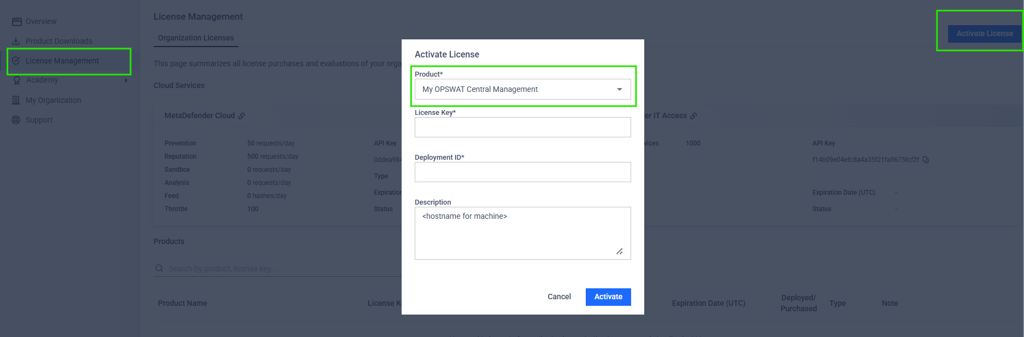
Paste your License Key provided by your Account Owner via your receipt.
Navigate to My OPSWAT Central Management > License > MetaDefender Endpoint. Click the “Add License” and hit “Offline”. Please copy the Deployment ID.
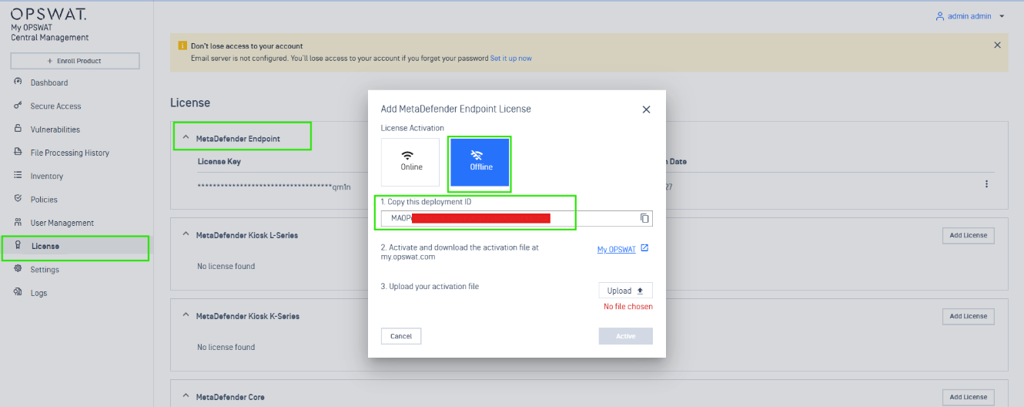
Paste the Deployment ID into the “Deployment ID” field.
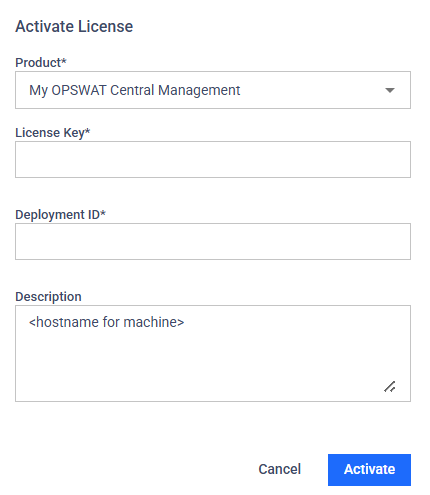
For “Description”, we recommend a unique name such as the hostname for the machine.
Hit Activate and Download the .yml file. Transfer the .yml file to My OPSWAT Central Management Machine and hit “Upload”. Select the file and hit activate. You should now see the Expiration date and device limit.
Support:
If Further Assistance is required, please proceed to log a support case or chatting with our support engineer.