
This guide explains how to configure an active-active deployment of MDSS where multiple instances can use the same shared external services for improved performance and scalability.
Overview
In an active-active deployment, multiple MDSS instances work together using shared external components (RabbitMQ, PostgreSql, and Redis) to distribute workload, add redundancy and improve throughput. This configuration is particularly useful when handling large volumes of files.
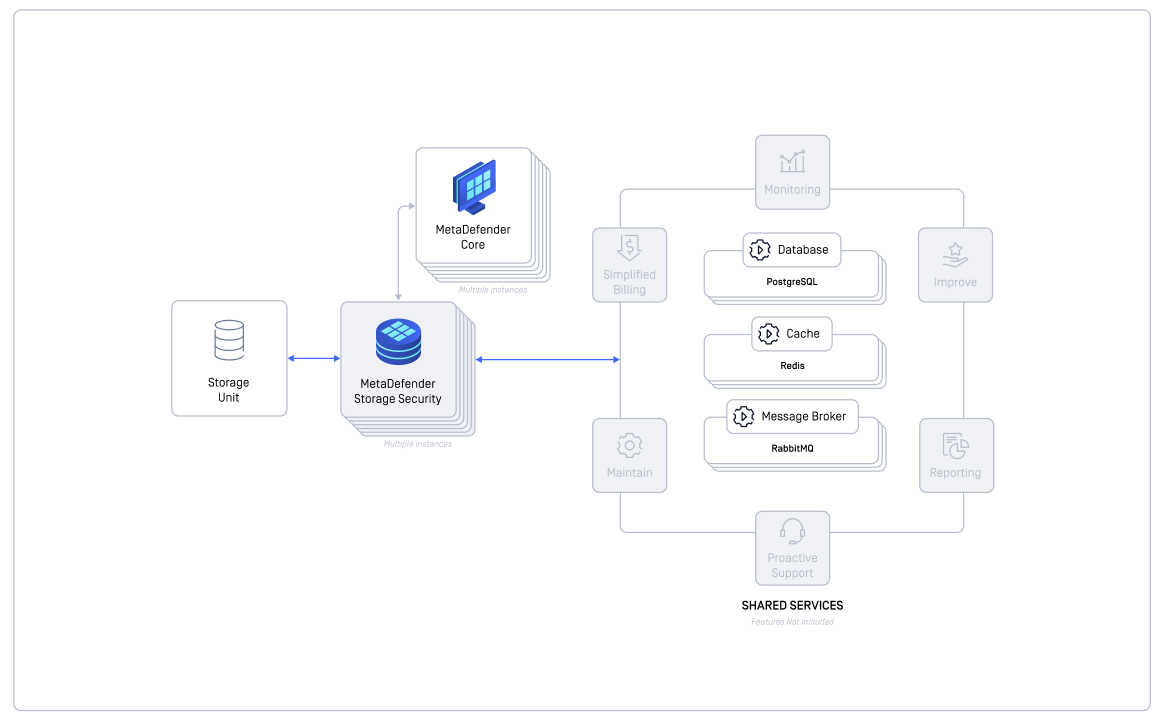
Active-Active Configuration Behavior
In an active-active configuration, file processing operations are distributed dynamically across available instances:
File Discovery - any available MDSS instance can detect and identify files requiring processing
File Scanning - any available MDSS instance can perform the security scanning operation
Remediation - any available MDSS instance can execute the remediation actions
Key Points
Operations may be handled by different instances (distributed processing) or by the same instance (consolidated processing)
The actual distribution depends on which instance processes the message first
This design ensures optimal load balancing and high availability across your deployment
This approach maximizes system efficiency while maintaining consistent security coverage regardless of which specific instances handle each operation.
External Services Deployment Options
External services are required for this type of deployment, a deployment and configuration guide is available here: External Services Configuration
Alternative: Active-Passive Failover
Active-active is not the only way to add redundancy. If you would rather keep a single instance processing at a time and switch over only when it becomes unavailable, an active-passive setup can be automated with the following reference script:
OPSWAT/mdss-active-passive-failover
The script continuously monitors the active instance's web interface health and, after a configurable number of consecutive failed health checks, automatically triggers a scan on the passive instance. It re-arms itself once the active instance recovers again.
All settings are supplied as PASSIVE_MODE_* environment variables. Required: the active and passive URLs and ports, an MDSS API key, the ID of the storage to scan (one storage), the workflow ID and a name for the scan it starts. Optional: the scan priority, the request timeout, and the health check interval and failure threshold. Prerequisites, configuration and usage are documented in the repository's README.
This script is provided as a reference implementation to be adapted to your own environment and is not covered by OPSWAT product support.