
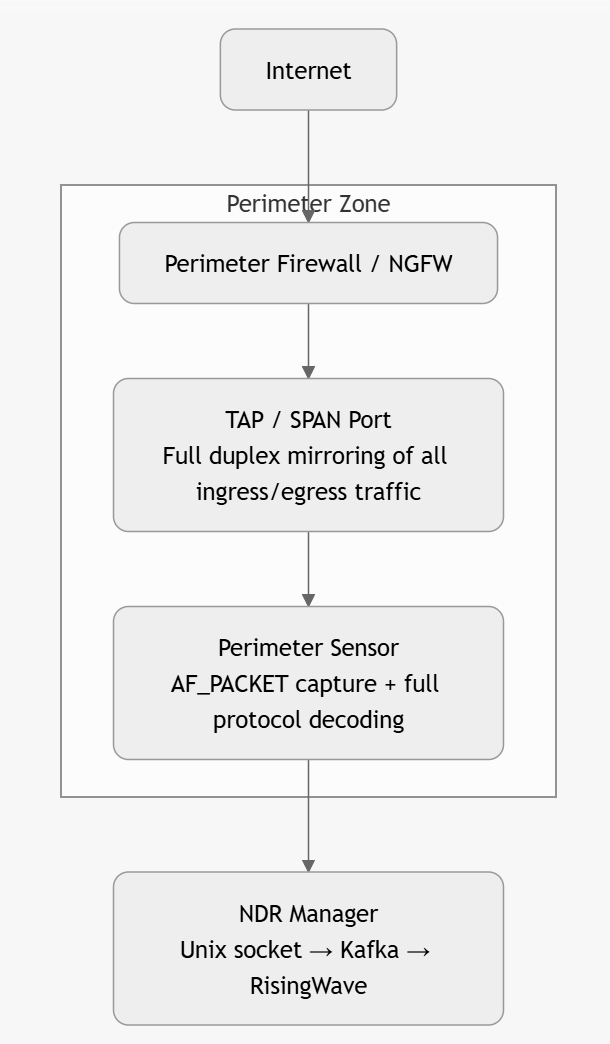
Perimeter (north-south) placement – detailed diagram
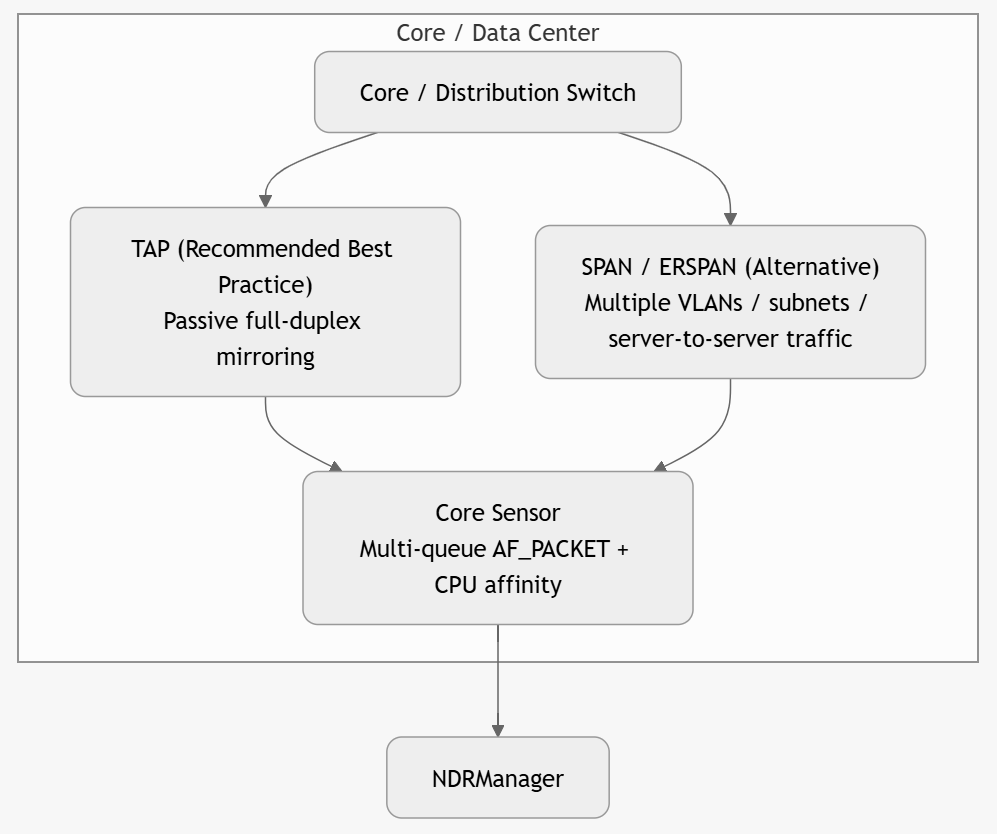
Core / east-west placement – detailed diagram
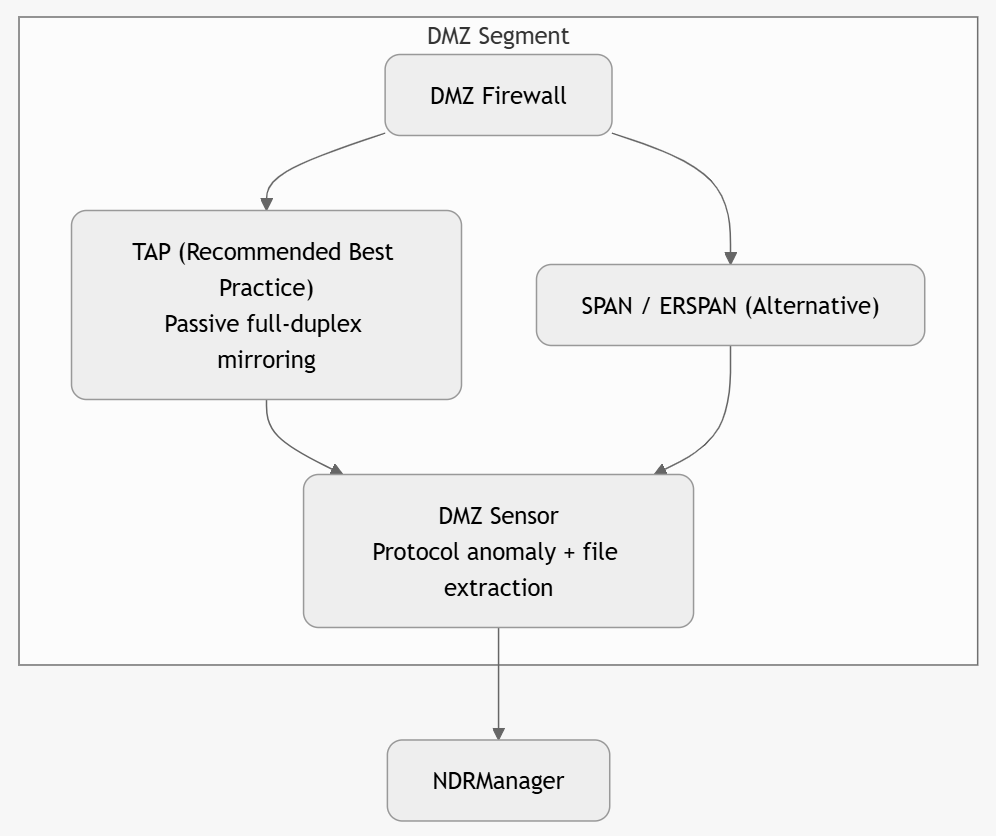
DMZ placement – detailed diagram (separate from Cloud)
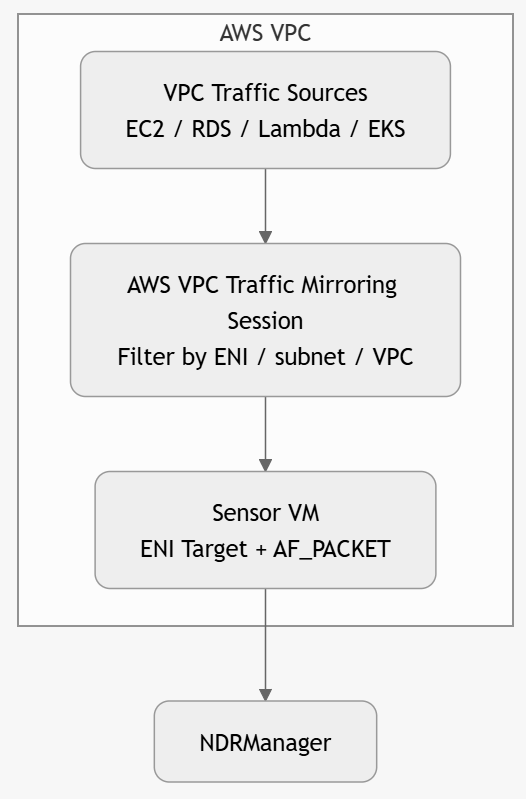
Cloud placement diagrams (separate from DMZ)
AWS Cloud Sensor
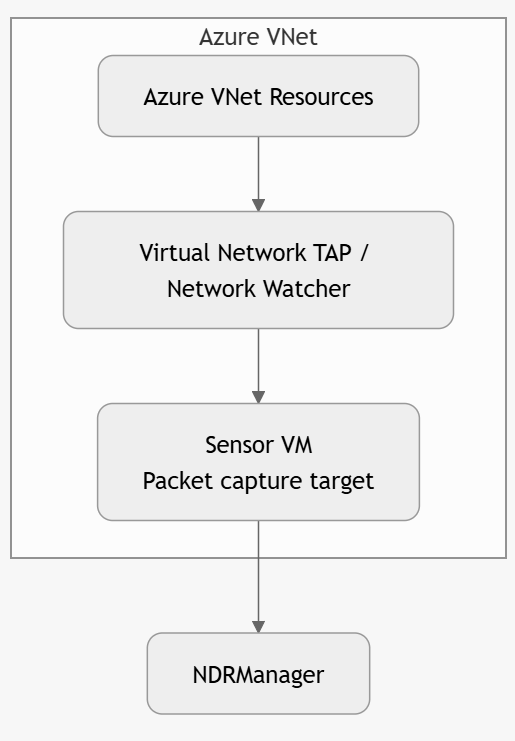
Azure Cloud Sensor
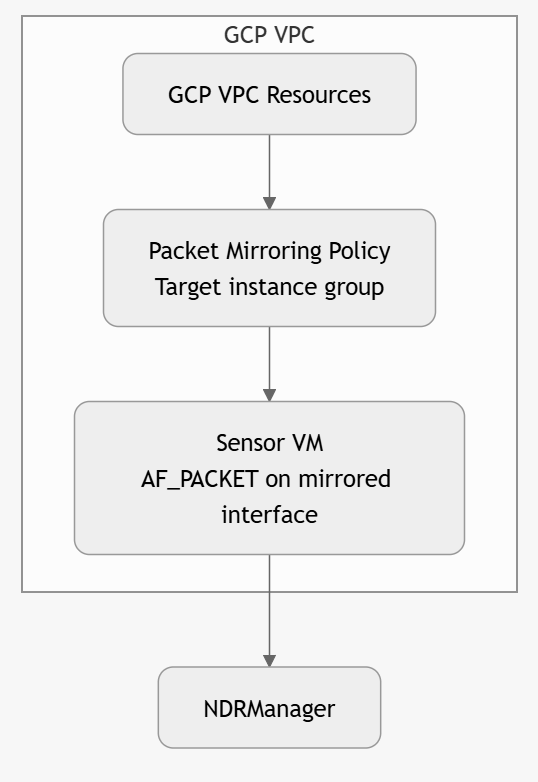
GCP Cloud Sensor
Best practice: Deploy 2–4 Sensors per major segment for redundancy. Group Sensors in the Manager for unified policy application.
Sensor placement in VMware Cloud Foundation (VCF)
VMware Cloud Foundation (VCF) runs your workloads as virtual machines on ESXi hosts. Most of the traffic between these virtual machines is east-west traffic. This traffic often stays inside the cluster. A physical tap or a physical switch SPAN port does not see this traffic.
To inspect east-west traffic in a VCF cluster, you deploy a virtual sensor (vSensor) in the same cluster. You then send a mirror of the traffic to the vSensor.
A vSensor is passive. It receives a copy of the traffic through a mirror. The vSensor does not sit inline. It does not change or slow the workload traffic.
Why the sensor goes in the same cluster
Two virtual machines on the same ESXi host can talk through the virtual switch only. This traffic never reaches a physical switch or a physical tap. A physical SPAN port misses this host-local traffic. A vSensor in the same cluster receives a mirror from the virtual switch. This is the only way to see the host-local east-west traffic.
In-cluster vSensor (required for east-west): The vSensor and the monitored workloads run in the same cluster. The virtual switch sends the mirror to the vSensor.
Physical SPAN (north-south only): A physical SPAN or a tap sees the traffic that leaves the host to the physical fabric. Use this method for north-south traffic. Do not use it for host-local east-west traffic.
Mirror source options
A VCF cluster gives you two ways to mirror east-west traffic. Choose the option that matches your network design.
NSX traffic mirror (preferred for VCF with NSX): VCF uses NSX for the overlay network. The overlay carries east-west traffic in Geneve tunnels between the hosts. Configure an NSX port-mirror profile. Select the source segments or the source virtual machines. Set the vSensor capture interface as the destination.
vSphere Distributed Switch (VDS) port mirror: If you do not use the NSX overlay for the target traffic, use a VDS port-mirror session. Select the "Encapsulated Remote Mirroring (L3) Source" session type. Add the source port groups. Set the vSensor capture interface as the destination.
Pure host-local traffic between two virtual machines does not reach the physical switch. A physical SPAN alone misses this traffic. You must use an NSX mirror or a VDS port mirror for full east-west visibility.
vSensor requirements on ESXi
Deploy the vSensor as a virtual machine on VMware ESXi 8.x. Use these settings for full performance:
Use a dedicated SR-IOV or passthrough network interface card (NIC) for the capture interface.
Use a separate NIC for management traffic.
Pin the CPU and align the Non-Uniform Memory Access (NUMA) nodes.
Reserve 1 GB hugepages for the sensor.
Set AF_PACKET to
cluster_flowmode.
A tuned vSensor gives the same performance as a bare-metal sensor.
Do not enable vMotion on the vSensor. A vMotion migration drops packets and loses capture state. Do not hot-add a CPU or a NIC to the vSensor. Do not overcommit the host CPU or the host memory.
Deploy the vSensor for east-west visibility
Follow these steps to add a vSensor to a VCF cluster:
Download the vSensor OVA from the OPSWAT portal.
Deploy the OVA to the target cluster with the vSphere Client.
Assign the management NIC to the management network.
Assign the capture NIC to a dedicated port group for the mirror.
Set SR-IOV or passthrough on the capture NIC.
Power on the vSensor. Complete the initial configuration.
Create the mirror session. Use an NSX port-mirror profile or a VDS port-mirror session.
Set the source segments or the source port groups for the east-west traffic.
Set the vSensor capture interface as the mirror destination.
Register the vSensor with the Manager.
Confirm that the vSensor receives traffic. Check the interface counters and the live events.
Scale and redundancy
Deploy 2–4 vSensors per major segment for redundancy.
Deploy one vSensor per cluster when the cluster carries high east-west traffic.
Group the vSensors in the Manager for one policy across the cluster.
For a large VCF fabric, place a vSensor in each cluster that needs east-west visibility. A single vSensor cannot see the host-local traffic of another cluster.
See also
Encrypted traffic visibility
Deployment options
Installation options
Sensor scalability and performance