
Retention Settings
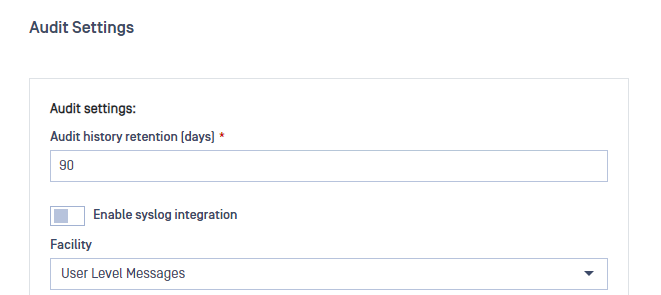
The "Audit history retention" field allows you to configure a retention period for general audit and file audit events, ranging from 10 to 1100 days. Any event older than the specified period will be automatically removed.
Syslog Integration Settings
Enabling Syslog integration will instruct Managed File Transfer to transmit any audit event to the configured Syslog server.
Note that support is currently limited to the UDP protocol, so Managed File Transfer cannot validate the connection to the Syslog server. However, a test message will be sent upon successful configuration.
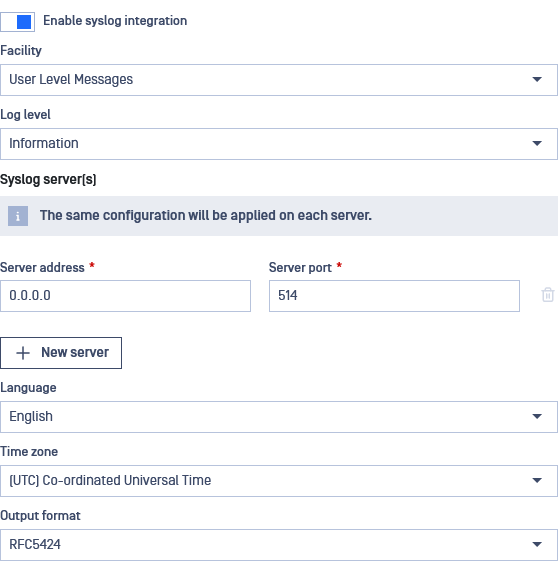
Syslog integration supports establishing multiple Syslog servers, ensuring audit logs are replicated and transmitted to each designated server. Each server's port or address must be unique.
The following settings are available for configuration:
Setting | Description | Default value |
|---|---|---|
Facility | The type associated with Managed File Transfer events | User Level Messages |
Log level | Determines which messages sent to the Syslog server, filtering out any messages less important than the one selected | Information |
Server address | The address of the server where the Syslog is located | 0.0.0.0 |
Server port | The open port on the Syslog server for accepting messages | 514 |
Language | The language to use for logging messages | English |
Timezone | The time zone recorded at the time the log is sent | (UTC) Coordinated Universal Time |
Output format | Supported message formats, including: Standard and Common Event Format (CEF) | Standard |
CEF Message Format
Base Format: Date Host CEF:Version|Device Vendor|Device Product|Device Version|Device Event Class ID|Name|Severity|[Extension]
Example: 2020-01-16T08:45:47Z LE10-L3174 CEF:0|OPSWAT|MetaDefender MFT|1.0.0.0|1|Logon|6|requestClientApplication=127.0.0.1 deviceAction=Logon outcome=Success msg=Username logged on.