Overview MetaDefender Managed File Transfer Release Notes
Getting Started
Deployment & Usage
Support
Troubleshooting
v3.6.2
Search this version
Troubleshooting
Troubleshooting
Title
Message
Create new category
What is the title of your new category?
Edit page index title
What is the title of the page index?
Edit category
What is the new title of your category?
Edit link
What is the new title and URL of your link?
CLI installation
Copy Markdown
Open in ChatGPT
Open in Claude
Persistent Popup in /silent Mode on Windows Server
Users may encounter a persistent popup even when utilizing the /silent mode on a Windows Server machine. This issue is closely tied to Windows User Account Control (UAC). Resolving this may involve adjusting the severity level from the displayed window.
Resolution
- While in /silent mode, if a popup persists, it may be related to Windows UAC.
- Manually tweak the UAC severity level to address the popup. Adjust the UAC settings as needed for the specific severity level from the displayed window.
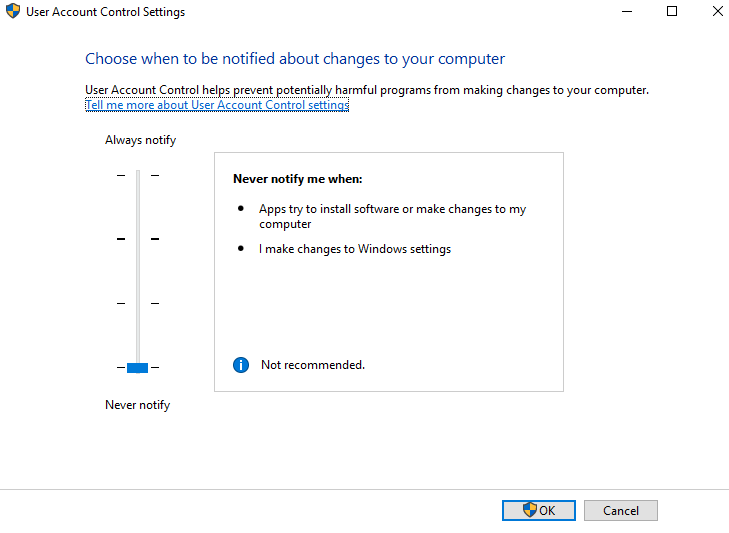
This solution ensures that the popup issue is resolved, allowing for smoother execution in /silent mode on Windows Server machines.
Type to search, ESC to discard
Last updated on
Was this page helpful?
Next to read:
ServicesDiscard Changes
Do you want to discard your current changes and overwrite with the template?
Archive Synced Block
Message
Create new Template
What is this template's title?
Delete Template
Message
