
Version | 4.8.4 |
|---|---|
Release date | 30 July 2026 |
Scope | This release simplifies deployment with new setup options to deploy or restore configuration from a config file on a USB drive. It expands file retrieval and MFT workflow flexibility, strengthens scan reporting, and improves stability when scanning large volumes of data. The release also increases operational transparency through detailed engine status, configurable telemetry settings, and upgrade reminders, and includes a range of usability, security, and reliability improvements along with bug fixes. |
Kiosk 4.8.4.8500 - 6 August 2026 | |
Bug fixes | |
Kiosk shows "Connection to MetaDefender has been interrupted" error during scanning | Resolved a regression introduced in 4.8.4 where Kiosk incorrectly displayed a "Connection to MetaDefender has been interrupted" error popup during scanning which caused by the unreadable files (locked) even though Core was active and healthy. The fix ensuring unreadable files are gracefully skipped instead of triggering false connection-loss alerts. |
Kiosk 4.8.4.8437 - 4 August 2026 | |
|---|---|
Bug fixes | |
Kiosk failed to connect over self-signed or non-CA HTTPS even when Verify SSL Certificate is disabled | Fixed an issue where the Verify SSL Certificate setting was not applied to Kiosk's outbound connections, so certificate verification was always enforced even when the option was disabled. As a result, HTTPS connections to Core, Central Management (CM10), and MFT servers that use self-signed or non-CA certificates were rejected, causing scans and other operations to fail. |
Duplicated upgrade history records for a single application upgrade via CM10 | Fixed an issue where multiple upgrade history records were created for a single completed application upgrade performed through Central Management (CM10) |
Unable to save an Encrypted USB profile when another profile is already imported | Fixed an issue where saving an Encrypted USB profile failed with a missing signature error when another profile had already been imported |
Custom screensaver falls back to default after a group policy update | Fixed an issue where a custom screensaver reverted to the default after applying a group policy of an older version. |
Kiosk 4.8.4.8406 - 30 July 2026 | |
New Features | |
Restore Configuration from a Backup File During Setup | The Out-of-Box Experience (OOBE) can now restore configuration from a backup file during setup. This enables faster manual deployment. 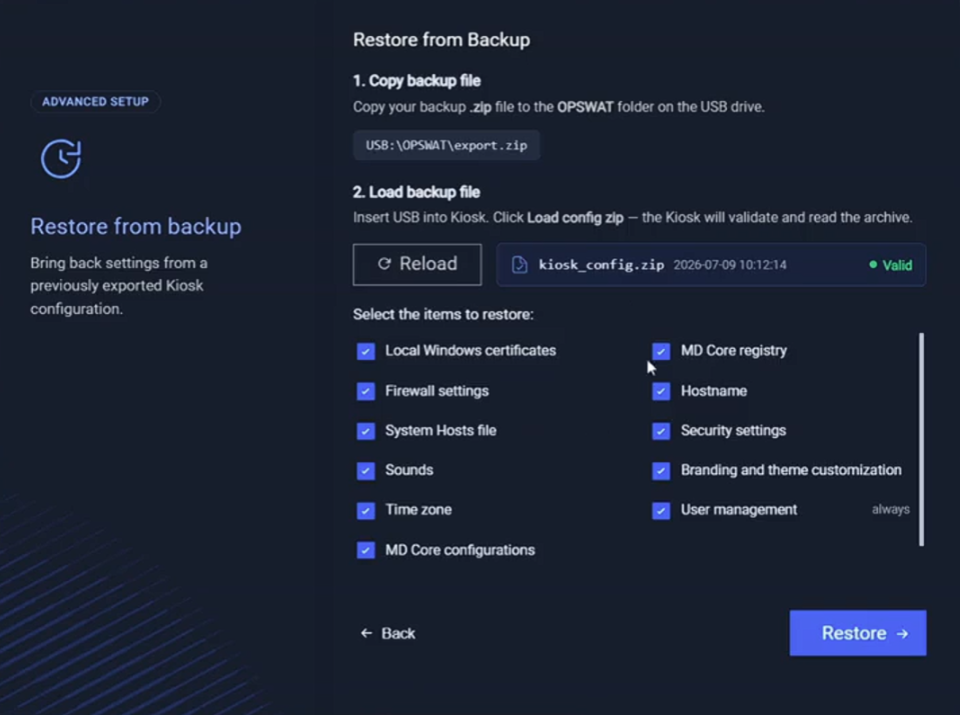 |
Import Configuration from a USB Drive During Setup | Administrators can now browse and inject an INI configuration file from a USB drive as part of the OOBE for auto deployment. 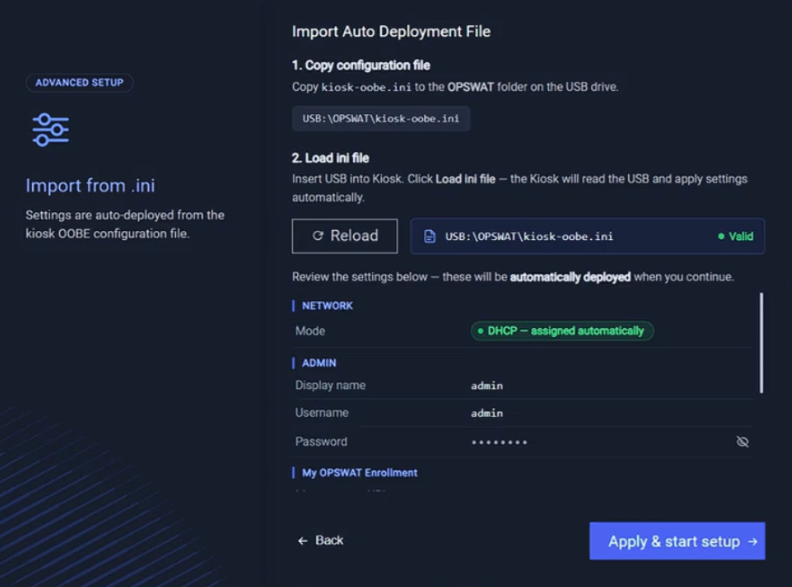 |
Automatic Power-On When AC Power Returns (Wake-on-AC) | Administrators can now enable Wake-on-AC on supported Kiosk hardware so the device powers on automatically when AC power is restored, without pressing the physical power button. |
View Detailed Engine Status on the Kiosk Screen | Users can now view detailed Engine status by interacting with the engine status icon on the Kiosk UI, improving operational monitoring, and troubleshooting. 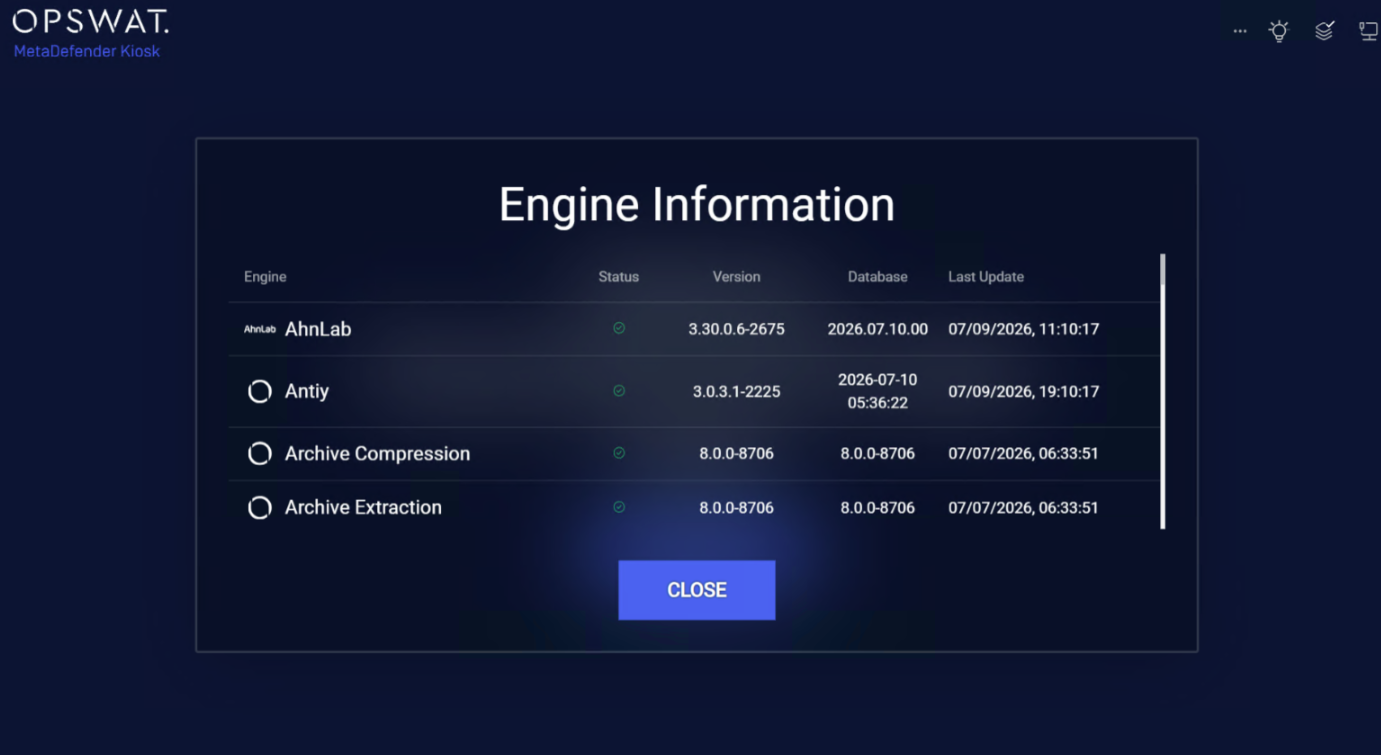 |
Show User Details from Active Directory in the Kiosk UI | After login, the Kiosk GUI can display one or more configurable Active Directory attributes (for example, display name) to review and clarify the logged in user account. 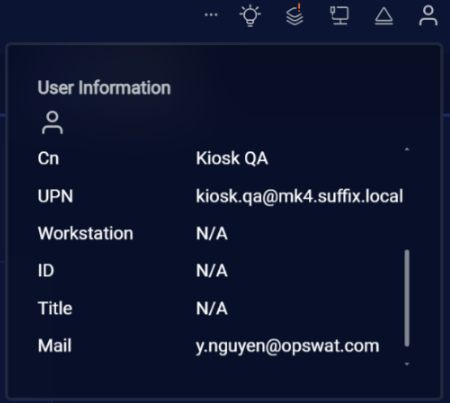 |
Kiosk Hardened Image Upgrade Notification in the Kiosk Console | A notification in the Admin UI can be enabled to prompt for the upgrade, increasing awareness of the automated upgrade utility and reducing confusion around the upgrade process, including hardened image upgrades. 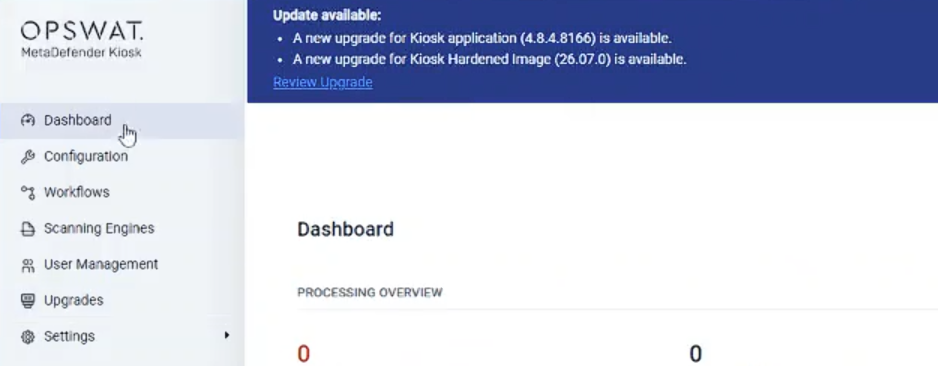 |
Enhancement | |
File Retrieval from MFT with a Local Windows Account | File Retrieval from an MFT server is now available when logging in to the Kiosk UI with a local Windows account, extending support beyond Active Directory accounts. |
Consistent Unlock Behavior for DL4 Encrypted Devices | The unlock flow for DL4 hardware-keypad encrypted devices is now unified with the flow used by other encrypted devices, improving maintainability and preventing DL4 devices from being misidentified as standard CD-ROM media. |
Wipe Destination Media Before Retrieving Files | When File Retrieval from an MFT server is enabled, administrators can now configure the destination media to be wiped before retrieved files are written, providing an additional layer of data control. |
Key Combination Whitelist Moved Under Active Keyboard Filter | The "Allow the following key combinations" option is now a subtask of the Active Keyboard Filter, since the setting is only relevant when the Active Keyboard Filter is enabled. |
Full File Paths for Blocked and Password-Protected Files in Reports | Scan reports now include the full file path for password-protected and blocklisted files within archives, not only for infected files, improving traceability and investigation. |
Turkish Language Support | The Kiosk interface now supports Turkish, extending localization for Turkish-speaking users and environments. |
Stable Memory Usage When Scanning Large Volumes of Data | Improved memory management to enhance stability and reliability when scanning large volumes of data, resulting in more consistent performance, better system responsiveness, and a smoother scanning experience. |
Keep Folder Attributes When Copying | Folder attributes are now retained during copy operations. When copying a folder, its associated attributes are preserved in the destination rather than being lost during folder creation. |
Support Excluding Email Recipients from CM10 Policies | Administrators can now exclude email recipients from the CM10 group policy, allowing customized email delivery for specific user groups. |
Predefined MFT Account Now Available in the Guest Workflow | The predefined MFT account (admin-configured) option for copying to a secondary location is now available in the Guest workflow, extending functionality previously limited to the Employee workflow. |
Option to Skip Media Processing | Administrators can now configure Kiosk to skip media processing and immediately end the scan session. This option is particularly useful when used with the Media Passport feature to quickly generate exempted Media Passports without performing a media scan. |
Configurable and Transparent Telemetry Settings | Kiosk now always shows the telemetry settings (enabled, disabled, or greyed out) after installation and upgrade for transparency, and the settings can be configured through VPACK at the instance and group level for centralized control across Kiosk devices. |
Enhanced Kiosk Upgrade in Air-Gapped Environments | Enhance support to upgrade Kiosk in the air-gapped environment where it could not reach Certificate Revocation List (CRL) for validation. |
Bug Fixes | |
Files with "%" in the name not shown when retrieving from a network share | Fixed an issue where the Kiosk UI failed to list files from a Windows (SMB) network share in the Retrieve Files feature when a filename contained the "%" character. |
Self-scan schedule set to an unexpected date after cancelling a scan | Fixed an issue where cancelling a self-scan job and re-saving the Self-Scan Schedule page caused the next scheduled scan to be set to an unexpected date and time. |
Workflow matching failed for AD groups with special characters | Fixed an issue where workflow-to-AD-group matching failed for groups whose names contained LDAP-escaped characters (such as a leading "#"), causing affected users to fall back to the Default workflow instead of their assigned one. |
Password prompt showed the wrong file for infected, encrypted archives | Fixed an issue where the Kiosk UI prompted for the password of the parent archive instead of the encrypted file inside when the archive contained an infected, encrypted file. |
Known Issues | |
Total Files Scanned Shows Incorrectly When Scanning Encrypted Disk Image | When scanning an encrypted VHDX disk image with the "Scan full VHDX" option enabled, the Total Files Scanned count in the processing log is reported incorrectly. The kiosk does not prompt for the encryption password and miscounts the files within the encrypted container. |
Skipped Files Are Recorded to the Printout | When scanning a disk image with skip options enabled (e.g., Skip processing locked system files, Skip protected OS files, Skip hidden files), the skipped files still appear in the printed scan report. |
MetaDefender KIOSK Documentation
The users can consult this web page or, alternatively, they can download the manual in pdf format from the link below:
MetaDefender KIOSK manual (SHA256: 9BB644060CE8A8FE92645EAD93B20D6BA6E3D81239DAAD0EA322147C6AC6C780).
OPSWAT MetaDefender AGD Documentation_v1.6 (SHA256: 78A69F89D3C0D0FCA8A4B8D30B2C92E55D80CC559583F23AC61158F67CE04988).