
1. Environment
Using the K1001 model device in the local test environment. This is a controlled, isolated environment.
Server | vCPU | Memory (GB) | OS | Disk type |
|---|---|---|---|---|
MD KIOSK (K1001) | 24 | 32 | Windows 10 IoT Enterprise | SSD |
MD CORE (K1001) | 24 | 32 | Windows 10 IoT Enterprise | SSD |
MFT (VAULT) | 16 | 32 | Windows Server 2022 | SSD |
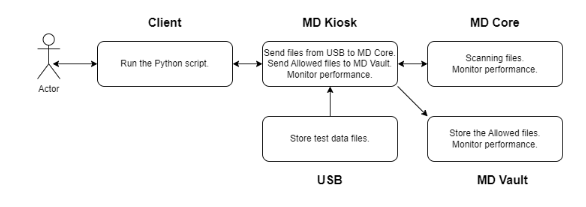
USB Storage Device (stores data & connects to MD KIOSK server)
128GB KINGSTON DataTraveler Exodia DTX
Client (runs the Python scripts & collects measurement values)
OS: Windows 2022
vCPU: 8 cores
Memory: 16GB
Network Bandwidth
10 Gigabit Ethernet
2. Test flow
Files are scanned by MD Core and Allowed files are uploaded to MFT.
3. Dataset
Detailed information of the dataset below will be used for testing:
File category | File type | Number of files | Total size (MB) | Average File Size (MB) |
|---|---|---|---|---|
Adobe | 370 | 385 MB | 1.0 MB | |
Executable | EXE | 45 | 309.5 MB | 6.9 MB |
MSI | 15 | 45.75 MB | 3.1 MB | |
Image | BMP | 80 | 515 MB | 6.4 MB |
JPG | 420 | 237.5 MB | 0.6 MB | |
PNG | 345 | 169 MB | 0.5 MB | |
Media | MP3 | 135 | 865 MB | 6.4 MB |
MP4 | 50 | 500 MB | 10.0 MB | |
Office | DOCX | 235 | 190 MB | 0.8 MB |
DOC | 225 | 486 MB | 2.2 MB | |
PPTX | 365 | 860 MB | 2.4 MB | |
PPT | 355 | 1950 MB | 5.5 MB | |
XLSX | 340 | 283.5 MB | 0.8 MB | |
XLS | 335 | 284.5 MB | 0.8 MB | |
Text | CSV | 100 | 236 MB | 2.4 MB |
HTML | 1075 | 76 MB | 0.1 MB | |
TXT | 500 | 210 MB | 0.4 MB | |
Archive | ZIP | Compressed files: 10 Extracted files: 270 | Compressed size: 125.5 MB Extracted size: 156.5 MB | Avg compressed size: 12.6 MB Avg extracted size: 0.6 MB |
Sumarry (compressed):
Number of files: 5000
Total size (MB): 7728.5 MB
Average File Size (MB): 1.55 MB average file size
Sumarry (extracted):
Number of files: 5260
Total size (MB): 7759.5 MB
Average File Size (MB): 1.48 MB average file size
Largest file size: 24.7 MB
Smallest file size: 5 KB
4. Product versions to be tested
MD Kiosk 4.6.6
MD Core 5.8.0
Anti-virus: 5 engines (AhnLab, Avira, ClamAV, ESET, Microsoft Defender)
DLP: 2.18.0
CDR: 6.8.1
Vulnerability: 4.2.416.0
Archive: 6.5.1
FileType: 6.5.1
MD MFT 3.6.0.0
5. MD Core settings
The performance will be measured as below MD Core settings.
General settings
Turn off data retention
Turn off the engine update
Archive extraction
Enable engine
Max recursion level: 99999999
Max number of extracted files: 99999999
Max total size of extracted files: 99999999
Timeout: 10 mins
Handle archive extraction task as
Failed: true
Partially: true
Filetype
Enable engine
Timeout: 5 mins
Metascan
Enable 8 engines
Max file size: 99999999
Global scan timeout: 20 mins
Per-engine scan timeout: 5 mins
CDR
Enable
DLP
Enable
Archive Compression
Enable
6. Test result
Copy options | 1 thread | 4 threads | 7 threads |
|---|---|---|---|
Upload files and preserve directory structure | 42 minutes | 17 minutes | 12 minutes |
Upload files, preserve directory structure and send scan results | 50 minutes | 10 minutes | 12 minutes |
Upload a zip archive containing the files | 2 minutes | 2 minutes | 2 minutes |