
This document is used for upgrade existing MetaDefender ICAP Server older than 5.2.0 to MD ICAP Server version 5.2.0 or newer.
1.Database Migration
Database Migration will be happened when you install MetaDefender ICAP Server v5.2.0 or newer on a host which has already installed older MD ICAP Server version
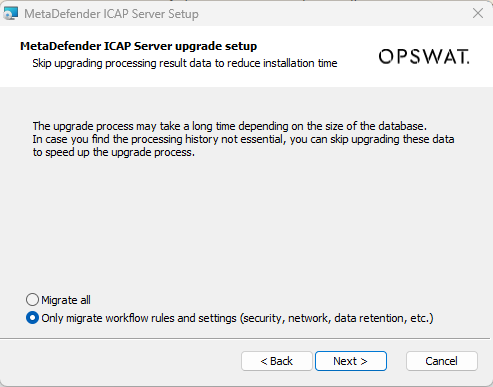
Two options for migration:
1.Do not migrate ICAP history (only migrate workflow rules, setting, user management,..)
2.Migrate all database(include ICAP history)
The upgrade process may take a long time depending on the size of the ICAP history database.
1.1.Wizard Installation
After 1.2.Setup database server for local database mode or 1.3.Create an unique instance name for that MetaDefender ICAP Server for shared database mode, if the host has already installed older version of MD ICAP Server (older than v5.2.0) then the migration wizard will be displayed
1.2. Command Line Installation
1.2.1. Without ignition file
The installation will ask to input the option migrate all database or skip ICAP history via console if detect the older ICAP server version has already installed
hit enter to select default option [false]: migrate all database
input false: migrate all database
input true: Only migrate workflow, rules and setting (do not migrate ICAP history)
1.2.2. With Ignition file
If skip_migrate_processing_history does not input in the ignition file, all database will be migrated
+ Only migrate workflow, rules and setting (do not migrate ICAP history)
+ Migrate all database
set skip_migrate_processing_history to false or remove internal field out of ignition file
2.Database Migration
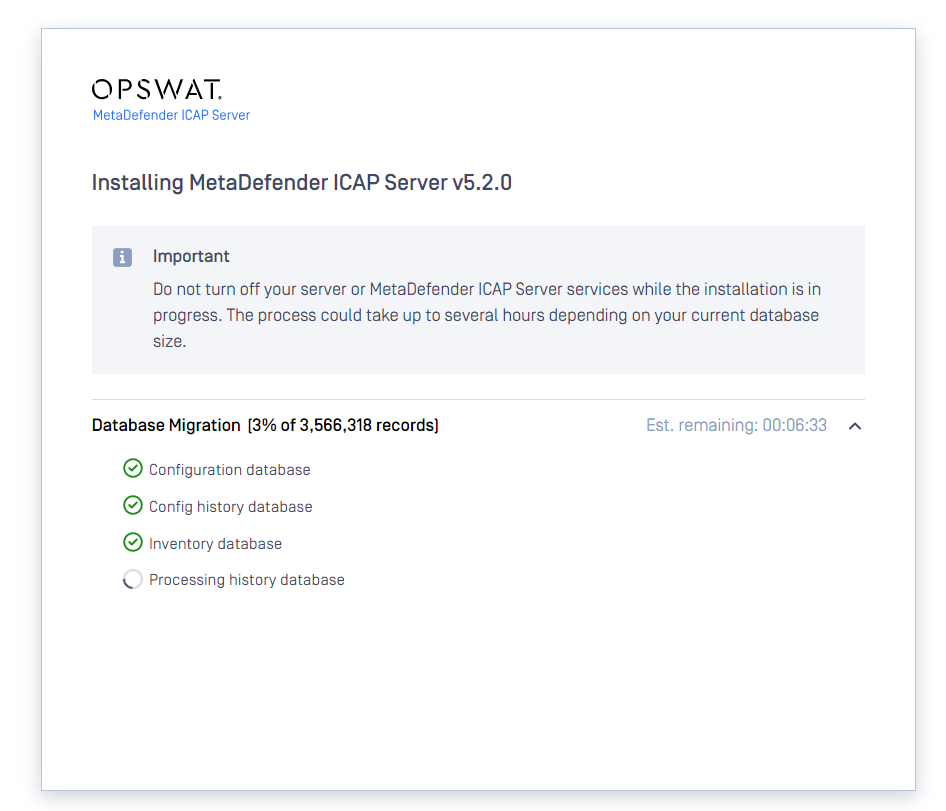
During migration process, the UI will display the migration status
3.Recommendation for migration
We suggest select Only migrate workflow, rules and setting (do not migrate ICAP history) then the migration process will take short time
After migration, MD ICAP Server 5.2.0 will back to work then the ICAP history can be migrated in background via mdicapsrv-migrate-db tool
Option -a mean the ICAP processing history will be appended to existing PostgreSQL database (if run multiple time with option -a then the database will be duplicated the record)
To learn more option of migration tool, please execute:
Windows: mdicapsrv-migrate-db.exe -h
Linux: /usr/sbin/mdicapsrv-migrate-db -h
Windows:
Linux: