
MetaDefender ICAP Server offers versatile deployment options to align with your organization's specific infrastructure and security requirements, including support for air-gapped environments. Understanding the different deployment models will help you choose the most suitable approach.
Regardless of the deployment type, make sure you have reviewed the recommended system requirements for MetaDefender ICAP Server.
MetaDefender ICAP Server can be deployed across various platforms:
Physical Servers for direct hardware installations.
Virtualization Platforms compatible with popular platforms like VMware, Hyper-V, and XenServer.
Infrastructure as a Service from major cloud providers such as AWS, Azure, and GCP.
Kubernetes clusters and containerized environments.
There are 4 decisions to make when planning your deployment.
The environment where the solution will be deployed. (Choosing a Deployment Model)
How to deploy in that environment? (Sizing Guide)
How many resources are needed for the expected file traffic? (System Requirements)
The base OS which will be used. (Licensing Model)
When designing and implementing a modern software solution, selecting the right deployment strategy is crucial to meeting performance, scalability, security, and compliance requirements. This section provides a detailed overview of the available deployment options - On-premises , CSPs, Containerized and SaaS - highlighting their key characteristics, benefits, and trade-offs. Understanding the considerations for different approaches will help stakeholders make informed decisions that align with their security requirements, technical needs and business goals.
Choosing a Deployment Model
On-Premises | CSPs (AWS, Azure, GCP) | Containerized (K8S. Docker) | ICAP Cloud (SaaS) | |
|---|---|---|---|---|
Scalability | LOW Limited to physical hardware capacity. | HIGH Highly scalable with elastic resources on demand. | HIGH Rapid, horizontal scaling with efficient resource utilization. | HIGH Scalability is managed by OPSWAT with adjustable usage and performance tiers. |
Performance | HIGH When adequately resourced with dedicated servers. | HIGH High performance with a global infrastructure ensures low latency. | MEDIUM Near-native performance; will vary based on orchestration overhead and resource contention. | MEDIUM Latency may play a factor due to file sizes and transfer times. Cloud-based file workflows are ideal. |
Security | HIGH Full control over the security of the platform. All data is on-premise. | HIGH Robust security frameworks and high configurability over security. | MEDIUM Depends on config; Kubernetes and Docker offer network policies and RBAC, but require proper setup. | HIGH Security is managed by OPSWAT with industry-standard security measures and compliance certifications. |
Control & Customization | HIGH Complete control over hardware and software configurations. | HIGH Users can configure services extensively but within the constraints of the provider's offerings. | HIGH Control over application deployment and environment; customization is facilitated through container configurations and orchestration tools. | MEDIUM OPSWAT manages the majority of the system with user-customizable workflow and application settings. |
Reliability & Availability | MEDIUM Dependent on internal infrastructure and disaster recovery planning; potential single points of failure. | HIGH High availability with built-in redundancy; services span multiple availability zones and regions to ensure uptime. | HIGH Reliability depends on orchestration and infrastructure; managed Kubernetes services offer features like self-healing and automated rollouts. | HIGH High reliability ensured by OPSWAT; service-level agreements (SLAs) often guarantee uptime. |
Maintenance & Operations | HIGH Higher operational overhead. Requires dedicated IT staff for maintenance, updates, and monitoring of software and hardware. | MEDIUM Lower operational burden with providers handling infrastructure maintenance and security, allowing IT staff to focus on application management. | MEDIUM Maintenance is simplified through orchestration tools, but requires expertise to manage configurations and updates effectively. | LOW Minimal maintenance required from users, OPSWAT manages all aspects of the service. |
Key Deployment Option Takeaways
On-Premise: Offers maximum control and customization but comes with higher costs, slower deployment, and greater maintenance responsibilities.
CSPs (AWS, Azure, GCP): Provide scalable, reliable, and secure environments with reduced operational overhead, suitable for a wide range of applications.
Containerized: Enable rapid deployment and scalability; ideal for microservices architectures but require expertise in orchestration and management.
Hybrid: Combines the benefits of on-premises and cloud deployments, offering flexibility, scalability for diverse environments.
ICAP Cloud (SaaS): Offers rapid deployment, minimal maintenance, and predictable costs, making it ideal for organizations seeking convenience and scalability.
Sizing Guide
This table summarizes the various deployment options available for MetaDefender ICAP Server to illustrate the differences between each option and choose the one that best fits your needs.
Single Instance (Standalone) | Single Instance (Remote DB) | Multi-Instance (Standalone) | Multi-Instance (Remote DB) | |
|---|---|---|---|---|
Best for | Small and predictable workloads. On-premises, CSPs or Docker | Small workloads, with managed services. On-premises, CSPs or Docker | Medium workloads, manual scaling. _ _ CSPs or Kubernetes | Medium to Large workloads, no auto-scaling. CSPs or Kubernetes |
Scalability | NO | NO | YES | YES |
High Availability | NO | PARTIAL | YES | YES |
Auto-Scale Ready | NO | NO | NO | YES |
Recommended MD Cores | 2-4 | 4 or more | 4 or more | 4 or more |
Recommended ICAP Servers | 1-2 | 2-4 | 2 or more | 2 or more |
Infrastructure complexity | 1/5 | 3/5 | 5/5 | 4/5 |
Overall performance and file throughput of the solution will depend on a variety of factors. When sizing your deployment, first consider the sizing requirements for MetaDefender Core. When adequately provisioned, ICAP Server can support the file traffic for up to (3) MetaDefender Core instances. In most cases, a ratio of (1) ICAP Server for every (2) MD Core servers is the best balance of performance, throughput and capacity.
System Requirements
Operating System Requirements
CentOS 8.x, 9.x
Red Hat Enterprise Linux8.x, 9.x
Rocky Linux 9
Debian 11.x, 12.x
Ubuntu 18.04, 20.04, 22.04, 24.04
Windows 11
Microsoft Windows Server 2016, 2019, 2022 or newer (64 bit)
OPSWAT will discontinue support for the following OS versions in MetaDefender ICAP Server:
CentOS 7 and RHEL 7 after December 2024
Ubuntu 18.04, 20.04 and Debian 10 after December 2024
Windows 10 after October 2025
Hardware Requirements
RAM: min. 2 GB
SSD: 2 GB + (Max size per scan request * [number of scan request in parallels ])
CPU: Min 4 CPU Cores
For performance reasons it is NOT recommended to use a HDD in place of an SSD.
If MetaDefender Core or any other system is installed on the same physical machine as MetaDefender ICAP Server then the additional systems' hardware requirements need also be taken into consideration.
Licensing Model
OPSWAT MetaDefender ICAP Server is licensed based on the OS platform where it will be installed. ICAP Server can be run in Windows or Linux instances. An activation key will be provided by your sales rep.
Licensing for MetaDefender ICAP Server is closely tied to MetaDefender Core as MD Core provides the scanning and analysis backend. You will need a license for MetaDefender Core in order to scan the files sent to MD ICAP Server by your ICAP client.
The LICENSE KEY for ICAP Server contains keys for all allotted activations/deployments. Each instance of ICAP Server will consume one activation, generating a DEPLOYMENT ID. This DEPLOYMENT ID will be needed later to automate the deactivation.
There are two ways to activate the instance, either from the Web Management Console UI or by using an API endpoint during an automated install. See the associated deployment options for information specific to automated license management for automated installs.
Activate using the Web Management Console
To activate your installation go to the Settings > License menu in the Web Management Console. If you have no valid license, you will only see your installation's Deployment ID. You will also see a warning in the Web Management Console header.

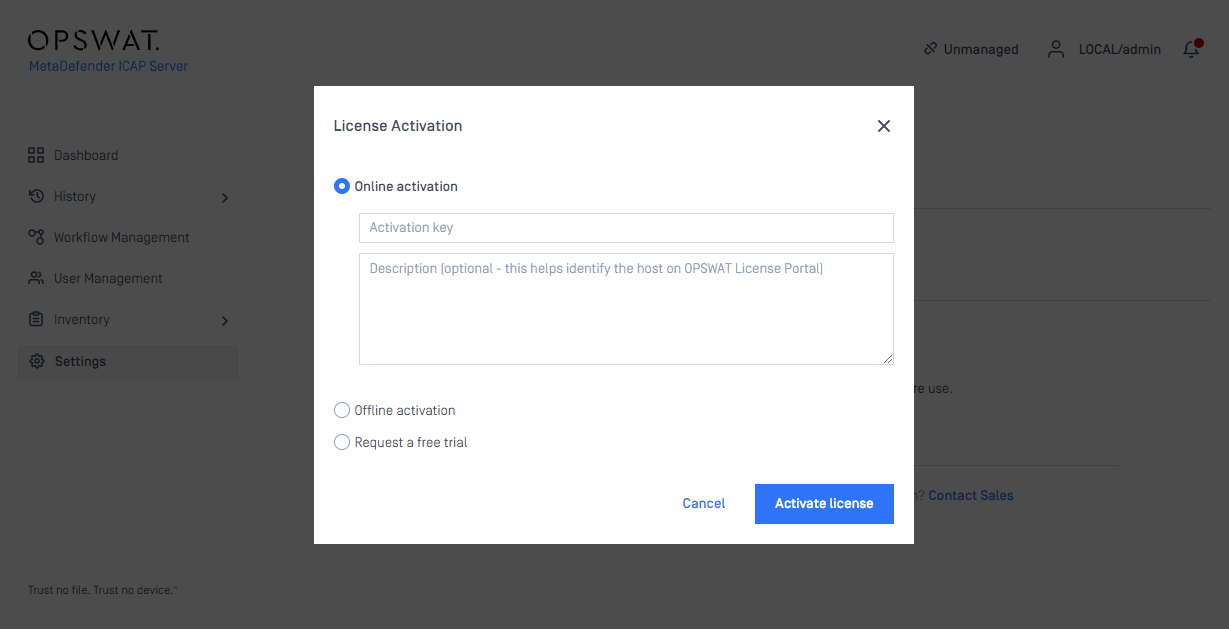
Press the Activate license button to bring up the Activation menu. The following modes are available:
Online
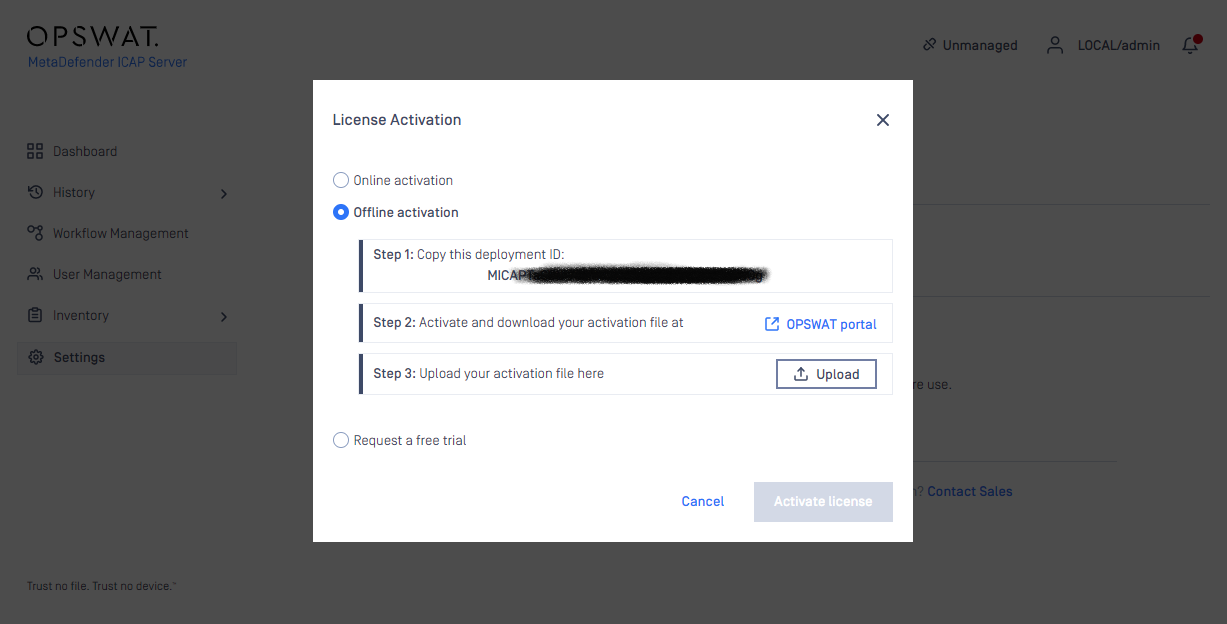
Offline
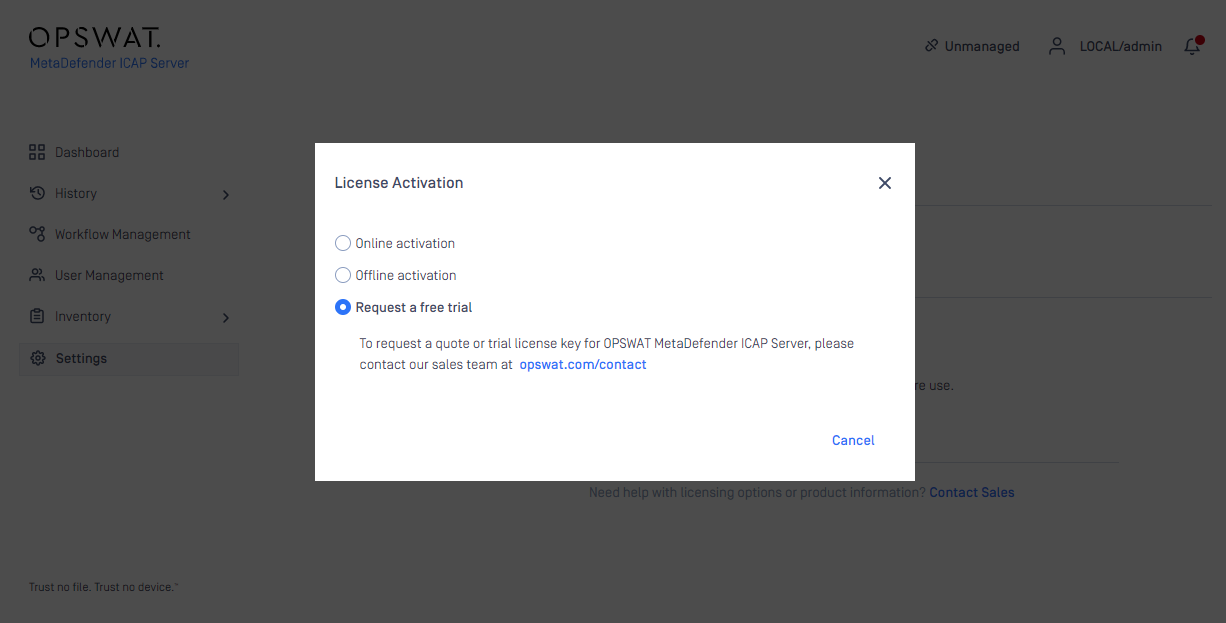
Request a free trial
Online Activation
With internet connection on the server, the MetaDefender ICAP Server instance may be activated directly using the Activation key received when purchasing the product.
Offline activation
With no internet connection on the server the MetaDefender ICAP Server instance may be activated indirectly from a different machine, that has internet connection. The Deployment ID of the MetaDefender ICAP Server instance and the the Activation key received at the time of purchasing the product will be required. Follow the steps on the screen to activate the product offline.
Request trial key online
An evaluation license can be acquired by contacting our sales team.
If you have activated your installation previously, but your license becomes invalid or expired, you will see a RE-ACTIVATE button. After clicking it, the product will attempt to activate the license with the formerly entered activation information.
License menu
For more license details and activating your installation go to Settings > License menu on the Web Management Console:
Package ID: product identification as on your order
Product name: product name as on your order
Active until: last day of license validity
Deployment ID: identification of this installation