
MetaDefender ICAP Server version 5.1.1 or newer
Health check API feature supports you to verify MetaDefender ICAP Server application readiness.
The readiness condition is determined via product configurations, see more at Configure health check policy.
Using the health check API
Health check API expects to return HTTP(S) 200 Successful only when all pre-configured conditions met.
Request:
Method | URL | Auth | Function |
|---|---|---|---|
GET | /readyz | None | Heath check endpoint |
Request query params :
Name | Type | Detail | Required |
|---|---|---|---|
verbose | Boolean | Show detailed result of health check | no |
Response status code:
HTTP status code | Description |
|---|---|
200 | Healthy. ICAP service is fully up and running, and ready for process request |
503 | Not healthy. ICAP service is not ready to handle any request yet or got issues |
500 | ICAP service is down. Internal Server Error |
Response body (only response when verbose enabled)
Json element | type | Description | Support from | |
|---|---|---|---|---|
database | object | Database connection | 5.1.1 | |
status | string | Database connection status true/false | ||
license | 5.1.1 | |||
status | string | License status
| ||
server_profiles | The status of server profiles | 5.2.1 | ||
required | Boolean | Indicate whether the status of server profiles checking affects the final result or not | ||
status | Boolean | The connection status between the ICAP Server and the Scan Server (MD-Core, MD-Cloud)
| ||
engines | object | The status of ICAP Server's engines | 5.10.0 | |
engines.filetype | object | The status of the FileType engines | 5.10.0 | |
required | Boolean | Indicate whether the status of the FileType engine checking affects the final result or not | ||
status | Boolean | The status of the FileType engine
|
Example:
Configure health check policy
You are supported to adjust thresholds on vital criterias as your own policy tailored for heath check verification, via both REST API and MetaDefender ICAP Server management console.
Using UI
The relevant settings could be found under Settings > System > Health Check
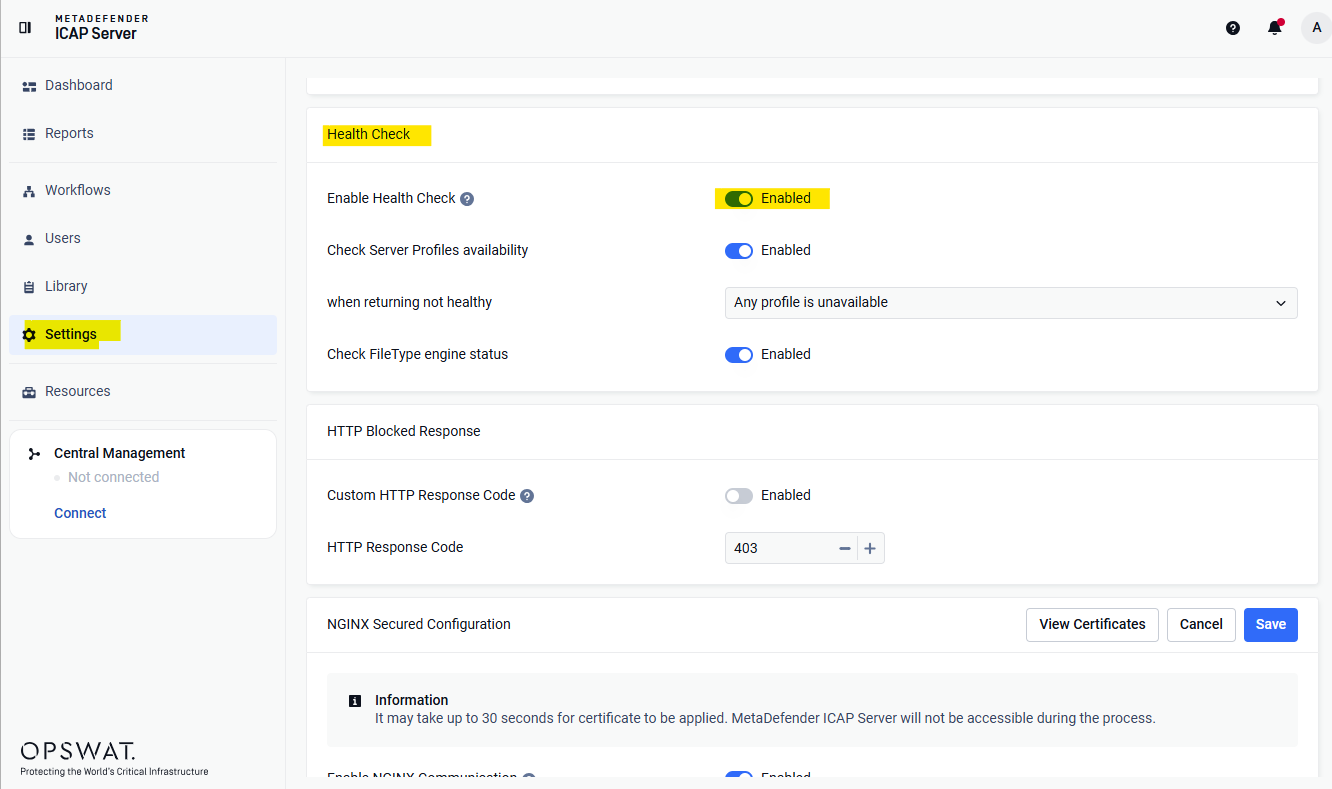
Value | Description | Support from | |
|---|---|---|---|
Enable Health Check | On / Off | Enabling this option will allow MetaDefender ICAP Server automatically run a background task to collect application operational data for health check logic. | 5.1.1 |
Check Server Profiles | On / Off | Defines if server profile availability should be considered for health status. | 5.2.1 |
Condition | Defines when to report unhealthy status:
| ||
Check FileType Engine | On / Off | If | 5.10.0 |
Using administrative REST API
Get setting heath check
Request:
Method | URL | Auth | Function |
|---|---|---|---|
GET | /admin/config/healthcheck | Administrator | Heath check endpoint |
Response Body:
enable_featureenable or disable this featuredatabase: true - always enable when enabledenable_featurelicense: true - always enable when enabledenable_featureserver_profilesenableenable or disable this featureconfigcheck_all_rules:true : /readyz will return status code 503 if ALL MD Core rules are not available (mean: all MD Core connect to ICAP are down or ALL MD Core rules are deleted from MD Core)
false : /readyz will return status code 503 if ALL MD Core rules are not available (mean: all MD Core connect to ICAP are down or ALL MD Core rules are deleted from MD Core)
enginesfiletypeenableenable or disable this feature
Example:
Set setting heath check
Request:
Method | URL | Auth | Function |
|---|---|---|---|
POST | /admin/config/healthcheck | Administrator | Set setting heath check |
Request headers
Key | Value |
|---|---|
apikey | Administrator's API Key |
Request body:
enable_featureenable or disable this featureserver_profilesenableenable or disable this feature (default: false)configcheck_all_rules: (default: false)true : /readyz will return status code 503 if ALL MD Core rules are not available (mean: all MD Core connect to ICAP are down or ALL MD Core rules are deleted from MD Core)
false : /readyz will return status code 503 if ALL MD Core rules are not available (mean: all MD Core connect to ICAP are down or ALL MD Core rules are deleted from MD Core)
enginesfiletypeenableenable or disable this feature (default: false)
Example:
From ICAP Server 5.2.1 the core_rules and core_rules.config have been replaced by server_profiles to make the API more friendly. The core_rules and core_rules.config still responds in the API for backward compatibility purposes, but we do not recommend using it.