
For deployment automation support, an ignition file pre-defined by admin user is required, so create it if not existed:
Windows: C:\OPSWAT\mdicapsrv.conf
Linux:* /etc/opswat/mdicapsrv.conf
The product supports fully automated deployment. It means that it can be installed and configured with no human interaction.After installing MetaDefender ICAP Server for the first time (clean install), it requires you to go through wizard steps to accept EULA, create a default local admin user, and optionally import configrations. Those steps could be automated using ignition file described in this page.
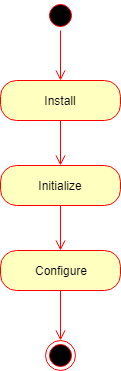
The automated deployment can be split to three steps on a high level:
Installation
Initialization
Configuration
Installation
To automate the installation, install the product from the command line and provide the installation-time options as parameters to the installer. For further details see Installation Methods
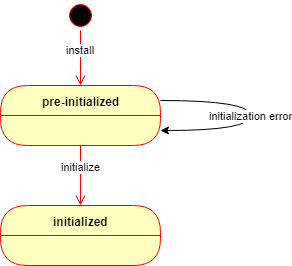
After the installation is complete, the product starts up and waits in a pre-initialized status. The product may be initialized in two ways:
Manually using the wizard or command line
Automatically using an ignition file (see below).
If the automated initialization fails for some reason (e.g. the ignition file is not in place) then the automated initialization may be retried fixing the problem (e.g. placing the ignition file to its lookup location) and restarting the OPSWAT Metadefender ICAP Server service.
Until the product is in pre-initialized status, it will try the automated initialization every time after a service (re)start.
Initialization
Initialization is the process of bringing the product to an operable status.
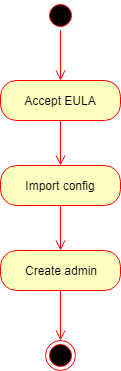
Basically the initialization consists of the following steps:
Accept the End User License Agreement (EULA),
Import product configuration and
Create the first administrator user account.
Ignition file
The initialization process can be configured in a file called the ignition file.
The ignition file must be in conf format
Sample ignition file
eula=true
[global]
dbmode=1
[user]
name=admin
password=admin
email=admin@local
[dbserver]
type=local
host=localhost
port=5433
user=postgres
password=non_Unicode_password
private_username=my_internal_db_user
private_password=mypassword
Ignition file fields
The ignition file must have the following fields:
Section | Key | Required | Description |
|---|---|---|---|
eula | Mandatory | Whether to accept the End User License Agreement. This key must be set to true to accept the EULA. Any other value will cause the initialization to fail. | |
global | |||
dbmode | Mandatory |
| |
user | Mandatory | Initial administrator user account properties. The Administrator role is granted to the account. | |
name | Mandatory | User name for the initial administrator user account. | |
password | Mandatory | Password for the initial administrator user account. WARNING! Clear text password The password in this configuration file must be stored in its clear-text format and as so it may be visible for unauthorized parties. | |
Mandatory | E-mail address for the initial administrator user account. | ||
dbserver | Supported and Mandatory since MD ICAP Server v5.2.0 | ||
type | Mandatory |
(supported since MD ICAP Server 5.2.0) | |
host | Mandatory | IP address / domain name of the server where PostgreSQL server locates. "localhost" can be used when applicable | |
port | Mandatory | Port of PostgreSQL server is listening for connections from clients (i.e. MD ICAP Server). | |
user | Mandatory | PostgreSQL server's user. SUPERUSER privilege is required for MetaDefender Core to setup its database and extensions for the first time. Only non-Unicode characters supported. | |
password | Mandatory | PostgreSQL server's user credentials. Only non-Unicode characters supported. | |
private_username | Optional | PostgreSQL server's internal user created for MetaDefender Core own operational purpose. If not specified, then MetaDefender Core will auto generate this user. See details at Customize Internal PostgreSQL User | |
private_password | Optional | PostgreSQL server's internal user created for MetaDefender Core own operational purpose. If not specified, then MetaDefender Core will auto generate this user. See details at Customize Internal PostgreSQL User | |
internal | |||
skip_migrate_processing_history | Optional | This option is used incase upgrade to MD ICAP Server 5.2.0 or newer from existing older MD ICAP Server instance Default is false
|
Ignition file location
The directory of the ignition file is configurable:
Platform | Configuration method | Configuration section | Configuration key | Configuration example | Default directory |
|---|---|---|---|---|---|
Windows | Windows Registry | internal | ignition_file_location | COMPUTER\HKEY__LOCAL_MACHINE\SOFTWARE\OPSWAT\ICAP SERVER\internal\ignition_file_location (reg_sz)_ | C:\OPSWAT The default applies if this configuration entry is not set in the Registry. |
Linux | Configuration file | internal | ignition_file_location | MetaDefender API | /etc/opswat The default applies if this configuration entry is not set in the MetaDefender configuration file (/etc/opswat/mdicapsrv.conf) |
Detailed initialization process
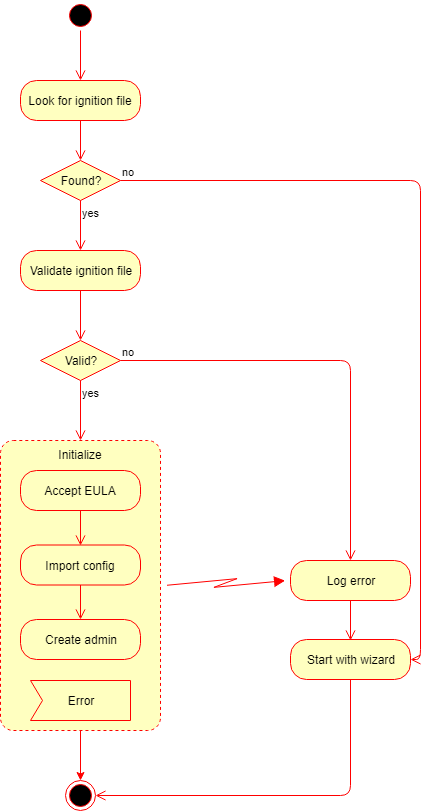
After the product has been started, it looks for the ignition file in the configured (or default) location.
If an ignition file is found, then
It gets validated, and if it is valid, then
Based on the information found in the ignition file:
The EULA is accepted,
The configuration is imported,
The administrator account is created.
If any of the above steps fails, then the error is logged, and the initialization gets terminated.
In this case the product starts normally: if for example the basic configuration wizard has not been completed yet, then it must be completed first.
2. If it is not valid, then the error is logged, and the initialization gets terminated.
In this case the product starts normally: if for example the basic configuration wizard has not been completed yet, then it must be completed first.
If there is no ignition file, then no initialization is performed.
In this case the product starts normally: if for example the basic configuration wizard has not been completed yet, then it must be completed first.
If the automated initialization fails for some reason (e.g. the ignition file is not in place) then the automated initialization may be retried fixing the problem (e.g. placing the ignition file to its lookup location) and restarting the OPSWAT Metadefender ICAP Server service.
Until the product is in pre-initialized status, it will try the automated initialization every time after a service (re)start.
Configuration
After the initialization is complete, the product is ready with the default and the imported configuration.