
After installation and successful license activation MetaDefender ICAP Server user interface is ready to be used with full functionality.
For requests to be scanned MetaDefender ICAP Server needs, however, to be connected to MetaDefender Core.
Establishing this connection requires two steps:
Creating a MetaDefender Core type server profile
Assigning this server profile to the ICAP Server (see 1.4 Basic security rule)
Creating the Core server profile
Go to Inventory > Server profiles and click ADD NEW PROFILE. In the SERVER PROFILE TYPE drop-down list select MetaDefender Core and specify the details of your MetaDefender Core instance(s).
Properties not listed in the table below may be left on their default values or blank, or filled according to the organizational policies.
Server profile type | Profile name | Server specifications (URI) | |
|---|---|---|---|
Value | MetaDefender Core | Unique name | Core servers URI |
Examples | MetaDefender Core | Core | -http://10.40.161.181:8008 (none encryption) -[https://10.40.161.181:8008](https://10.0.0.10:8008) TLS |
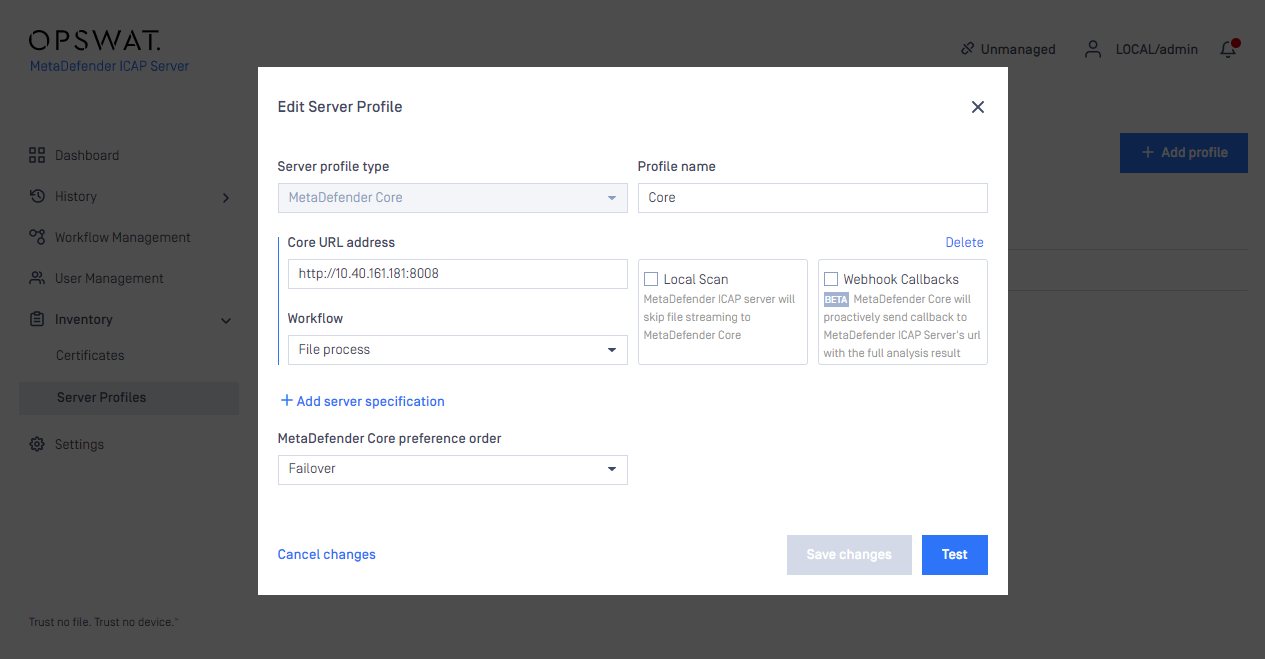
For further details about server profiles see 3.9 Server profiles.