
AppExchange is asking me to verify my payment details?
According to Salesforce there is an issue occurring on their side that might cause an issue when you try to download our app (or some other app). You might encounter a screen such as this one below:
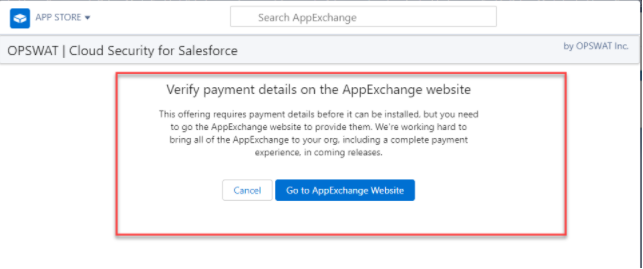
Please follow the instructions on this link provided by Salesforce to solve the issue. If you still have any questions please reach out to sales-inquiry@opswat.com.
I am unable to download the app even with the Download AppExchange Packages permission?
A possible cause for this might be that your Salesforce environment does not allow you to download managed packages (which MetaDefender for Salesforce is). You can view Setup > Package Manager in your Salesforce environment to see if that is the case. If your environment's settings are such that you cannot download a managed package, you will need to contact your Salesforce admin to enable that ability.
Should I install for admins only or for all users?
Our recommendation is to install the application for admins only. This way only your Salesforce admins will have access to all the files that are being submitted into the environment and will be the only ones with authority to release files that MetaDefender for Salesforce flags as "infected". If you install for all users, then everyone with access to your Salesforce environment can view the MetaDefender for Salesforce application within Salesforce and all the (potentially sensitive) data that it contains.
Does Cloud Security for Salesforce (MDFS) support email to case?
Attachments that are part of emails converted into cases (via the email to case functionality) will be scanned and sanitized depending on your applications configuration. You also have the option to enable email body scanning.
Does MDSF support files uploaded by users of Experience Cloud (formerly Community Cloud)
CSFS supports files uploaded by community users that are logged in to the Experience Cloud portal you have set up. We are in the process of enhancing our application to support users who are not logged in to an Experience Cloud portal as they are given a different user type in Salesforce and can only have limited permissions assigned to them. Please contact sales-inquiry@opswat.com with any questions and our sales team will be happy to assist you.
How do I get my API Key?
Your organization can reach out to sales-inquiry@opswat.com to initiate a purchase of the application and a member of our sales team can assist you. Once the purchase is made you can register for an API Key on the OPSWAT Portal and we will provision the API Key you receive in accordance with the limits you have procured.
Will OPSWAT be storing my files?
If you enable the private mode configuration in the settings tab for MetaDefender Cloud, OPSWAT will delete your files that are sent for scanning immediately after the scan is done. Now your sanitized files are automatically deleted after downloading form Salesforce.
Can we set up alerts when a malicious file is uploaded?
Salesforce Admin Approvers get an email and an in-app notification whenever a malicious file is uploaded to the system.
I am having trouble downloading the free trial?
There is an issue on the Salesforce side that is preventing some downloads of apps on their app store. You can follow this link provided by Salesforce and follow the instructions to download a free trial of MetaDefender for Salesforce.
What size files can we upload using MDFS?
Cloud Security for Salesforce allows the users to upload files bigger than 10MB, up to 256MB. Large File Support is a feature designed to surpass Salesforce's limitations for processing files larger than 10 MB. More information regarding the feature and how can you can enable it, can be found here.
What are some of the limitations of MDFS?
When installed, Chatter Free or Chatter External users will not be able to upload files in Salesforce. This issue is due to conflicting permissions from Salesforce and our application.
Why do you license this product by "units"?
We license the product in units because there are actually two apps within this one app: the file scanning/sanitization portion and the device security portion. The file security portion is ultimately measured by API calls and the device security portion is measured by number of devices. Salesforce allows us to have only one pricing metric for the app so we came up with the "unit" so we can convert 1 unit = 5 API calls for file security.
What time of the day on the following day does the process re-commence/limit reset?
The Rate Limit counter is set with the first request to the rate limited endpoint. The counter is cleared after 24 hours. For example, if You start sending requests at 1pm, your limits will be refreshed next day at your first requests after 1pm.
Does OPSWAT scan a password protected file using MDFS?
Yes. We do support scanning of password-protected files via MDFS.
What is the expected SLA's regarding OPSWAT availability, expected throughputs, planned outages, etc.?
SLA are accordingly to your license Tier.
For Professional Tier, the SLAs are:
99.5% SLA availability,
8 seconds p75,
500ms API calls p75.
For more details, please check: https://metadefender.opswat.com/licensing