
Check Your Version:
This article applies to all MD Endpoint versions.
When copying a file to or from removable media, the file still appears at the destination even though the scan result for that file is Blocked (for example, "Sensitive Data Found"). This occurs in both directions (local drive → USB and USB → local drive).
Cause
This is expected behavior when Deep CDR is enabled and the policy is configured to use sanitized output.
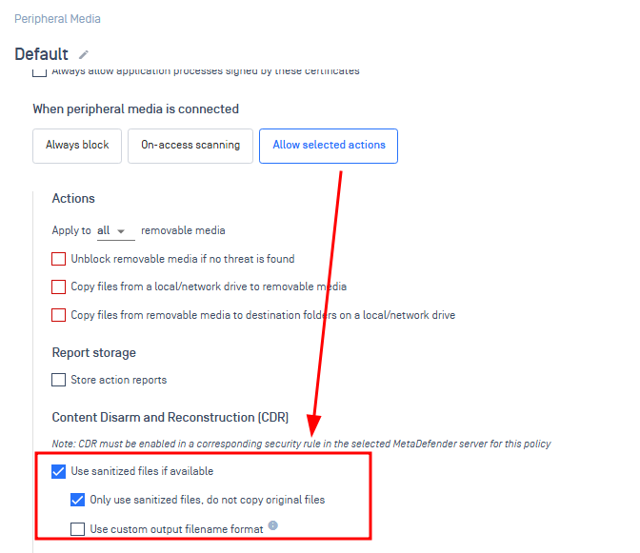
When a file is processed, MetaDefender Core produces a sanitized (reconstructed) version of it. With the CDR option "Only use sanitized files, do not copy original files" enabled, MetaDefender Endpoint copies the sanitized version to the destination in place of the original file, regardless of the returned verdict (Blocked or Allowed).
As a result, the file that reaches the destination is the reconstructed (sanitized) file, not the original file that contained the sensitive content.
How to verify
Open MetaDefender Core and locate the scan result for the file.
Download the sanitized file directly from MetaDefender Core.
Compare it with the file that was copied to the destination device.
How to change the behavior
If you prefer that files with a Blocked verdict are not copied at all:
Open the policy in your management console.
Go to Content Disarm and Reconstruction [CDR].
Uncheck "Only use sanitized files, do not copy original files".
This changes how sanitized output is handled for blocked files.
Support:
If Further Assistance is required, please proceed to log a support case or chatting with our support engineer.