Release date | Scope |
|---|---|
17th December, 2025 | Beside bug fixes and minor improvements, this release brings DMARC verification capability to MetaDefender Email Gateway Security. |
New & improved
DMARC verification
This release of Email Gateway Securtiy brings DMARC policy enforcement.
DMARC reporting is planned to be addressed in a later release.
For details see the Anti-phishing and anti-spam section in Security policy; Registry configuration and Email classifications.
Non-standard AAR
With this release the product supports non-standard ARC-Authentication-Results (AAR) headers (e.g. those that have the x-bits property type / property value set). Older versions gave DKIM invalid result with such AAR headers as these AAR headers are not according to the RFC.
Failed email alerts
The error_message element is now available in the alert_email_failed_recipients_or_sender.xsl notification email template so that email users can be better informed about the failure reasons.
The error_message element is not used in the alert_email_failed_recipients_or_sender.xsl template by default (for security and backwards compatibility).
DB service logs
Database service logs are now added to the support package.
Changed
SVG sanitization
To address some security risks, Email Gateway Security now removes <script> elements from .svg files when uploaded on the Settings > Rebranding page.
For details see Graphical user interface.
Fixed
Bodies marked as inline
When email parts (especially bodies) were marked with Content-Disposition: inline; Email Gateway Security misinterpreted these parts as attachments and at time of reassembling the email this could cause the email structure to be broken.
Inline attachment workflow
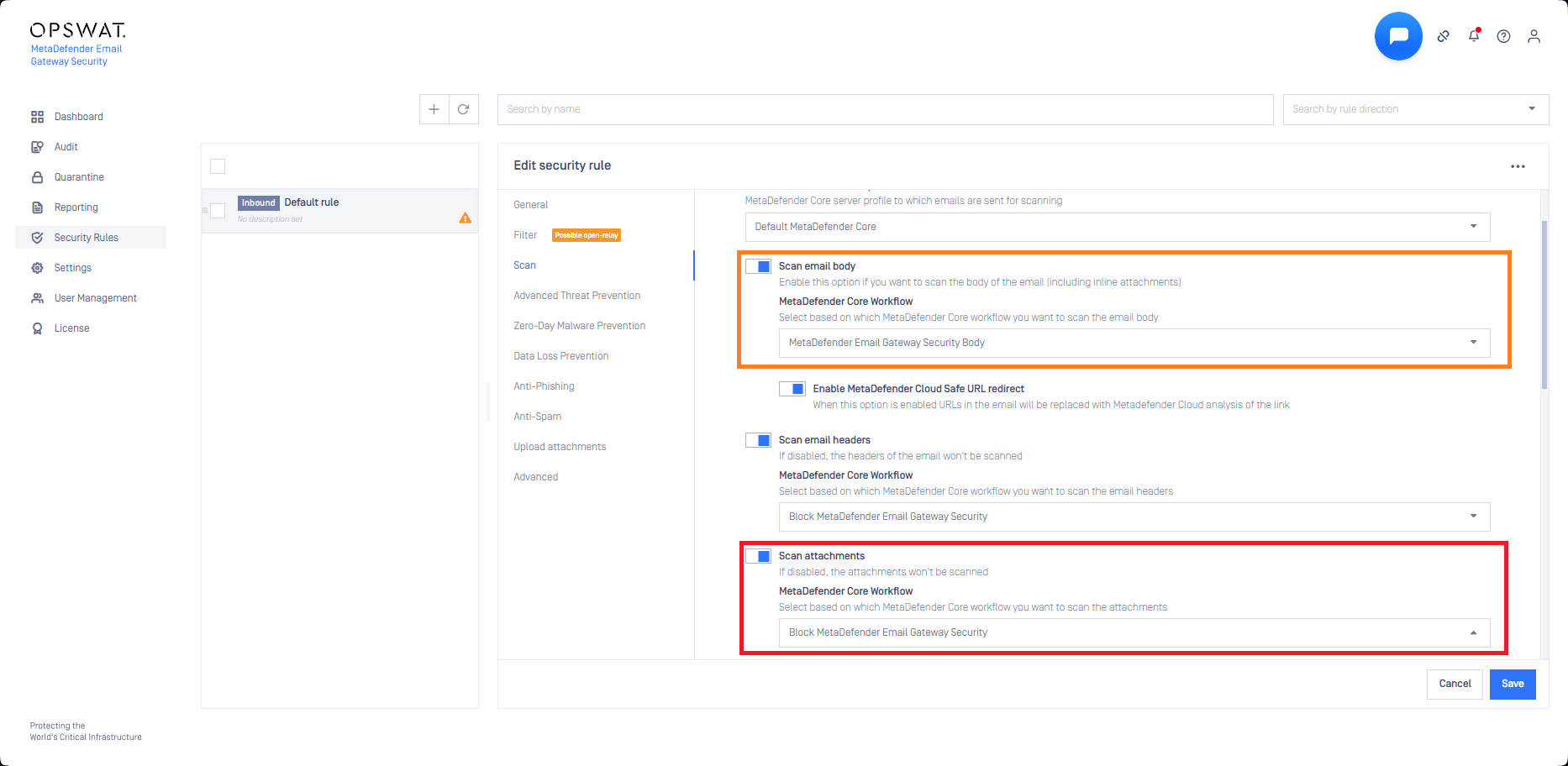
Inline attachments (attachments that display inline the HTML body; marked with Content-Disposition: inline;) were scanned with the Core side workflow selected for email attachments (marked with red below) and not with the workflow selected for the email bodies (marked with orange below).
This is fixed now: inline attachments are scanned with the workflow selected to scan email bodies (marked with orange below).