
As an alternative to generating support packages and extracting log files, a MetaDefender Drive image can be generated from a Linux machine via terminal commands.
Generate a MetaDefender Drive Image
Insert the MetaDefender Drive that you want to clone into a running Linux machine.
Launch the terminal, and run the following command:
lsblk -o name,serial,mountpoint
Identify the drive you want to clone by the
serialvalue, then copy itsname. In the sample image below, the drive to be cloned is/dev/sdb
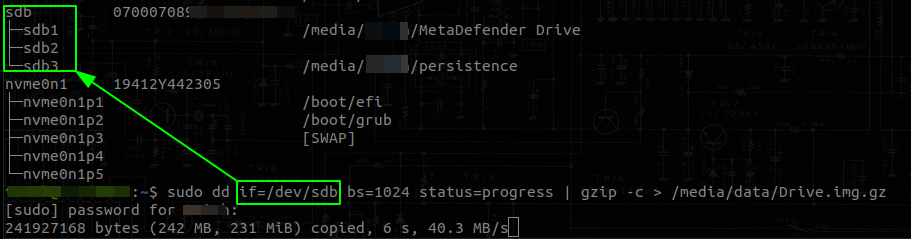
Run the following command after replacing
/dev/sdxwith your drive'snameand/path/to/img/Drive.img.gz4with the filesystem location and the file name where you want the image saved.
sudo dd if=/dev/sdx bs=1024 status=progress | gzip -c > /path/to/img/Drive.img.gz4. fd
.
Was this page helpful?
Troubleshooting