
Knowledge Base
v5.22.1
Search this version
How can I export the processing history from the Core console?
Check Your Version:
This article applies to all MetaDefender V5 releases deployed on Windows and Linux systems.
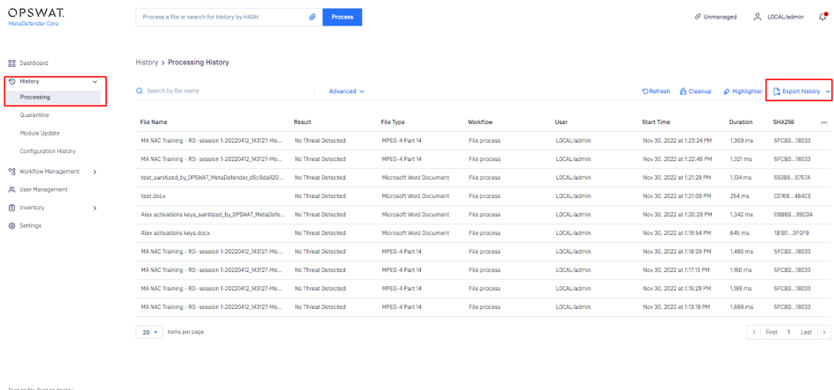
To export the processing history from any of the MetaDefender Core deployments users will have to navigate to the Core console\History\Processing tab and select the “export history” tab.
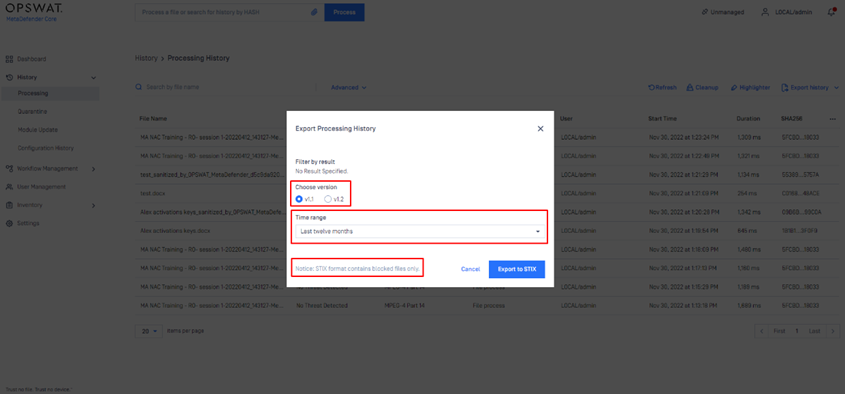
Please take note: STIX format contains blocked files only. A few options are available for the users prior to exporting such as:
Version
Time Range
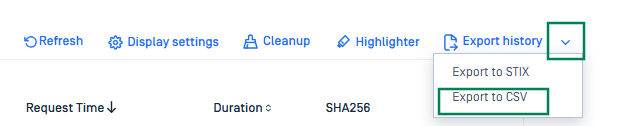
How to export to a CSV file?
Click the drop-down arrow and select Export to CSV.
Support:
If Further Assistance is required, please follow the instructions on How to Create Support Package With Bundle Tools?, then proceed to log a support case or chat with our support engineer.
Last updated on
Was this page helpful?
Next to read:
How to Utilize YARA Rules with MetaDefender Core?Knowledge Base
Knowledge Base
Configuration and Settings
Errors and Troubleshooting
Features and Functionality
Feedback and Support
Licensing, Setup and Deployment
Testing MetaDefender Core
Updates, Patches and Bug Fixes
Version Upgrades